

Three years ago, an orthopedic practice near me lost around $47,000 in a single week. Not from a lawsuit or equipment failure — they just couldn't handle volume when their senior partner got COVID and two other providers were already on vacation. The practice manager spent the week scrambling to reschedule 180 appointments while fielding calls from post-op patients who needed follow-ups. By Thursday, remaining providers were seeing 40+ patients a day, documentation was backing up, and the front desk had essentially stopped answering phones.
That's what surge actually looks like. It doesn't announce itself. One moment you're running at 85% capacity, feeling fine. The next, a provider calls in sick during flu season, your nurse practitioner's kid breaks an arm, and suddenly you're drowning.
Everyone thinks they have a system until they actually need it. "We'll just work longer hours." "The other providers will cover." "We can push non-urgent cases." Those aren't plans. They're panicked reactions dressed up as contingencies — and they burn out staff while pushing patients toward competitors who can actually see them this week.
Why traditional coverage models break during surge events
Most clinics treat surge coverage like musical chairs. Someone's out, the remaining providers split the load. Simple math. Except healthcare doesn't work that way.
There's the specialty mismatch problem. Your pediatrician can't suddenly start seeing complex diabetes cases because the internist is out. Even within specialties, providers have their own patient populations — Mrs. Chen has been seeing Dr. Rodriguez for chronic pain management for three years and isn't interested in starting over with someone new, even temporarily.
Then there's the documentation bottleneck nobody plans for. When providers absorb extra patients, they don't get extra documentation time. Notes pile up. Quality drops. I've reviewed charts from surge periods where providers were clearly copying forward previous notes with minimal updates because there simply wasn't time to do it properly.
The scheduling system becomes a constraint too. Most EMRs aren't built for dynamic reallocation. Moving 30 patients from one provider's schedule to three others isn't just clicking a button — someone has to manually review each appointment, assess urgency, find appropriate slots, contact patients, and update insurance authorizations if needed, all while new appointments keep coming in.
What actually breaks operations is the cascade. Your MA is now prepping for unfamiliar patients. The front desk is handling confused patients who showed up for appointments that were moved without clear notice. Billing gets messy when covering providers have different coding habits. Lab results land with providers who didn't order them.
Telehealth doesn't automatically help either. Switching modalities mid-stream has its own logistics — does the patient have the technology? Is the visit type appropriate? Is the provider licensed in the patient's current location if they're traveling? These questions take time to answer, and during surge you don't have time.
Building surge triggers that actually work
Practices that handle surge well don't wait for the crisis to start making decisions. They use threshold-based triggers that activate contingency protocols before things spiral.
Eliminate appointment gaps and no-shows.
GoCliny streamlines every patient interaction from booking to billing—seamlessly.
- Unified appointment scheduling
- Automated patient reminders
- Staff calendar & task management
No credit card required
Start with capacity thresholds, not provider availability. Track real capacity as a percentage — total available appointment slots across all providers versus booked slots. When you hit 90% capacity for the next 48 hours, that's your yellow alert. Not when someone calls in sick, but when the math tells you things are getting tight.
At yellow alert, specific things happen automatically:
-
The practice stops accepting new patient appointments for three days
-
All providers get notified to expect schedule changes
-
The overflow telehealth panel gets activated — typically part-time providers who can pick up virtual visits on short notice
-
Front desk starts triaging all appointment requests through a clinical urgency matrix
At red alert — 95% capacity or loss of two or more providers — you shift to contingency scheduling. Routine follow-ups for stable patients get pushed out two weeks with automated messages explaining the temporary change. Providers move to 10-minute slots for simple visits, 20-minute slots for complex ones. Pre-negotiated coverage agreements with locum agencies or neighboring practices get activated.
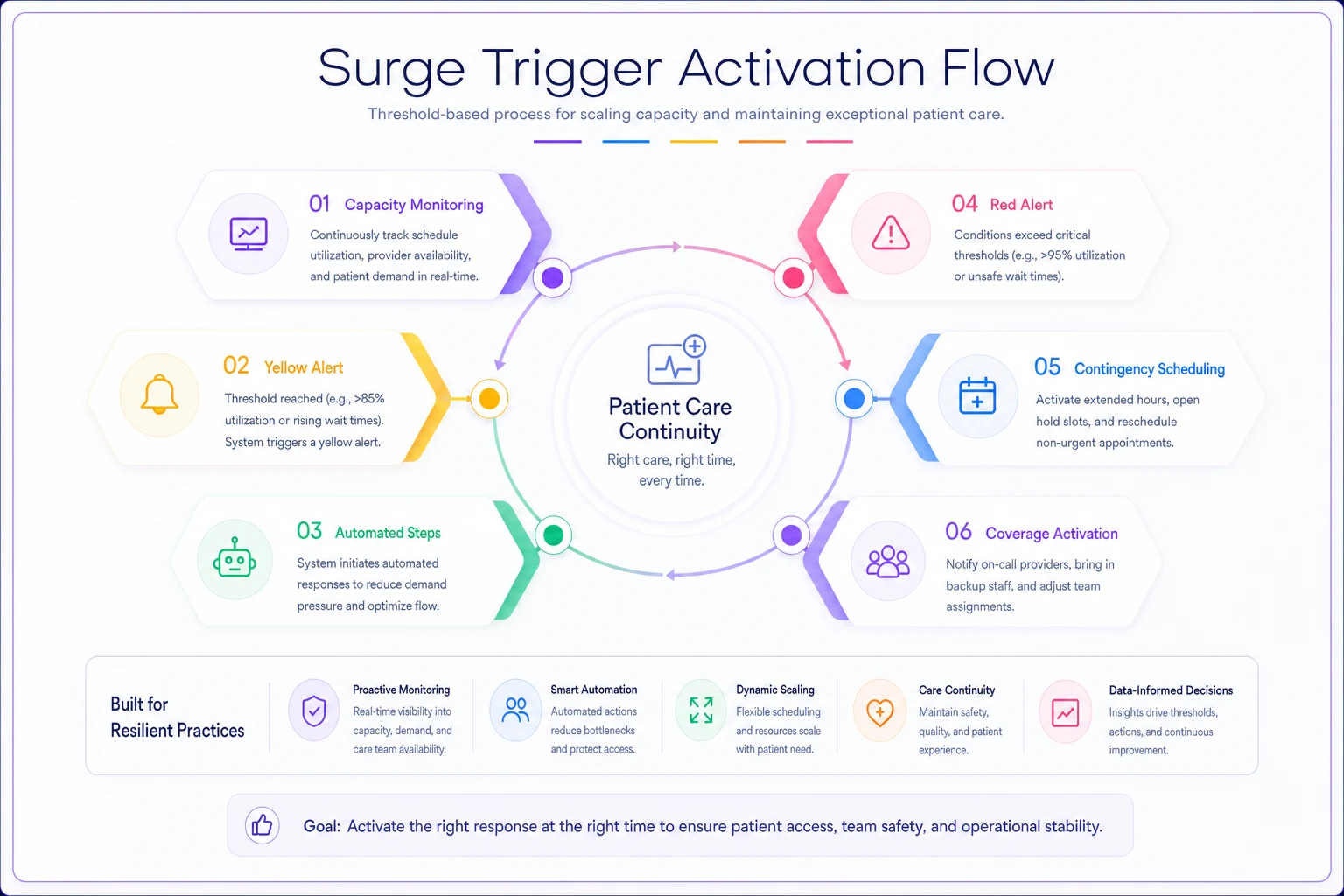
This diagram shows the trigger flow and protocol steps in sequence.
The point is making these triggers objective. No meetings to decide whether this is "really" a surge event. No debate about whether to activate protocols. The numbers hit the threshold, things move.
Cross-coverage agreements that don't fall apart
Every practice thinks they have coverage agreements until they try to use them. "Oh, Dr. Smith will cover if needed." But Dr. Smith hasn't logged into your EMR in six months, doesn't know your protocols, and his malpractice insurance might not cover him at your location.
Real cross-coverage agreements need operational detail. Which specific visit types can each covering provider handle? What's their EMR access status? How do they get paid — hourly, per visit, percentage of collections? Who handles malpractice coverage? What about credentialing with insurers?
The smartest approach treats coverage like a subscription, not emergency help. You pay neighboring providers or locum agencies a small monthly retainer — somewhere in the $500–$1,000 range — to guarantee availability. In exchange, they maintain active credentials in your systems, attend quarterly protocol updates, and commit to specific coverage hours if activated.
For multi-location practices, you need location-specific coverage maps. Not every provider can work at every site. Some locations don't have the equipment certain specialists need. Parking can actually be a real barrier — coverage has failed before because a covering doctor couldn't find parking at an urban clinic. Your playbook needs to specify exactly who can cover where.
Your internal coverage pool needs structure too. Some providers will pick up extra shifts for extra pay. Others will only do telehealth overflow. Some see adults but not kids. Get these preferences documented before a crisis. Build coverage preference profiles for each provider: maximum patient load, visit types they'll accept, preferred communication method for urgent scheduling, blackout dates. None of this is complicated — it just has to be done in advance.
Pre-authorized overflow templates and patient messaging
When surge hits, you don't have time to craft careful patient communications. Every message needs to be pre-written, pre-approved, and ready to deploy.
Your basic surge message templates should cover:
The appointment change notification: "Due to unexpected provider availability changes, we need to reschedule your appointment with [Provider] on [Date]. You've been rescheduled with [New Provider] on [New Date] at [Time]. If this doesn't work, please call..."
The telehealth conversion offer: "To ensure you're seen promptly, we can convert your in-person visit to a telehealth appointment at your originally scheduled time. Reply YES to confirm or call us to keep your in-person appointment at a later date."
The overflow practice referral: "To avoid delays in your care, we've arranged for you to be seen at [Partner Practice] located at [Address]. They have your records and accept your insurance. Your appointment is confirmed for..."
The triage questionnaire: "We're experiencing high demand and want to make sure urgent needs get addressed first. Please reply with: 1) Are you experiencing new or worsening symptoms? 2) Is this visit for medication refills? 3) Can this wait 2 weeks?"
Each template needs variations for different patient segments. Post-surgical patients get different messaging than routine physicals. Pediatric practices need parent-friendly language. Mental health practices need to be especially careful about how they communicate continuity of care — the wrong tone in a message can cause real harm.
The legal side matters too. Templates need review by legal counsel before surge happens. If you're referring patients elsewhere or changing providers, you need appropriate disclaimers. If you're converting to telehealth, you need consent language. None of this can be figured out mid-crisis.
The telehealth fallback system that actually functions
Telehealth isn't just "same visit but on video." It's a different operational model that needs its own surge protocols.
First problem: not every visit can convert. You need a pre-classified list of visit types with telehealth eligibility. Annual physicals? Usually no. Medication management? Usually yes. Post-op wound checks? Depends on the surgery. This classification needs to be built into your visit type definitions before surge, not sorted out during it.
The provider side needs structure too. Some providers are comfortable on video, others aren't. Some have solid home setups, others don't. Some can document while video chatting, others need extra time afterward. Your surge plan has to account for these differences.
Technical readiness becomes critical under surge conditions. That patient portal that "mostly works" will fail when you suddenly need 50 patients to join video calls simultaneously. The provider's home internet that's "usually fine" will struggle during peak hours.
Where practices go wrong is testing telehealth in ideal conditions — one provider, three patients, planned schedule. That's not surge. Surge is six providers running video calls simultaneously while the phone system is getting hammered and patients are trying to join from phones with weak signals.
Your surge telehealth protocol needs specific fallback rules. When video fails, do you default to phone? How many connection attempts before rescheduling? Who handles tech support for patients? What's the documentation standard when you can't examine the patient? These decisions can't be made in real time.
Drill scripts and simulation exercises
The military doesn't wait for war to practice tactics. Your clinic shouldn't wait for surge to test protocols. But most "drills" are just tabletop exercises where managers talk through scenarios — that's like learning to swim by watching videos.
Real surge drills need to simulate actual operational stress. A script that actually tests the system:
Morning Surge Drill: At 7:45 AM on a regular Tuesday, the practice manager announces that two providers are "out" effective immediately. All their patients for the next 48 hours need to be managed. The drill runs until noon. Staff have to actually call patients, actually reschedule appointments, actually activate coverage agreements. Measure: how many patients were successfully contacted, how many appointments were rescheduled, how much overtime was needed, what broke.
Run drills during regular clinic hours with full patient contact tasks to surface real operational bottlenecks.
Throw in complications mid-drill. "Mrs. Johnson is refusing to see anyone except her regular doctor." "Dr. Kim from the coverage pool just said she can only do telehealth, not in-person." "The EMR is running slowly due to high usage." These aren't unfair curveballs — they're exactly what happens in real surge events.
Document everything during drills. Which staff stepped up? Who got overwhelmed? What decisions took too long? Where did communication break down? The drill isn't about perfect execution — it's about finding weak points before they matter.
Drill frequency matters. Quarterly is the minimum for a mature practice. Monthly is better for the first year. Vary the scenarios — provider illness, a positive COVID exposure taking out half the clinical staff, weather. Each scenario stresses different parts of the system.
Shift-change checklists and handoff protocols
The most dangerous moments during surge aren't the busy periods — they're the transitions. When day shift hands off to evening coverage. When the regular provider returns after emergency coverage. When you're scaling back from surge mode to normal operations.
Information gets lost at these moments. The covering provider forgot to mention they changed Mrs. Garcia's medication dose. Nobody told the returning doctor about the patient complaint that came in while they were out. The front desk doesn't know which rescheduled appointments were high-priority versus routine.
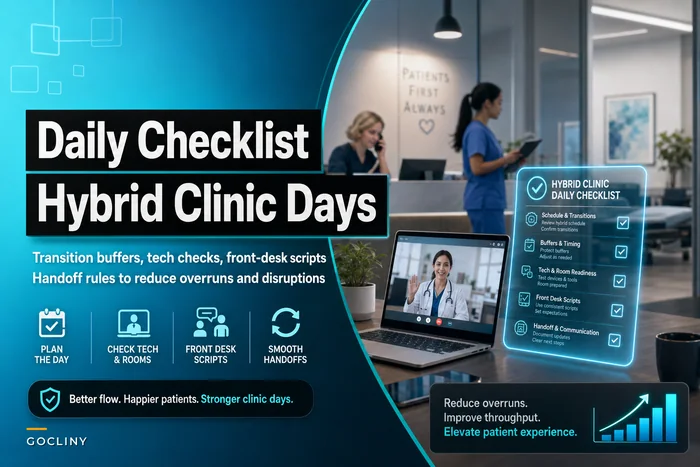
This is where daily checklists for hybrid clinic transitions become critical during surge events. But surge handoffs need even more structure than regular operations.
-
Which patients were seen by covering providers with pending issues
-
What medication or treatment changes were made
-
Which lab results came back and need review
-
What patient complaints or concerns were raised
-
Which appointments were rescheduled versus cancelled
-
What billing or coding issues need cleanup
The handoff needs to happen in writing, not just verbally. "I told them about it" doesn't hold up when something gets missed. Use a standardized form or secure messaging system that creates an audit trail.
Build in 15-minute overlap periods specifically for information transfer. Yes, you're paying for overlap time. It's cheaper than the mistakes that happen without it.
Who owns what during surge events
Chaos loves ambiguity. During surge, every decision needs a clear owner or you'll waste time figuring out who can authorize what.
| Role | Owns |
|---|---|
| Practice Manager | Patient flow decisions — who gets rescheduled, which visits convert to telehealth, when to activate overflow agreements |
| Medical Director | Clinical coverage decisions — which providers cover which patients, what visit types can be deferred, when to activate locum coverage |
| Lead Nurse / Clinical Supervisor | Staff redeployment — which MAs work with which providers, who handles triage calls, how nursing staff gets reallocated |
| Front Desk Lead | Patient communication — which templates go out when, how to handle upset patients, when to stop accepting new appointments |
| Billing Manager | Financial decisions — whether to waive rescheduling fees, how to handle insurance issues from provider changes, prior authorizations |
These roles need backup assignments too. What if the Practice Manager is the one who's sick? Who makes decisions on weekends or during evening hours? The succession plan needs to be written down and posted somewhere visible — not stored in someone's head.
Measuring surge response effectiveness
Most practices never actually measure their surge response. The crisis passes, everyone's exhausted, and they just want to move on. That's exactly how you guarantee the next surge will be just as rough.
Response speed: How long from trigger to full protocol activation? How many patients were notified within four hours? How quickly did coverage providers respond?
Capacity preservation: What percentage of appointments were maintained — seen by someone, even if not the original provider? How many true cancellations versus reschedules? What was the average delay for rescheduled appointments?
Quality maintenance: Documentation completion rates during surge. Patient satisfaction scores for surge-period visits. Billing error rates. These tend to spike during surge, but tracking by how much gives you a useful baseline for improvement.
Staff impact: Overtime hours required. Number of staff who called out in the week after surge — that's a burnout signal worth watching. Time to return to normal operations.
Financial impact: Lost revenue from cancellations versus revenue preserved by maintaining operations. Most practices find that good surge response saves money despite the extra costs involved.
Track these in a surge response log. Each event gets its own entry — what triggered it, how long it lasted, what protocols were activated, what worked, what didn't. Patterns surface over time. Maybe Tuesday surges are harder because of your scheduling habits. Maybe certain providers' absences cause disproportionate disruption compared to others.
When to activate surge protocols (and when not to)
Not every busy day is a surge event. Over-activating surge mode exhausts staff and makes them less responsive when you actually need the protocols to work.
| Condition | Response |
|---|---|
| Single provider absent, booking under 85% | Normal coverage, no surge activation |
| Two providers out or booking at 90%+ | Yellow alert |
| 30%+ provider capacity lost or booking at 95%+ | Red alert, full protocols |
Also define what isn't surge. Predictably busy periods like flu season need capacity planning, not surge response — that's what monthly capacity planning systems are for. Surge is for unexpected disruption, not seasonal patterns you can anticipate three months out.
Some practices use surge protocols to paper over persistent scheduling problems. If you're consistently sitting at 95% capacity, that's not surge — that's a deeper issue with appointment lifecycle management. Fix the underlying problem instead of living in permanent crisis mode.
The technology stack for surge response
Modern surge response increasingly relies on AI-powered operational platforms that coordinate the moving parts. The right system monitors capacity thresholds automatically, triggers notifications when limits are hit, manages patient communication workflows, and tracks handoffs between providers.
During surge events, AI automation handles the high-volume, time-sensitive tasks that tend to overwhelm staff. Patient notifications go out the moment protocols activate. Appointment rescheduling follows pre-defined clinical priority rules. Coverage requests get routed to available providers based on their capabilities and preferences. Everything gets logged — decisions, communications, exceptions.
The more valuable thing, though, is early pattern recognition. AI-assisted platforms can surface warning signs before surge actually hits — unusual booking patterns, multiple staff requesting overlapping time off, seasonal illness trends starting earlier than expected. They can also learn over time which providers work well together during coverage periods, which patient messages get the best response rates, which rescheduling patterns cause the least disruption.
This doesn't replace human judgment. The practice manager still decides when to activate protocols. The medical director still determines clinical priorities. But the technology handles execution — the hundreds of small tasks that need to happen quickly and correctly for surge response to actually work.
A surge response that actually happened
A primary care practice with six providers and roughly 900 active patients faced their first real surge test last winter. Two providers got influenza the same week, right as respiratory illness visits were spiking. They were already booking at 94% capacity before the absences hit.
Following their surge playbook, they activated yellow alert immediately. The front desk stopped booking new patients and started triaging all requests through their urgency matrix. They activated an overflow agreement with a local urgent care for acute visits and brought in their part-time telehealth provider for medication management.
The practice manager personally called the 20 highest-risk patients scheduled with the absent providers. The MA team was redeployed to support remaining providers, giving each one roughly 1.5 MA support instead of the usual 1:1 ratio. They converted about 30% of visits to telehealth using pre-written patient templates.
Over five days, they managed to see 87% of originally scheduled patients. Only around 8% were true cancellations — the rest were rescheduled within 10 days. Revenue dropped by roughly $8,000 for the week, but the estimate without surge protocols was over $35,000. No providers worked more than 11 hours in a day, and documentation stayed current throughout.
Post-surge review surfaced two problems they hadn't anticipated: telehealth conversion was lower than expected because many elderly patients couldn't navigate the technology, and their overflow urgent care didn't have EMR access, which complicated follow-up care. Both got addressed in the next playbook revision.
Making surge capacity sustainable
Practices that handle surge well don't treat it as an emergency — they treat it as an occasional operating mode, like switching gears. The protocols exist, the agreements are in place, the templates are ready. When surge hits, they shift into that gear and operate there until it passes.
That requires investment before the crisis. Time to develop protocols. Money for coverage agreements. Technology for coordination. Training for staff. Compare that to the cost of a failed surge response: lost revenue, burned-out providers, patients who leave and don't come back, and potentially dangerous gaps in care.
The goal isn't to eliminate disruption — that's not realistic in healthcare. The goal is to respond quickly, maintain quality, protect your staff, and return to normal smoothly. With clear triggers, defined protocols, and regular practice, surge events become manageable operational challenges instead of the kind of week nobody wants to talk about afterward.
Ready to transform your practice workflow?
Join 2,000+ healthcare providers using GoCliny to increase efficiency, improve patient satisfaction, and grow revenue.