


Most practice managers don't discover they're locked in until they try to leave. The contract is signed, the EHR is live, three years go by, and then someone pitches a better scheduling system or the current vendor jacks up their renewal 22%. That's when the real question lands: can we actually get our data out, in a usable form, without paying a ransom or waiting six months?
For a lot of clinics, the honest answer is no. Not because anyone made a dumb decision, but because nobody wrote vendor portability into the selection process. The demos looked good. The references checked out. Nobody ran an actual export test before go-live, so nobody knew the "data export" feature produces a 40-column CSV with no appointment history, no attachments, and provider IDs that don't map to anything a human can read.
This is a solvable problem, and it's solvable upfront. A real clinic vendor governance playbook isn't a legal document — it's an operational one. It's the set of acceptance tests, export validations, health checks, and exit procedures that let you treat every vendor like a tenant, not a landlord. You keep the keys. You can always move out.
Below is how the whole system works, where it breaks, and the templates you can lift directly.
Why clinics get locked in (it's rarely the contract)
Lock-in usually gets blamed on contract terms, but the contract is downstream. The actual trap is operational dependence that built up quietly while nobody was measuring it.
The pattern repeats across clinics of every size. A vendor goes live. Over 18 months, staff build workflows around its quirks. Custom fields pile up. Three different integrations start pulling from it. The billing team memorizes its denial codes. Patient history, scanned docs, insurance cards, telehealth consent forms — all of it accumulates inside a system nobody has ever tested for export.
-
Data you can't cleanly extract
-
Workflows nobody documented
-
Integrations that will silently break
-
Staff retraining
-
The terrifying unknown of whether anything will reconcile on the other side
A vendor doesn't need predatory contract language to lock you in. They just need you to never test the exit. Most clinics never do, which means the "cost of leaving" is really the "cost of never having prepared to leave."
The fix is boring and it works: you build acceptance and exit readiness into procurement from day one, and you re-test it quarterly so it stays true.
What actually breaks at scale
A solo practice can tolerate a bad vendor. You hand-key some data, grit your teeth, move on. The stakes change completely once you've got multiple providers, multiple sites, or integrations feeding a reporting layer.
Eliminate appointment gaps and no-shows.
GoCliny streamlines every patient interaction from booking to billing—seamlessly.
- Unified appointment scheduling
- Automated patient reminders
- Staff calendar & task management
No credit card required
A few specific failure points come up repeatedly as clinics grow:
-
Export completeness drifts. The export that worked at signup covers 90% of your data. Two years later you've added telehealth, e-consents, and a patient-messaging module — none of those are in the export. You only find out when you leave.
-
Referential integrity falls apart. Your appointments export fine. But the provider IDs, location codes, and insurance plan IDs are internal keys that mean nothing outside the system. You have the data and no way to reconnect it.
-
Reporting dependencies hide the real lock-in. Once a vendor becomes the source for your KPI dashboards, leaving means rebuilding every metric. This is where clean vendor governance connects directly to how you structure a clinic KPI taxonomy with owner matrices and validation checks — if your KPIs are defined independently of any one vendor, switching gets a lot less scary.
-
Incident handoffs have no owner. When the vendor has an outage or a data issue, nobody knows who on your side owns the ticket, what the SLA actually promises, or when to escalate. Small issues become multi-day messes.
At scale, these aren't annoyances. They're the difference between a 30-day migration and a 9-month one.
The minimum SLA language you actually need
Forget the legal boilerplate for a second. Operationally, there are only a handful of SLA commitments that protect a clinic, and they need to be specific enough to test. Vague language like "reasonable efforts" and "industry-standard uptime" is worthless because you can't run a check against it.
Below is the minimum operational SLA set, and what good looks like versus what's a red flag:
| SLA area | Minimum acceptable language | Red flag |
|---|---|---|
| Data export | Full export of all patient, appointment, billing, and document data in documented, open formats (CSV/JSON + files), self-serve, within 5 business days | "Export available upon request" with no format or timeline |
| Export frequency | On-demand export at least quarterly during contract, no per-export fee | Export only at termination, or fees per export |
| Uptime | 99.5%+ during clinic hours, with credits tied to missed targets | Uptime measured monthly in a way that hides business-hour outages |
| Incident response | Acknowledgment within 1 hour, status updates every 4 hours for Sev-1 | "We'll respond as soon as possible" |
| Exit assistance | Documented export + data dictionary provided within 10 business days of notice | Exit support "subject to additional professional services fees" |
| Data deletion | Certified deletion of your data within 30 days of exit, on request | Silent retention with no deletion commitment |
The key move: every SLA line should map to a test you can run before you sign and again every quarter. If you can't test it, it's not a real commitment.
The vendor acceptance checklist (run this before go-live)
Acceptance testing is the single highest-leverage thing in this whole playbook, and it's the step clinics skip most. Before you flip the switch to production, you prove the vendor does what the demo promised — with your data, not their sandbox.
-
[ ] Full export test completed using real (or realistic) data volume, not three demo records
-
[ ] Export contents verified against a field inventory — every data type you care about is present
-
[ ] Document/attachment export works — scanned IDs, consents, uploaded files actually come out
-
[ ] Referential keys are usable — provider, location, and payer IDs map to human-readable values or a provided lookup table
-
[ ] Export timing measured — how long does a full export actually take? (Find this out before, not during a crisis)
-
[ ] Data dictionary received — a document explaining every field in the export
-
[ ] Integration endpoints tested — any API or interface you depend on returns what you expect
-
[ ] Incident reporting path confirmed — you know who to call, the portal works, and you've filed a test ticket
-
[ ] Permissions and audit logs verified — you can see who accessed what
One thing worth flagging: run the acceptance test with volume that resembles your real database.
One thing worth flagging: run the acceptance test with volume that resembles your real database. An export that completes in 20 seconds on 50 test records can choke or time out on 80,000 real ones. Common problem. Completely avoidable.
The runnable export-validation test
A checklist tells you what to check. A runnable test tells you whether the export is actually usable. This is the part most clinics never formalize, and it's genuinely simple to do.
Run this at acceptance, and again every quarter:
-
Request a full production export. Time it. Note the delay between request and delivery.
-
Count records against the source. Pull totals from the live system — patients, appointments in a date range, claims — and confirm the export matches. Mismatches here are the loudest alarm bell.
-
Spot-check 20 records end to end. Pick real patients and trace every field: demographics, appointment history, insurance, documents, notes. Does everything that's in the system appear in the export?
-
Test the attachments. Open five exported documents. Do they render? Are they linked to the right patient?
-
Resolve the keys. Take the internal IDs in the export and confirm you can translate them using the data dictionary or lookup tables.
-
Attempt a trial import. Load a sample into a spreadsheet or staging environment and see what breaks. Date formats, character encoding, and multi-value fields are the usual culprits.
-
Document the gaps. Anything missing or unusable goes into a log the vendor has to respond to.
Clinics that do this quarterly almost never get surprised at exit. An export that's tested four times a year stays honest — if the vendor ships an update that breaks something, you catch it in weeks instead of discovering it mid-migration.
For a deeper look at how export formats and interfaces should be structured, the thinking in pragmatic data and integration architecture for SMB clinics pairs directly with this. Portability is a lot easier when your data model isn't tangled up in one vendor's assumptions.
Here's a simple visual of the runnable test workflow.
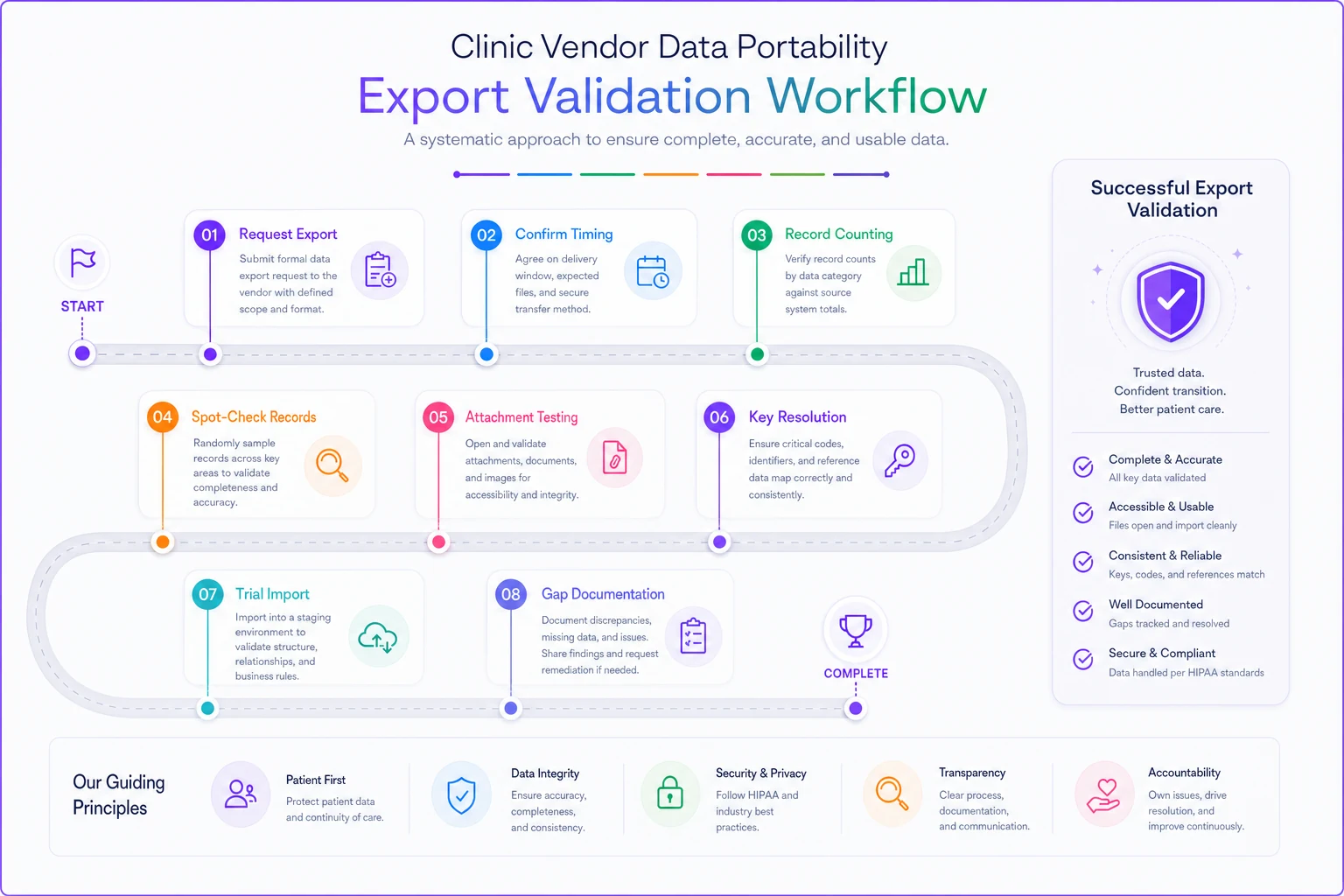
Use this as a checklist you can hand to implementation teams and vendors during onboarding.
Quarterly vendor health checks tied to real KPIs
Acceptance testing proves a vendor works at signup. Health checks keep that true over the life of the relationship. The mistake clinics make is treating vendor review as a once-a-year contract conversation instead of an operational check tied to numbers they already track.
A quarterly vendor health check should score the vendor against the operational metrics they actually influence — not satisfaction surveys, but real KPIs:
-
Uptime during clinic hours vs. the SLA target
-
Incident count and resolution time over the quarter
-
Export test result — pass/fail from the validation run above
-
Support responsiveness — median time to first meaningful response
-
Integration reliability — failed syncs, dropped messages, mismatches
-
Billing/data accuracy issues traced back to the vendor
Give each a simple green/yellow/red. Three yellows or any red triggers a documented conversation with the vendor and, if it repeats, kicks off exit planning. The point isn't to be adversarial — it's to make degradation visible before it becomes a crisis.
Something worth watching: vendors often perform best in the first six to nine months, then drift once your account stops being new. A quarterly health check catches that drift. Without one, you only notice when something's already on fire.
A quick real scenario
A three-provider primary care practice decided to switch EHRs after their vendor's renewal came in roughly 25% higher with no new functionality. They'd been on the system for about four years.
They assumed migration would take a few weeks. Instead, the export they requested came back missing all scanned documents — insurance cards, signed consents, outside records — because those lived in a separate module the standard export didn't touch. Getting them required a "data services engagement" quoted at several thousand dollars and a 6-week wait. Provider and payer IDs in the export were internal codes with no lookup table, so appointment history couldn't be mapped without manual work.
What should have been a 30-day move stretched past four months. They ended up hand-reconciling a meaningful chunk of patient records, and the direct cost landed somewhere in the mid five figures once staff time was counted.
The fix going forward cost them almost nothing. They built a quarterly export-validation test into their new vendor relationship from day one. The first test caught two missing document types, which the new vendor fixed under the implementation agreement — while they still had leverage. That's the whole point. Leverage exists before you sign and fades fast after.
The exit checklist (build it before you need it)
Exit readiness isn't something you scramble together after giving notice. It's a standing document you maintain from go-live, so that leaving is a procedure, not a panic. When termination becomes real, you run the list:
-
[ ] Notice delivered per contract, with export request submitted same day
-
[ ] Full production export received and validated (run the test above)
-
[ ] All document types and attachments confirmed present
-
[ ] Data dictionary and key lookup tables received
-
[ ] Record counts reconciled against the live system
-
[ ] Integrations inventoried and disconnection plan documented
-
[ ] Reporting/KPI dependencies rebuilt on the new source
-
[ ] Staff access plan for cutover window
-
[ ] Certified data deletion requested in writing
-
[ ] Final invoice and credit reconciliation completed
Keep this list current. Every time you add a module or integration, add the matching line to the exit checklist. That way the document always reflects your real footprint, not what it looked like three years ago.
The incident handoff template
The last piece most clinics lack is a clean incident handoff — the script for what happens when the vendor has a problem that hits your operations. Without it, a Sev-1 outage turns into everyone guessing who's responsible.
-
What happened — one plain-language sentence
-
Scope — which workflows, sites, or providers are affected
-
Severity — Sev-1 (clinic can't operate) through Sev-3 (minor)
-
Vendor ticket number and contact
-
Your internal owner — the one person accountable for this ticket
-
Last update time and next update due
-
Workaround in effect — what staff should do right now
The named internal owner is what makes this work. When "someone" owns an incident, nobody does. When one person owns it, updates flow and escalation happens on time. This connects naturally into broader resilience planning — the same discipline that shows up in a solid clinic cybersecurity playbook, where knowing exactly who owns an incident is half the battle.
When this level of rigor makes sense (and when it doesn't)
This playbook isn't free. It takes time to build the tests and discipline to run them quarterly. Worth being honest about fit.
When it's clearly worth it: multi-provider or multi-site clinics, anyone whose vendor holds clinical data, and any practice that's been burned by a migration before. If leaving a vendor would mean losing patient history, you need this.
When you can run a lighter version: a solo practice with a single, simple tool and minimal integrations can skip the quarterly cadence and just run a solid acceptance test at signup plus an annual export check.
Who should not over-engineer this: if you're a brand-new practice still choosing your first systems, don't let governance paralysis stop you from launching. Run the acceptance test, get the export commitment in writing, and build out the quarterly checks once you're stable. The goal is portability, not a bureaucracy.
Bringing it together
Vendor lock-in isn't something that happens to you — it's something that happens because nobody tested the exit while they still had leverage. Every piece of this playbook is really the same idea repeated at different stages: prove the data can come out, and keep proving it.
Acceptance tests prove it at signup. Export validations prove it quarterly. Health checks prove the vendor is still holding up. The exit checklist proves you can leave on your timeline, not theirs.
None of it requires legal expertise. It just requires treating portability as an operational metric you own, right alongside your scheduling and billing KPIs. Clinics that do this don't necessarily switch vendors more often — they just negotiate from strength, sleep better, and never find out the hard way that "data export" meant a broken CSV and a six-week wait.
Build the tests once. Run them on a cadence. The question "can we actually leave?" stops being a gamble and becomes a checklist you've already passed.
Vendor lock-in isn't something that happens to you — it's something that happens because nobody tested the exit while they still had leverage. Every piece of this playbook is really the same idea repeated at different stages: prove the data can come out, and keep proving it.
Build the tests once. Run them on a cadence. The question "can we actually leave?" stops being a gamble and becomes a checklist you've already passed.
Ready to transform your practice workflow?
Join 2,000+ healthcare providers using GoCliny to increase efficiency, improve patient satisfaction, and grow revenue.