
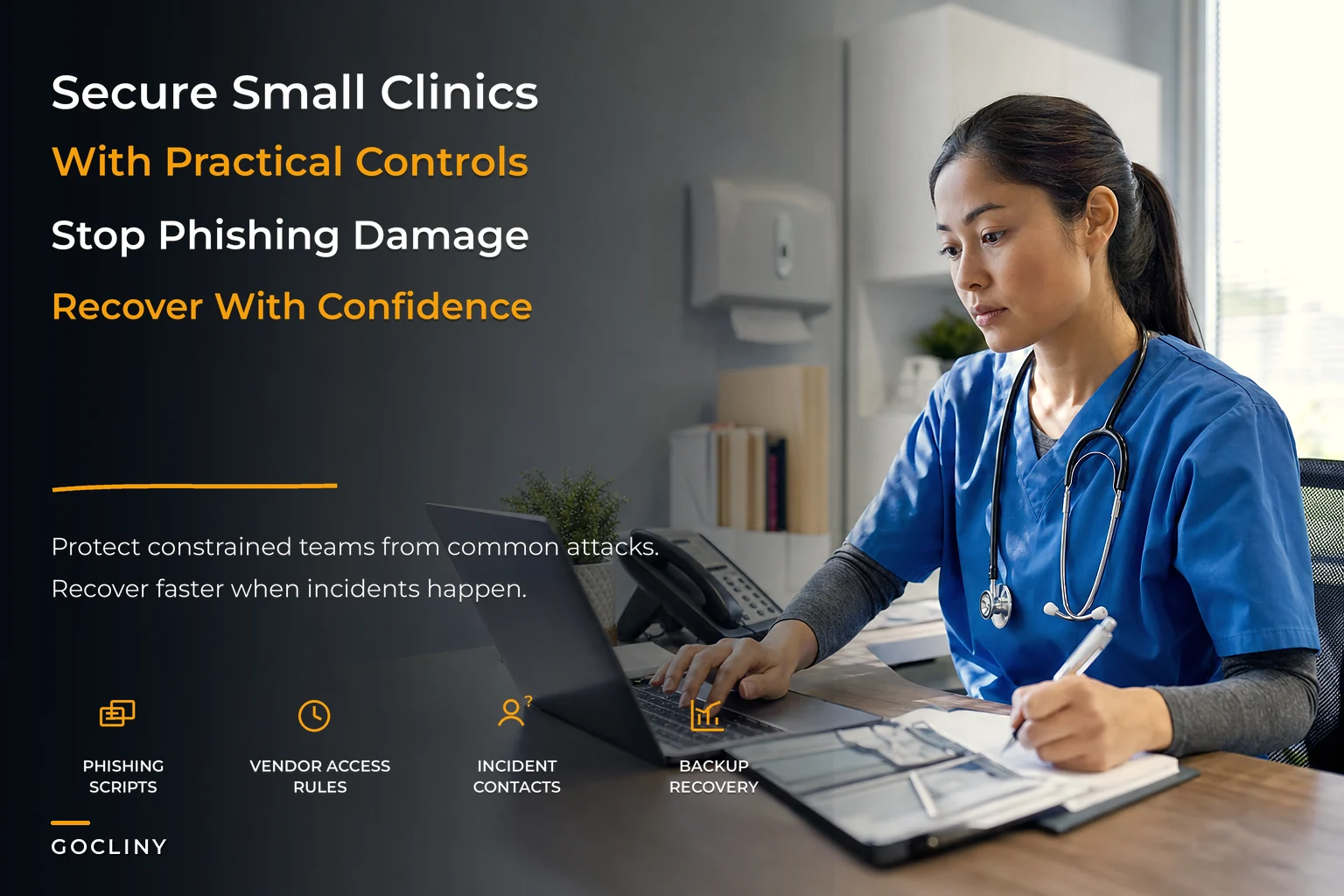

Most clinic security advice is written for hospitals with a CISO, a SOC, and a six-figure tooling budget. That advice is useless when you have four exam rooms, a shared front-desk password, and a practice manager who's also handling payroll, prior auths, and the copier that keeps jamming. The gap between "enterprise security best practices" and "what a five-person practice can actually maintain" is where most breaches happen.
So this isn't a compliance lecture. It's a playbook for deciding what actually matters when you can't do everything, and building the handful of controls that stop the attacks small practices actually get hit with.
Start with the threat you'll actually face, not the one in the headlines
Small practices almost never get taken down by a sophisticated nation-state exploit. They get taken down by three boring things:
-
Someone at the front desk clicks a link in an email that looks like it's from the EHR vendor or a payer.
-
A vendor with remote access gets compromised, and the attacker walks right into your systems through that open door.
-
A laptop, phone, or backup drive with patient data on it walks out the building unencrypted.
That's the honest risk profile for a clinic under 20 people. Ransomware crews specifically target small healthcare because they know two things: the data is sensitive enough that you'll consider paying, and the security is thin enough that getting in is easy.
The mistake most practices make is spending their limited attention on the wrong layer. They'll buy a fancy firewall appliance but leave the front-desk workstation logged into the EHR with no screen lock and a password taped to the monitor. Attackers don't fight through your strongest control. They stroll through your weakest one.
Prioritized controls: what to buy first when the budget is small
The core question for a constrained practice isn't "what's the best security?" It's "what gives me the most protection per dollar and per hour of maintenance?" Because maintenance time is often scarcer than money.
Eliminate appointment gaps and no-shows.
GoCliny streamlines every patient interaction from booking to billing—seamlessly.
- Unified appointment scheduling
- Automated patient reminders
- Staff calendar & task management
No credit card required
Here's how the common controls actually stack up for a small clinic. This is the rough mental model for sequencing spending, not a vendor spec sheet.
| Control | Rough annual cost | Impact on real clinic risk | Maintenance burden |
|---|---|---|---|
| Multi-factor authentication (MFA) on everything | ~$0–$60/user | Very high | Low once set up |
| Password manager for the team | ~$40–$80/user | High | Low |
| Automatic patching / update policy | Mostly time | High | Medium |
| Encrypted disks on all laptops/phones | Built-in, free | High | Low |
| Reliable, tested backups (offline copy) | ~$300–$1,200 | Very high | Medium |
| Staff phishing training + drills | ~$0–$500 | High | Medium |
| Email filtering / anti-phishing gateway | ~$3–$6/user/mo | Medium-high | Low |
| Endpoint protection (modern EDR) | ~$4–$12/user/mo | Medium-high | Low-medium |
| Network firewall/segmentation | ~$400–$1,500 | Medium | Medium-high |
| SIEM / log aggregation tool | Varies, often overkill | Low for tiny teams | High |
The pattern here is worth sitting with. The top of that table — MFA, password manager, encryption, backups — costs almost nothing and blocks the majority of what actually hits small practices. The bottom is where clinics waste money, buying enterprise-grade tooling they can't staff.
If you do nothing else this quarter: turn on MFA everywhere it's supported (EHR, email, payer portals, the practice management system, your domain registrar), get a shared password manager, confirm every laptop has full-disk encryption on, and verify you have a backup you've actually restored from. That's the 80% for pennies.
When the expensive stuff makes sense
A managed EDR and real firewall segmentation start earning their keep once you're multi-site, running your own on-prem server, or holding a large enough volume of records that you become a more interesting target. A SIEM almost never makes sense for a single-location practice — you don't have the staff to read it, and unread logs are just expensive noise. Don't buy monitoring you can't monitor.
Staff phishing: the single highest-leverage thing you control
You can't patch your way out of a person clicking a link. Front-desk and billing staff live in their inbox all day, dealing with real payer emails, real vendor emails, real refill requests — which is exactly why a well-made fake blends right in. The attacker's whole game is looking like normal Tuesday email.
Generic "don't click suspicious links" training doesn't stick because nothing looks suspicious in the moment. What works is giving staff scripts — specific phrases and specific pause points that trigger a check. The goal isn't to make them security experts. It's to install two or three reflexes.
Phishing reflexes worth drilling
-
The money-or-access rule Any email asking to change bank details, send a payment, reset a password, or grant access gets verified by a second channel — a phone call to a known number, never the number in the email.
-
The urgency flag "Your account will be suspended in 24 hours" is the oldest trick there is. Real vendors don't threaten your front desk. Urgency = slow down, not speed up.
-
The hover habit Before clicking, hover over the link and read the actual domain.
login.athenahealth.comis fine.athenahealth-secure-login.comis not. -
The attachment pause Unexpected invoice, resume, or "scan" attachment? Confirm the sender expected to send it before opening.
A front-desk phishing script that actually gets used
> "I got an email asking me to [change/pay/reset X]. Before I do anything, I'm going to call [vendor] at the number we have on file and confirm. If I can't confirm, I'm forwarding it to [manager] and not touching it."
Then put that on a laminated card at each desk. It sounds almost too simple, but practices that write down the exact response are the ones where staff actually follow it under pressure.
Run a fake phishing test twice a year. Not to punish anyone — to find out who clicks and give them a five-minute refresher. The first internal test at most clinics catches somewhere between a third and half the staff. By the third round, it's usually down to a handful. That downward curve is the security improvement. Treat clicks as a training signal, never a disciplinary event, or people start hiding mistakes and you lose your early warning system.
Vendor access rules: the door you forgot you left open
A pattern that shows up constantly: a clinic tightens its own passwords, trains its staff, feels good about it — and meanwhile the IT contractor from three years ago still has an active remote-access login, the old billing vendor's credentials were never revoked, and a marketing agency has admin access to the website that shares a password with the patient portal.
Your security is only as strong as the weakest vendor holding a key. And most small practices have never actually made a list of who holds keys.
The vendor access rules that matter for small teams
-
Keep a vendor access register. One simple sheet
vendor name, what system they access, level of access, who approved it, and a review date. If it's not on the list, it shouldn't have access.
-
Every vendor gets their own named login. No shared accounts. When the relationship ends, you kill one login and you're done.
-
Least privilege, always. The billing vendor doesn't need admin on your EHR. The web agency doesn't need patient-portal access. Give the narrowest access that lets them do the job.
-
Time-box remote access. Where your tools allow it, remote sessions should be granted for a task and revoked after, not left open indefinitely.
-
Get a signed Business Associate Agreement (BAA) from any vendor touching PHI. If they won't sign one, that tells you something.
-
Quarterly access review. Fifteen minutes, once a quarter, walk the register and revoke anything stale.
That quarterly review is where the leverage is. Access sprawl doesn't happen in one big dramatic moment — it accumulates. A vendor here, a temp login there, a "just for now" admin grant that never gets pulled back. The register plus a recurring calendar hold is what keeps it from compounding.
Make the vendor access register a shared spreadsheet with a last-reviewed column so quarterly reviews are quick.
The register plus a recurring calendar hold is what keeps it from compounding.
A lightweight incident-response runbook
When something actually goes wrong — ransomware note on a screen, a staff member realizing they entered credentials into a fake page — the worst outcome is five people standing around asking "who do we call?" while the clock runs. Panic wastes the exact minutes that matter most.
The one-page runbook structure
Step 1 — Contain (first 15 minutes). Disconnect the affected device from the network — unplug the ethernet cable, turn off Wi-Fi. Do not shut it down (that can destroy forensic evidence). Isolate, don't erase.
Step 2 — Call the right people, in order.
-
Practice owner / manager
-
IT support or MSP
-
Cyber insurance carrier's incident hotline (they often require you to call before acting, or coverage can be affected)
-
Legal counsel if PHI may be exposed
Step 3 — Preserve, don't clean up. Take photos of ransom notes or suspicious screens. Write down the timeline while it's fresh — what happened, when, who noticed. This matters enormously for insurance and any required reporting.
Step 4 — Assess scope. What systems are affected? Was patient data accessed or just encrypted? Your IT support drives this, but the runbook should note who's responsible for the answer.
Step 5 — Recover from backups. This is why you tested those backups earlier. Restore clean, verify, and bring systems back deliberately.
Step 6 — Report if required. HIPAA breach notification rules kick in above certain thresholds and have hard deadlines. Your legal counsel and insurer help determine what's reportable. The runbook's job is just to make sure this step doesn't get forgotten in the relief of getting systems back online.
The single most common failure here isn't technical. It's that the practice never assigned who owns each step, so under stress everyone assumes someone else is handling it. Put names next to steps. Rolling out a runbook like this is genuinely a change-management project as much as a security one — if you want it to stick past the first month, it helps to treat adoption deliberately, the same way you'd handle any other clinic change-management rollout with reinforcement loops.
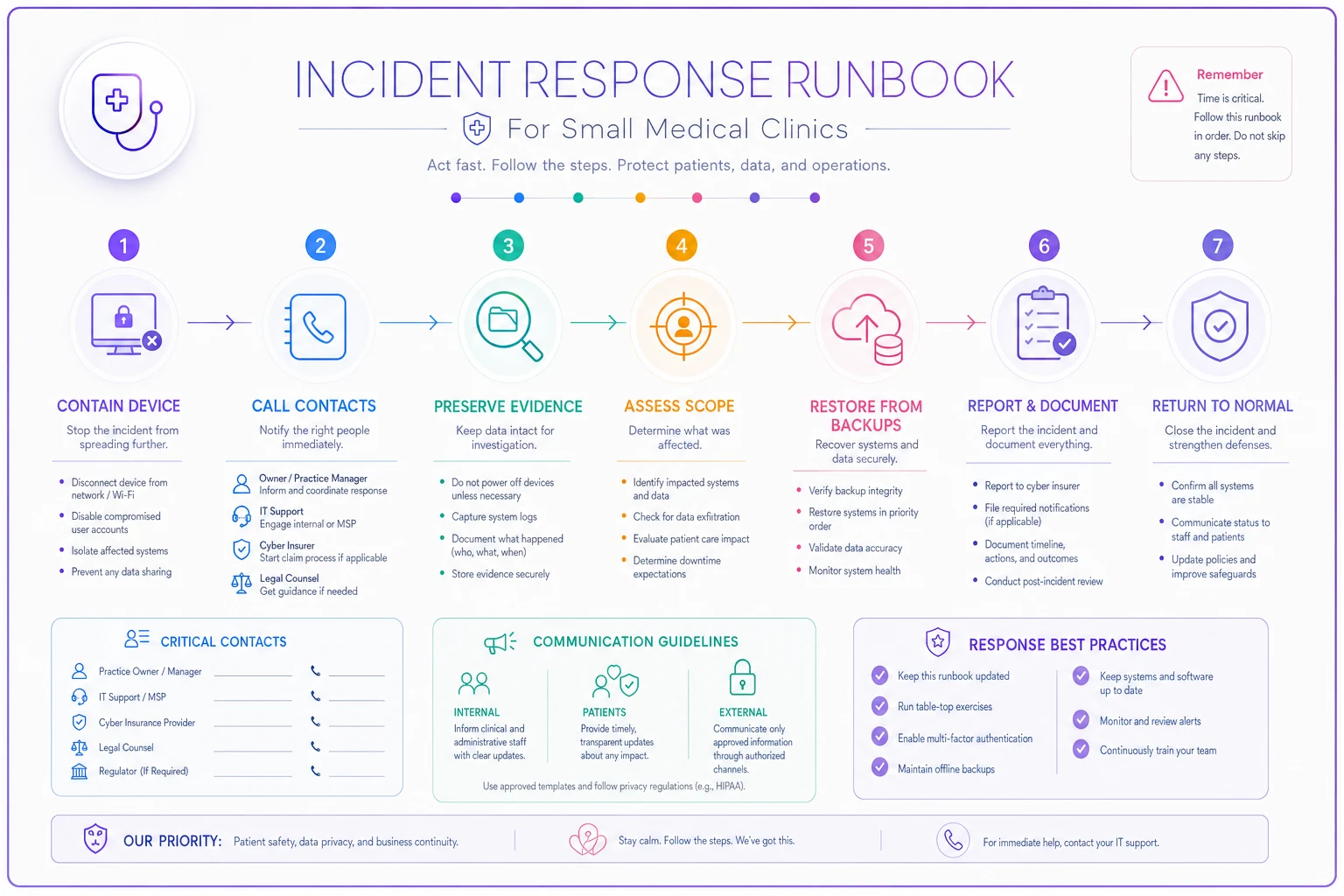
A simple visual like the one above helps staff follow the one-page runbook under stress.
Audit-ready logs without an enterprise budget
"Audit-ready" sounds like it requires a logging platform and a security analyst. For a small practice, it mostly means: can you answer who accessed what, when, and prove it if someone asks?
Regulators, insurers, and breach investigations all ask variations of the same questions. If you can produce clear answers quickly, an incident becomes a manageable event. If you can't, a small incident turns into an open-ended nightmare of "we're not sure how far this went."
What you actually need to be able to show
-
EHR access logs — who viewed which patient record, and when. Nearly every EHR keeps these; the failure is that practices never confirm the logs are on and never look at them.
-
User account activity — logins, failed login attempts, password resets, privilege changes.
-
Vendor access records — tied back to that access register.
-
A retention policy — how long you keep logs. Six years is a common HIPAA-aligned benchmark, but confirm your specific requirements.
The practical move is a quarterly log spot-check. You don't read everything. You sample. Pick a few records and confirm access looks legitimate. Look for the obvious red flags: a staff member accessing records they have no clinical reason to touch (the classic "looked up a neighbor" or "looked up a celebrity patient" problem), logins at 3 a.m., or a burst of failed logins on one account.
This is also where having a defined set of operational metrics pays off — the same discipline behind building a single source of truth with clear owners and validation checks applies directly to security logs. If nobody owns reviewing them, they might as well not exist.
How these pieces connect (because they're one system, not five)
It's tempting to treat each of these as a separate project. They're not. They're a loop.
Your prioritized controls reduce the odds of an incident. Phishing training hardens the layer your controls can't reach — the humans. Vendor rules close the doors you don't directly watch. Logs give you the visibility to notice when something's wrong. And the incident runbook is what turns a detected problem into a contained one instead of a catastrophe.
When one piece is weak, it undermines the rest. Perfect MFA doesn't help if a vendor login with no MFA is the entry point. Great logs don't help if nobody's assigned to read them. Solid backups don't help if you've never tested a restore and discover during ransomware that they've silently failed for eight months.
The clinics that stay out of trouble aren't the ones with the fanciest tools. They're the ones who picked the handful of controls that matter, wrote down who owns each, and actually maintain them on a rhythm.
A real scenario: what "good enough" looks like
A three-provider primary care practice, about nine staff total, no dedicated IT beyond a part-time MSP. Before any of this: shared front-desk EHR login, no MFA on email, an old IT contractor's remote access still active, backups running but never once tested, no phishing training.
They didn't buy anything expensive. Over about six weeks they turned on MFA across EHR, email, and payer portals; rolled out a password manager; killed four stale vendor logins and built a one-page access register; ran their first internal phishing test (a little over 40% clicked); and did a backup restore drill that surfaced a misconfigured folder that had been silently skipped for months.
That restore drill was the whole project justifying itself. They'd been one bad day away from discovering their "backups" didn't cover the folder that mattered. A second phishing test a few months later dropped clicks to under 15%. Total spend was a few hundred dollars a year in tooling plus a handful of the manager's hours. No breach — but they'd converted a wide-open practice into one that could actually answer the "who accessed what, when" question and recover if they had to.
That's the realistic target. Not perfection. Not enterprise tooling. A defensible baseline a small team can genuinely maintain.
Who should NOT try to do all of this at once
If you're a solo or two-person practice already drowning, don't attempt the whole list in a week — you'll do it badly and abandon it. Pick the top four cheap controls (MFA, password manager, encryption, tested backups) and stop there for the quarter. A half-built security program nobody maintains is worse than a small one that's fully in place, because it creates false confidence.
And if someone's pushing you toward an expensive SIEM or a managed detection service before you've even turned on MFA everywhere, push back. Sequence matters. Fix the free, high-impact layer first. The sophisticated tooling only earns its cost once the basics are actually solid and you have the staff time to use it.
The takeaway
A clinic cybersecurity playbook for a small practice isn't about matching what a hospital does with a fraction of the budget. It's about being honest about the three or four ways you'll actually get hit, spending your limited attention on the controls that block those specific paths, and writing down who owns each piece so it survives past the initial enthusiasm. Cheap controls, human-proof scripts, a locked-down vendor list, logs you actually glance at, and a one-page runbook anyone can follow under stress. Maintained on a rhythm, that combination puts a small practice ahead of most of its peers — and well ahead of the attackers who count on you having none of it.
Ready to transform your practice workflow?
Join 2,000+ healthcare providers using GoCliny to increase efficiency, improve patient satisfaction, and grow revenue.