


Most clinics can tell you their revenue per visit down to the dollar. Ask them what a follow-up actually costs to deliver, and you get a shrug or a number pulled from a cost-accounting report nobody fully trusts. That gap is where a lot of margin quietly leaks out.
Time-Driven Activity-Based Costing (TDABC) is usually presented as a hospital-scale project — armies of analysts, process maps covering an entire wall, months of consulting engagement. For a small clinic that's overkill, and honestly that's why most practice managers never touch it. But the core idea is simple enough to run on a spreadsheet, and the version that fits an SMB clinic is far lighter than the textbooks make it sound.
This is a walkthrough of how to build a lightweight TDABC setup that actually gets used: what data to collect, how often, sample math for the visit types you see every day, and — the part that matters most — what to change once the numbers tell you something.
Why the "big" version scares clinics off
The full academic method wants you to map every step of every process, assign a capacity cost rate to every resource, and validate it against your general ledger. That's a real project. In a four-provider practice, nobody has that bandwidth, and by the time it's done the schedule template has already changed twice.
The lightweight version drops the perfectionism. You only need two things per process:
-
The cost per minute of the resources involved (the "capacity cost rate")
-
How many minutes each visit type consumes of each resource
Multiply, add, done. You're not trying to reconcile to the penny — you're trying to see relative cost. Which visit types are expensive, which are cheap, and where the time is actually going. That relative picture is where the useful decisions live.
The pattern that keeps repeating: clinics either go full academic and burn out, or they never start because they think it requires all of that. A middle path — good-enough numbers, refreshed on a schedule — is the only version that survives contact with a real front desk.
The two building blocks, kept simple
Capacity cost rate
Eliminate appointment gaps and no-shows.
GoCliny streamlines every patient interaction from booking to billing—seamlessly.
- Unified appointment scheduling
- Automated patient reminders
- Staff calendar & task management
No credit card required
Take a resource — a provider, a room, a medical assistant — and figure out its cost per available minute. Not per paid minute. Per minute they're actually available for patient-facing work.
A typical example: a family medicine provider costs the practice roughly $220k a year fully loaded (salary, benefits, malpractice, employer-side taxes). They work about 46 weeks after PTO and holidays, four clinical days a week, and realistically around 6.5 hours of that day is patient-facing once you strip out admin blocks, lunch, and the meetings nobody scheduled but somehow still happen.
That works out to:
-
46 weeks × 4 days × 6.5 hours × 60 minutes ≈ 71,760 available minutes/year
-
$220,000 ÷ 71,760 ≈ $3.07 per provider minute
Do the same for a medical assistant — say $52k fully loaded, fewer admin blocks so more available minutes — and you land somewhere around $0.55–$0.65 per MA minute. A standard exam room, based on rent, utilities, cleaning, and equipment depreciation spread across usable hours, might come out to $0.20–$0.30 per minute.
Notice something already: provider time is 5x MA time and roughly 10x room time. That ratio is the single most useful thing TDABC surfaces, and you haven't costed a single visit yet.
Minutes per visit type
Now you time the process. Not with a clipboard stopwatch — that changes behavior and everyone resents it. You estimate, then sanity-check against reality over a few weeks. For each visit type, break it into the resource-consuming steps.
The part most people miss: the provider minute is not the whole visit. A 20-minute appointment slot might only involve 12 provider minutes, with 6 MA minutes for rooming and vitals, plus room occupancy that overlaps with both. Costing the slot instead of the steps hides where the actual spend is.
Sample calculations for common visit types
Here's what the math looks like for four visit types you'll recognize. These use the rates above — adjust to your own numbers, but the structure holds.
| Visit type | Provider min | MA min | Room min | Rough cost |
|---|---|---|---|---|
| Established follow-up (level 3) | 12 | 8 | 20 | ~$47 |
| New patient intake | 25 | 15 | 35 | ~$95 |
| Nurse-only / injection visit | 2 | 15 | 15 | ~$19 |
| Telehealth follow-up | 12 | 4 | 0 | ~$39 |
A few things stand out immediately:
-
The new patient visit costs roughly double a follow-up, mostly driven by provider time. If your new-patient reimbursement doesn't reflect that, you're effectively subsidizing intakes with follow-up revenue.
-
The nurse-only visit is cheap — under $20 — but only if a provider isn't pulled in. The moment a provider has to sign off or glance at something, the cost more than doubles. That "quick question" interruption is expensive in a way the schedule never shows.
-
Telehealth strips out room cost but keeps almost all the provider cost. The savings are real but smaller than most people expect, because the expensive resource barely moves.
That last point catches a lot of managers off guard. Telehealth is modestly cheaper per visit. Where it actually pays off is throughput and no-show reduction — not per-unit cost savings.
The data collection cadence that doesn't fall apart
Most costing efforts die because they're built as a one-time snapshot. Six months later the numbers are stale, nobody believes them, and the spreadsheet gets quietly abandoned. A lightweight system needs a rhythm instead.
Here's one that holds up in a small practice:
-
Weekly nothing. Don't touch it weekly. Weekly costing creates noise, not signal.
-
Monthly pull volume by visit type from the EHR. Just how many of each you did. Volumes shift; costs per unit mostly don't.
-
Quarterly re-check minute estimates for one or two visit types by spot-observing 8–10 real visits. Rotate which types you check so everything gets refreshed across the year.
-
Annually rebuild the capacity cost rates. New salaries, new rent, new benefit costs. This is the big refresh, and it takes an afternoon.
The principle matters more than the exact schedule: cost rates are slow-moving, volumes are fast-moving. Track the fast stuff often and lightly; revisit the slow stuff rarely and thoroughly. Clinics that flip this — obsessively re-timing visits while ignoring volume shifts — waste a lot of effort for worse decisions.
Treat capacity cost rates as your annual housekeeping task — don't let monthly noise tempt you into frequent rebuilds.
If you've already built a clean metrics layer, this plugs right in. A well-organized clinic KPI taxonomy with clear owners and validation checks means your visit-volume data is already trustworthy, and you're not re-cleaning EHR exports every month.
Where the numbers point to operational redesign
Costing is useless if it just sits in a spreadsheet. Each cost driver suggests a specific kind of change. Here's how the drivers map to actual redesign moves.
Driver: provider minutes dominate everything. Provider time is your most expensive minute by a wide margin, so anything that pushes non-provider work off the provider pays for itself quickly. If a follow-up visit has 12 provider minutes but 4 of those are the provider doing what an MA could do — pulling up results, reconciling meds, updating the problem list — you're spending $3+/minute on $0.60/minute work. Shifting even 3 minutes per visit across several thousand visits a year is real money.
Driver: room occupancy is the bottleneck, not provider time. Look at the follow-up: 20 room minutes versus 12 provider minutes. The room is occupied 8 minutes longer than the provider is in it — patient waiting, rooming lag, checkout. If rooms are your constraint, the fix isn't hiring, it's compressing the room-occupied-but-provider-absent gap. Better rooming flow can add capacity without adding square footage.
Driver: expensive visit types priced like cheap ones. When your new-patient cost lands around $95 and reimbursement barely clears it, the response is either operational (cut intake process time), contractual (renegotiate), or strategic (manage your new-patient mix relative to actual capacity).
Driver: hidden provider interruptions on "cheap" visits. The nurse-only visit is cheap until a provider gets pulled in. Protecting provider focus time — batching sign-offs, clear escalation rules — keeps the cheap visits cheap.
A workflow for turning numbers into action
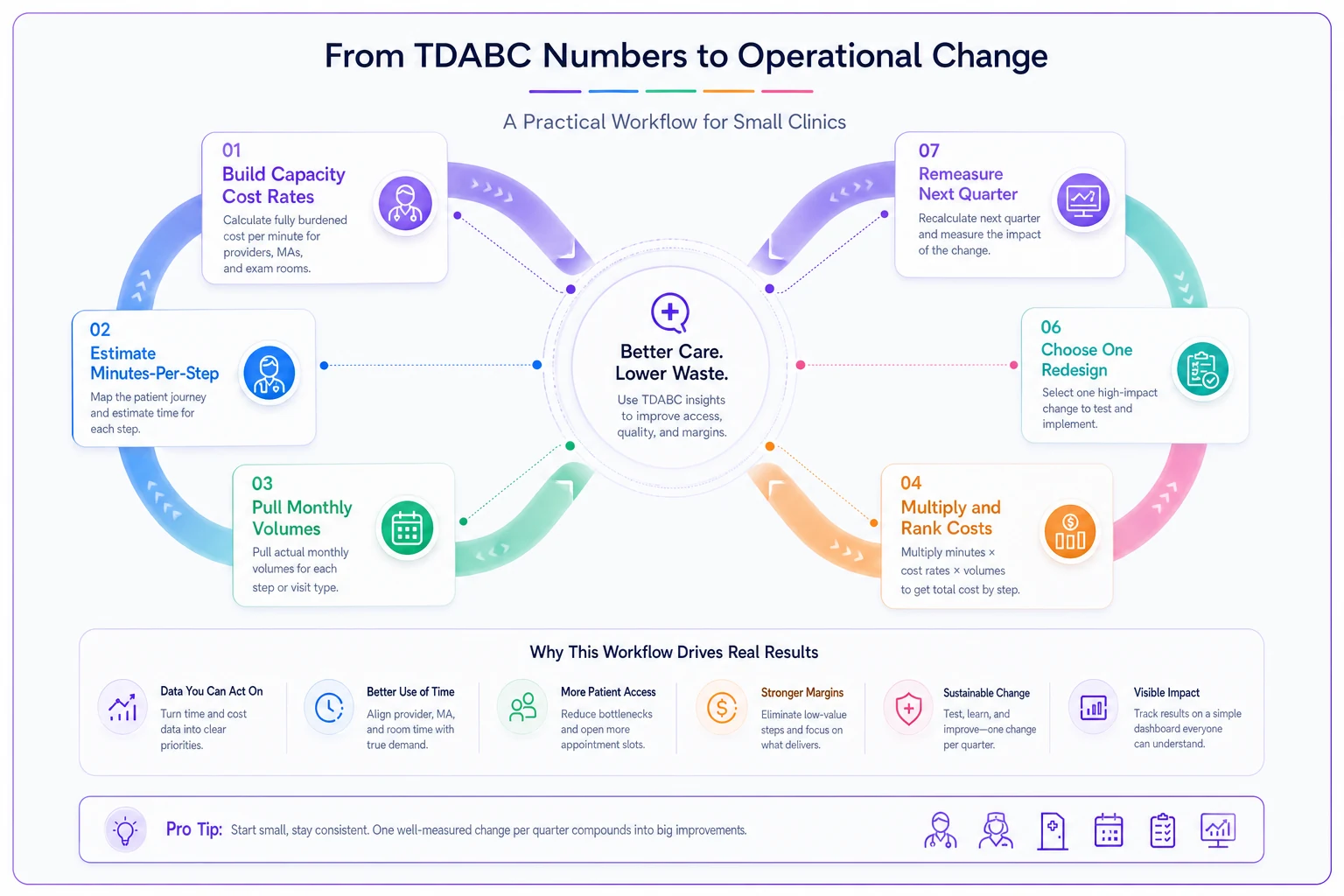
The actual loop, start to finish:
-
Build capacity cost rates once (an afternoon).
-
Estimate minutes-per-step for your top 5–6 visit types.
-
Pull last month's volume by visit type.
-
Multiply out total cost by visit type and rank them.
-
For the top two cost drivers, ask
is this a provider-time problem, a room problem, or a pricing problem?
-
Pick one redesign per quarter. Not five. One.
-
Re-pull volume and re-estimate the changed process the following quarter to confirm the move actually landed.
Step 6 is where discipline matters most. Clinics that identify eight problems and try to fix all of them fix none. The costing tells you what deserves attention; your job is to spend that attention narrowly.
Here's a simple visual of the loop to keep the team aligned.
Tying these outputs back into the dashboard leadership already looks at keeps it honest. When cost-per-visit-type sits alongside your other operational numbers in a monthly dashboard that actually triggers decisions, the costing stops being an academic side project and becomes part of how the clinic actually runs.
A real scenario
A three-provider internal medicine practice ran this analysis after noticing margins slipping despite steady volume. Nothing dramatic surfaced at first — until they costed their new-patient intakes and saw them landing around $90 each, with provider time doing most of the damage.
Digging into the 25 provider minutes, roughly 7 were spent on history-gathering and med reconciliation the provider was doing from scratch, because the pre-visit intake form was rarely completed and the MA didn't have a clear rooming script for new patients.
They made one change: a structured pre-visit intake sent ahead of time, plus an MA rooming checklist that pre-populated the med list and reason for visit before the provider walked in. Provider time on new patients dropped to around 18–19 minutes. Across roughly 40–50 new patients a month, that freed up somewhere in the range of 250–300 provider minutes monthly — enough to open a handful of additional slots per week without anyone working longer.
No new hires, no extended hours, no renegotiated contracts. They just stopped paying provider rates for MA-level work. That's the whole game.
When this makes sense — and when it doesn't
Worth doing when:
-
You have a mix of visit types and suspect some are underwater on margin.
-
You're capacity-constrained and deciding what to add or cut.
-
You're heading into payer negotiations and want cost-backed numbers.
-
You're considering telehealth expansion and want the real per-unit picture.
A bad idea when:
-
You're in the middle of an EHR migration or major staffing upheaval — your minute estimates will be meaningless.
-
You're a single-provider practice with two visit types. Just look at your schedule.
-
You'd use it to build a punitive productivity dashboard. TDABC is a process tool, not a stopwatch to wave at providers. Point it at workflows, not people.
Who should skip it entirely:
-
A very new practice still finding its rhythm. Wait until your processes are stable enough that the minute estimates mean something. Costing chaos gives you precise-looking nonsense.
A very new practice still finding its rhythm. Wait until your processes are stable enough that the minute estimates mean something. Costing chaos gives you precise-looking nonsense.
The takeaway
The value of a lightweight TDABC setup isn't the cost numbers themselves — it's the questions they force. Which visits eat the most of your most expensive minute? Where are you paying provider rates for support-staff work? Is your constraint actually providers, or is it rooms and flow?
Keep cost rates slow-moving, volumes fresh, and redesigns to one at a time. Done that way, this doesn't become another abandoned spreadsheet. It becomes the thing you check before you hire, before you renegotiate, and before you assume telehealth will save you more than it actually does.
Ready to transform your practice workflow?
Join 2,000+ healthcare providers using GoCliny to increase efficiency, improve patient satisfaction, and grow revenue.