

Most reactivation campaigns fail in one of two directions. Either they don't move the needle — a generic "we miss you" email that lands in spam — or they work too well and you suddenly have 90 overdue patients trying to book into a schedule that had maybe 15 open slots that week. The front desk gets buried, providers get squeezed into their lunch breaks, and three weeks later your no-show rate spikes because half those reactivated patients weren't that committed to begin with.
The core problem isn't getting people to respond. It's controlling when and how fast they respond so the demand you create actually fits the capacity you have. A reactivation campaign that ignores throttling is basically a demand grenade with the pin pulled.
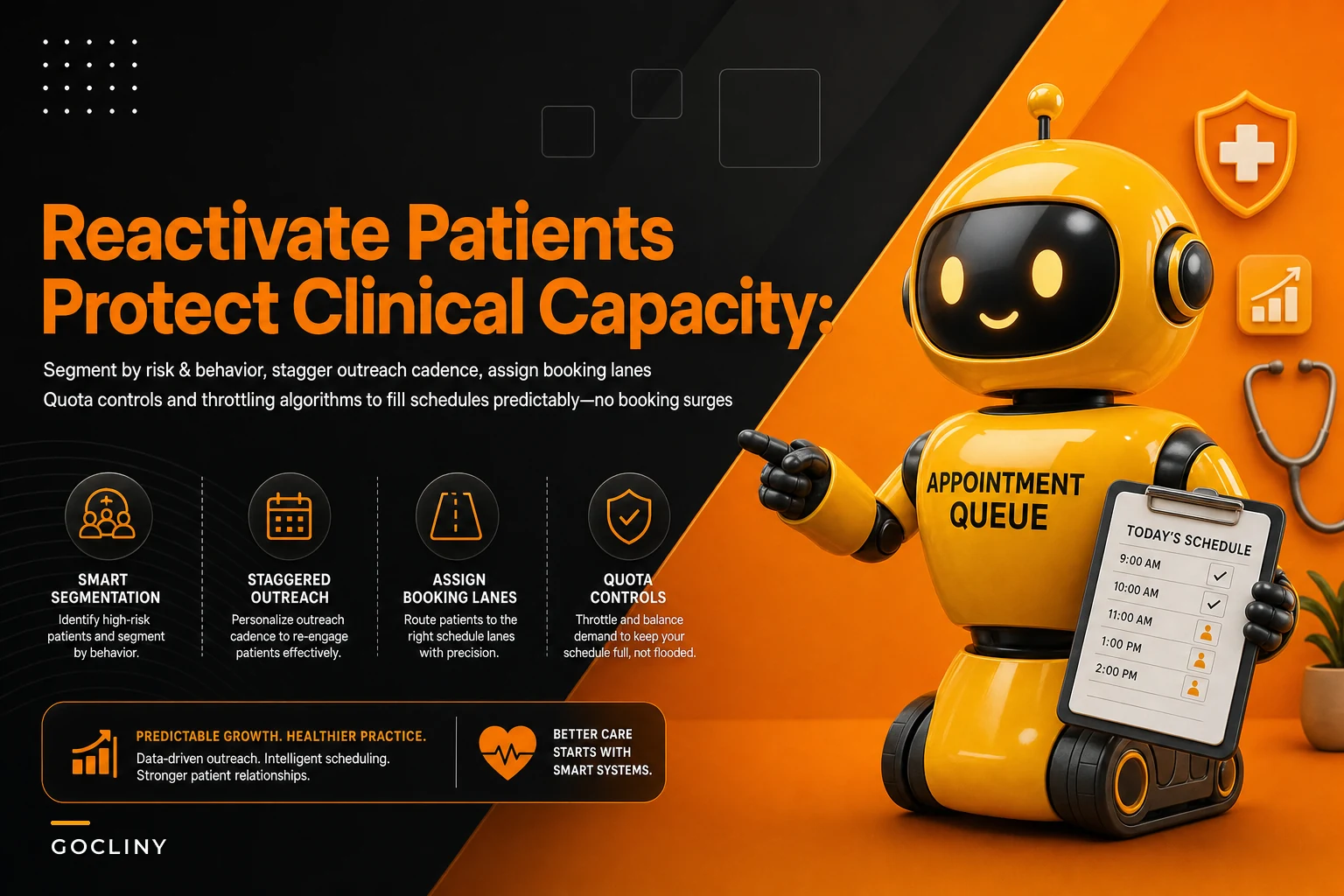
So this is really about pacing — segmenting patients by risk and behavior, staggering outreach so demand arrives in waves you can absorb, and setting booking-lane quotas so the schedule fills predictably instead of all at once.
Why blasting the whole list at once quietly wrecks your schedule
Say you pull everyone overdue for a visit — annual physicals, follow-ups, dental recalls, whatever your practice runs on. Maybe that's 800 names in the "haven't been seen in 12+ months" bucket. Someone exports it, drops it into the email tool, and hits send on a Tuesday morning.
The people most likely to respond immediately are your engaged, loyal patients — the ones who were going to come back anyway. They flood the phones within 48 hours. Your front desk, which normally handles new booking requests plus daily operational chaos, now has an extra 40–60 calls competing for the same 10 available slots over the next two weeks.
-
Staff start booking people 6–8 weeks out just to say yes to someone
-
A few get squeezed into buffer time or overbooked slots "just this once"
-
The genuinely at-risk patients — the ones the campaign was actually for — get a busy signal or a callback that never comes
-
Two months later, the overbooked days produce burnout and the far-out bookings produce no-shows
You created demand you couldn't shape. The campaign "worked" on paper (look at the response rate!) but it degraded access for the exact patients you were trying to reach and stressed the schedule for everyone else.
Segment by risk *and* behavior, not just recency
Most clinics segment reactivation lists by one thing: how long since the last visit. That's not enough, because "18 months overdue" describes both a healthy 30-year-old who skips checkups and a diabetic patient who dropped off follow-up care. Those two need completely different urgency, messaging, and slotting.
Eliminate appointment gaps and no-shows.
GoCliny streamlines every patient interaction from booking to billing—seamlessly.
- Unified appointment scheduling
- Automated patient reminders
- Staff calendar & task management
No credit card required
You want two axes:
Clinical risk — how much does a delayed visit actually matter for this patient? Chronic conditions, abnormal prior results, medication management, post-procedure follow-up all push someone up the priority ladder.
Behavioral likelihood — based on past history, how likely is this person to actually respond and show up? Someone with a clean attendance record is a different situation than a chronic canceller.
Cross those two and you get a simple grid that tells you who to contact first and how hard to push.
| Segment | Clinical risk | Response likelihood | Outreach priority |
|---|---|---|---|
| A | High | High | First wave, personal outreach (call + message) |
| B | High | Low | First wave, but expect low conversion — clinical staff should review |
| C | Low | High | Later waves, low-touch (email/text is fine) |
| D | Low | Low | Last, automated only, or skip until capacity is clearly open |
The insight most practices miss: your highest-value reactivations (Segment B) are often the lowest-responding, which means a plain email will never reach them. Those need a phone call or a message from someone they recognize, spread out so each one gets real attention. Meanwhile Segment C responds fast — which is exactly why you want to slow them down so they don't clog the lane your high-risk patients need.
Stagger the outreach cadence so demand arrives in waves
Once you've segmented, don't contact everyone the same week. Release outreach in controlled batches sized to the open capacity you actually have.
-
Week 1 — Segment A (high risk / high response). Small batch, high-touch. These convert fast and you want them in first. Cap the batch at whatever your schedule can absorb — if you have around 20 reachable slots over the next two weeks, don't release 200 names.
-
Week 1–2 — Segment B (high risk / low response), parallel but paced. Because response is low, you can release more names without flooding the schedule. But these need clinical eyes and possibly a nurse call, so pace them to what your team can personally handle.
-
Week 3–4 — Segment C (low risk / high response). Now that the urgent group is booked, open the low-touch lane. Email and text work here. Release in batches tied to remaining open slots.
-
Week 5+ — Segment D. Automated, low priority, only if capacity remains. Many practices should just skip D until a slow season.
The number that governs all of this is open capacity per week, not list size. You're not asking "how many overdue patients do we have?" You're asking "how many net-new visits can we actually absorb next week without displacing existing demand or overbooking providers?" Release outreach against that number.
This is the same discipline behind good waitlist prioritization and auto-allocation thresholds — matching a queue of demand to real, limited slots using rules instead of gut feel and first-come-first-served chaos.
Booking-lane quotas: protect your existing schedule
This is the part almost nobody sets up, and it's the difference between a campaign that fills gaps and one that cannibalizes your regular flow.
Reserve lanes in the schedule. A lane is just a quota — a defined number of slots per provider per week that reactivation bookings are allowed to fill. Everything else stays protected for new-patient demand, urgent same-week needs, and existing follow-ups.
-
Provider has roughly 40 bookable slots per week
-
6 slots are opened as the "reactivation lane"
-
Once those 6 fill, the lane closes — reactivation bookers see no availability until next week's lane opens
-
The other 34 slots are untouched by the campaign
Start with conservative lane sizes and tighten throttling if you see surges rather than increasing lanes immediately.
This caps how much of the schedule the campaign can consume and makes fill predictable. You know you're absorbing roughly 6 reactivations per provider per week — not zero one week and 25 the next.
The mistake to avoid: leaving lanes open with no cap "to be flexible." Flexibility is exactly how you get the surge. The quota is the whole point.
Throttling: how to actually control the flow
Throttling is the mechanic that keeps outreach volume matched to lane availability in real time. The rule itself isn't complicated: only release as many outreach messages as your open lanes can realistically convert.
If your reactivation lanes hold 30 slots this week across all providers, and Segment A converts at roughly 40%, you'd release around 70–75 outreach touches — not 400. When lanes fill, you pause outreach. When lanes reopen next week, you release the next batch.
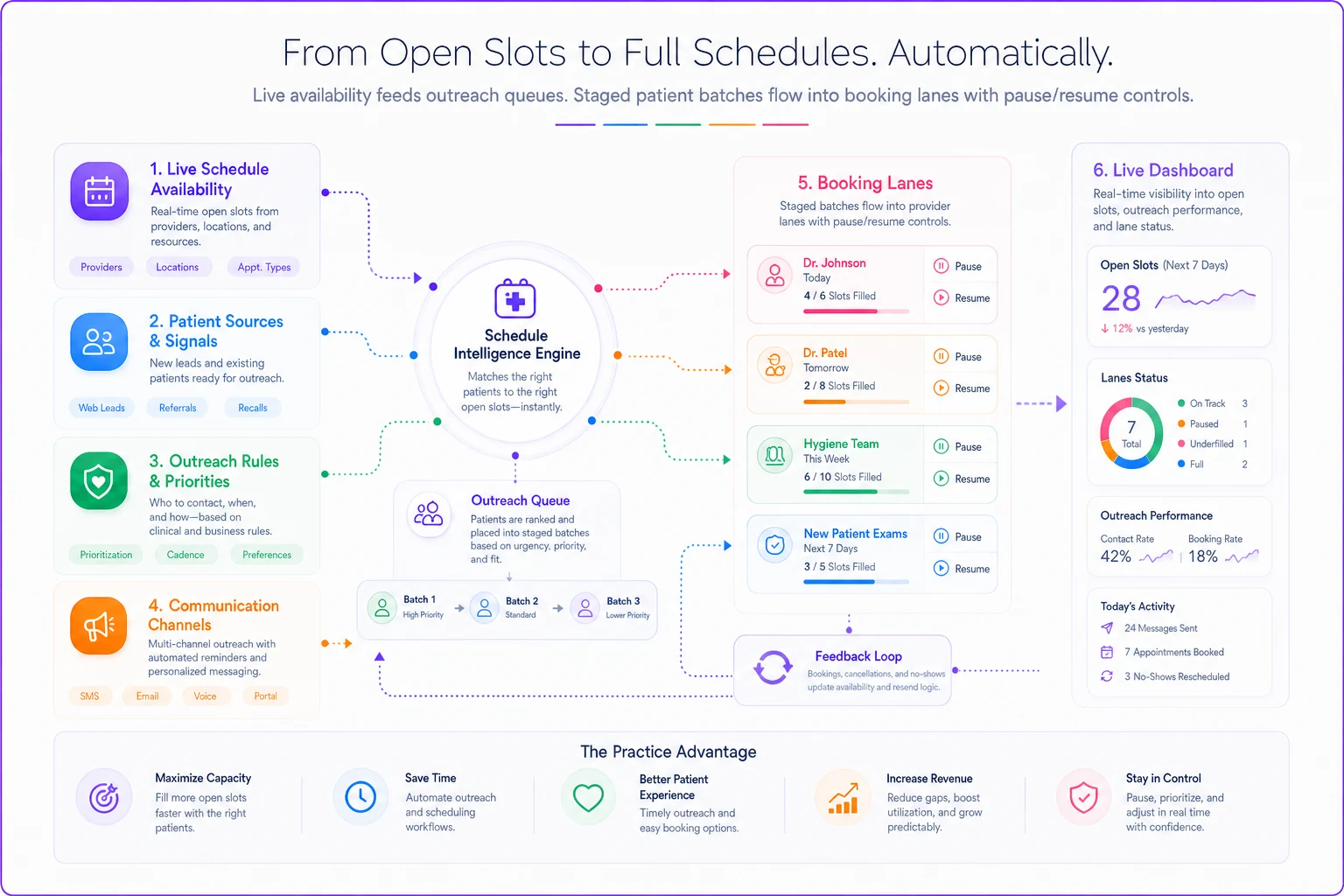
In practice this breaks because nobody's watching both numbers at once. The person running the email campaign doesn't see the schedule filling. The scheduler doesn't know another batch just went out. So the throttle has to be tied to live schedule data, not a fixed weekly plan someone set a month ago.
This is where practice-management platforms with AI-assisted outreach pacing actually earn their keep — not by sending more messages, but by holding messages back. A system that watches open lanes and only releases the next batch when capacity opens does the throttling automatically, so you're not manually reconciling a spreadsheet against the appointment book every morning. The value isn't fancy automation; it's that the campaign stops flooding you the moment the schedule fills. It's the same principle as a fast slot-recovery workflow for cancellations — matching outreach precisely to the openings you actually have, in near real time.
A real scenario
A three-provider family practice had about 640 patients overdue for annual visits after a rough winter of cancellations. Their previous attempt — one big email blast — generated around 120 responses in four days, most of which they couldn't book for 5–7 weeks. No-show rate on those far-out bookings ran close to 28%.
The rework was straightforward. They segmented the list, found roughly 90 high-clinical-risk patients, and prioritized those with nurse-led calls spread over two weeks. They set a reactivation lane of 5 slots per provider per week (15 total) and throttled email and text batches to that number.
Over about eight weeks, they reactivated around 210 patients. The schedule never surged — bookings landed inside a 1–2 week window instead of 5–7. No-shows on reactivated visits dropped to roughly 12% because people booked into appointments that were soon enough to actually remember. The front desk described the whole thing as "boring," which is exactly what you want a reactivation campaign to feel like.
When staggered reactivation makes sense — and when it doesn't
There's a temptation to apply this framework to every overdue list regardless of size or urgency. That's overkill in some situations, and genuinely the right call in others.
This makes sense when:
-
You have a real backlog of overdue patients (a few hundred or more)
-
Your schedule isn't sitting mostly empty — you have existing demand to protect
-
Some of your overdue patients carry genuine clinical risk
-
Your no-show rate climbs when you book far out
This is a bad idea when:
-
Your schedule has large open gaps and you genuinely need volume fast — in that case throttling is just leaving money on the table, so open the lanes wide
-
Your overdue list is small (under roughly 50 patients). Just have staff call them. You don't need a cadence for that.
Who should skip the heavy version: solo practices with a handful of overdue patients. The segmentation grid and lane quotas are overhead you don't need at that scale — a nurse and a phone will do it better.
Quick implementation checklist
Before running the campaign, it helps to have each of these confirmed and not just assumed:
-
Pull the overdue list and tag every patient by clinical risk (high/low) and response likelihood (high/low)
-
Calculate real open capacity per provider per week — net of existing demand, not gross slots
-
Set a reactivation lane quota per provider and commit to closing it when full
-
Sequence outreach
Segment A first, high-touch; B in parallel, clinical review; C later, low-touch; D last or skipped
-
Size each outreach batch to expected conversion, not list size
-
Pause outreach when lanes fill, resume when they reopen
-
Track no-show rate by booking lead time to confirm you're not booking too far out
The whole discipline comes down to one shift in thinking: a reactivation campaign isn't a marketing send, it's a capacity operation. The goal isn't the highest response rate — it's steady, predictable fill that gets your highest-risk patients back into care without wrecking the schedule for everyone already counting on it.
The whole discipline comes down to one shift in thinking: a reactivation campaign isn't a marketing send, it's a capacity operation. The goal isn't the highest response rate — it's steady, predictable fill that gets your highest-risk patients back into care without wrecking the schedule for everyone already counting on it.
Ready to transform your practice workflow?
Join 2,000+ healthcare providers using GoCliny to increase efficiency, improve patient satisfaction, and grow revenue.