


Most clinics can tell you their no-show rate. Almost none can tell you how many inbound referrals they lost last month before the patient ever got on the schedule. That gap — the space between a referral landing in your fax queue, your portal, or your voicemail and the moment someone actually books — is where a surprising amount of revenue leaks out, and it does it silently. Nobody reports a lost referral. There's no angry patient. The chart just never gets created.
This post is about that one gap. Not scheduling in general, not intake paperwork, not the whole revenue cycle. Just the intake-to-schedule window for referrals, and how to build a timeline, a triage matrix, owner-assignment SLAs, and a dashboard that makes leakage visible enough to fix.
Where referrals actually disappear
If you trace a referral backward from "never scheduled," you almost always land on one of a few failure points. And they're rarely dramatic. It's not one big broken system. It's a bunch of small handoffs where nobody clearly owned the next step.
A typical breakdown looks like this: a referral comes in by fax at 4:40pm on a Thursday. It gets printed and stacked with the day's other faxes. Friday is short-staffed. By Monday the stack has doubled, someone triages the "urgent-looking" ones, and the rest wait. The patient in the middle of that stack has a valid referral, decent insurance, and a condition that isn't screaming for attention — so they sit for nine days. By the time anyone calls, they've already been seen somewhere else, or they don't answer, and after two attempts the referral quietly ages out.
-
Channel fragmentation. Referrals arrive by fax, portal, phone, and direct EHR message. Each channel has a different person watching it, and no single queue shows all of them at once.
-
No ownership after "received." Someone logs the referral. Then it's nobody's job until a scheduler happens to pick it up. That in-between state is where things rot.
-
Unclear triage rules. Front desk staff make judgment calls about which referrals are urgent, and those judgments vary by person and by how busy the day is.
The pattern underneath all three: referrals have a status of "received" but no status for "owned." Received is passive. Somebody has it in a pile. Owned means a named person has an SLA clock running.
The real cost, and why it hides
Leakage hides because the denominator is invisible. You know how many patients you scheduled. You don't have a clean count of how many referrals you should have scheduled, because the ones that leaked never became complete records.
Eliminate appointment gaps and no-shows.
GoCliny streamlines every patient interaction from booking to billing—seamlessly.
- Unified appointment scheduling
- Automated patient reminders
- Staff calendar & task management
No credit card required
Here's a rough way to size it. Say a mid-size specialty practice receives around 240 referrals a month. If even 12–15% leak before scheduling — which is on the low end when nobody's tracking it — that's roughly 30 patients a month who never book. At an average first-visit-plus-downstream value of $400–$700 per referred patient (visit, imaging, follow-ups, procedures), you're looking at somewhere in the range of $12k–$20k of monthly revenue walking out before it's even counted. Over a year that's not a rounding error.
And the referring providers notice. When a referring office sends three patients and hears nothing back on two of them, they stop sending. Referral relationships erode from neglect, not from bad care. You lose the pipeline, not just the patient.
The intake-to-schedule timeline
The fix starts with agreeing on a timeline everyone can see. Not a vague "we call them soon" but actual clocks tied to referral urgency. Below is a workable baseline. Adjust the hours to your specialty, but keep the structure.
| Stage | What happens | Target SLA | Owner |
|---|---|---|---|
| Received | Referral logged into a single queue from any channel | Within 2 business hours of arrival | Intake coordinator |
| Triaged | Urgency category assigned, insurance/eligibility flagged | Within 4 business hours of "received" | Intake coordinator |
| Owned | Named scheduler assigned, first outreach attempt started | Same business day for urgent, next day for routine | Scheduling lead |
| First contact | Patient reached or first attempt made | Urgent: same day. Routine: within 48 hrs | Assigned scheduler |
| Scheduled or closed | Appointment booked, or referral formally closed with reason | Urgent: 48 hrs. Routine: 5 business days | Assigned scheduler |
The single most important line in that table is "Received within 2 business hours from any channel." If your fax and portal referrals don't hit one queue quickly, every SLA downstream is already late. Most leakage problems are really intake-latency problems wearing a scheduling costume.
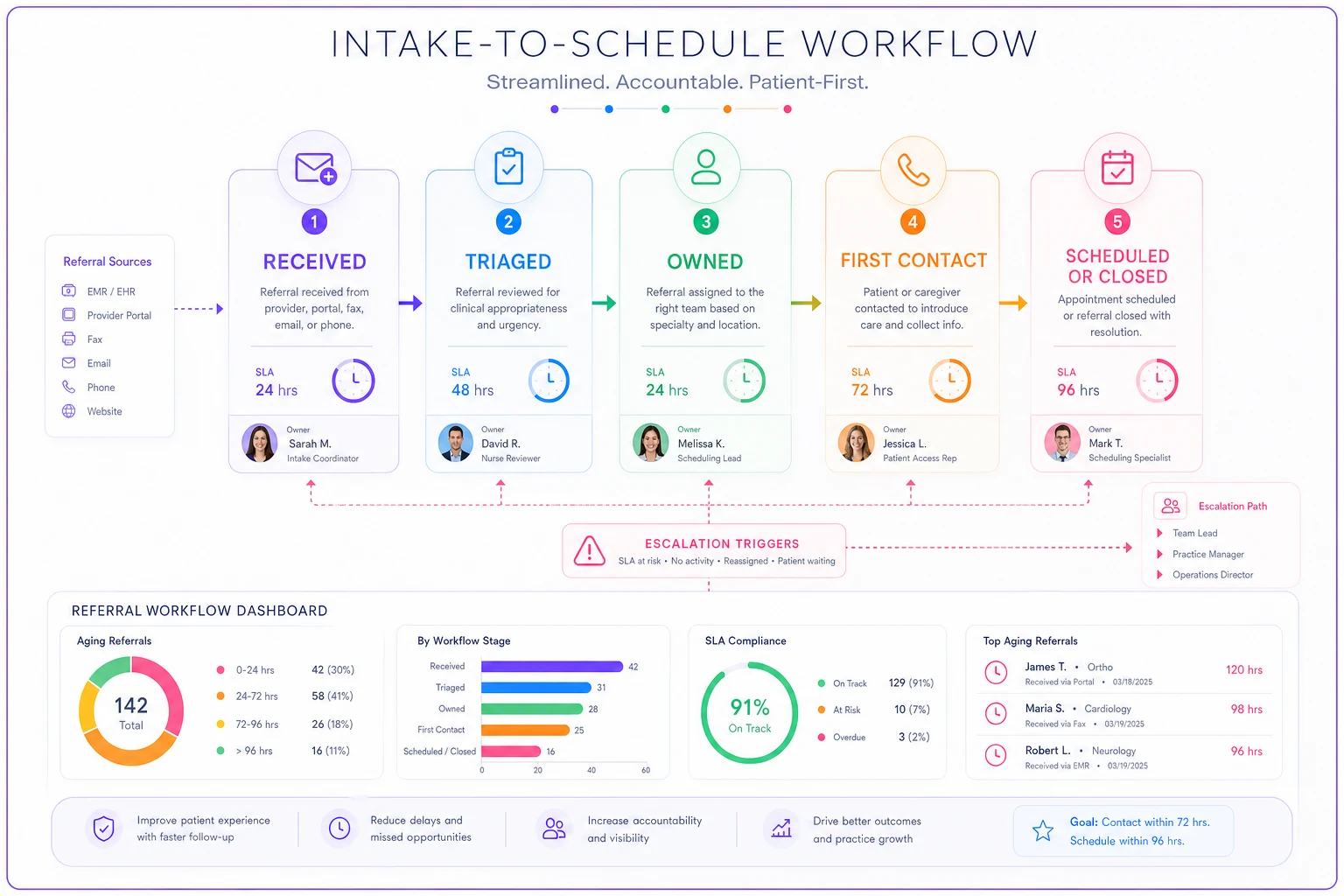
The "Owned" stage exists as its own step deliberately. The moment a referral is triaged, a specific human name gets attached to it. No orphan referrals floating between roles.
A triage matrix that removes the guesswork
Front-desk judgment about urgency is the quiet source of a lot of leakage, because "urgent" is inconsistent and "not urgent" often means "ignored." A simple matrix takes the judgment out of it and replaces it with rules anyone can apply.
Build it on two axes: clinical urgency and scheduling friction (how hard the patient will be to book — new patient, out-of-network, needs prior auth, etc.).
-
Urgent + low friction Book immediately. Same-day outreach, escalate if not reached.
-
Urgent + high friction Same-day outreach, but flag for prior-auth or eligibility work in parallel so the clinical clock doesn't wait on paperwork.
-
Routine + low friction Standard 48-hour outreach. These are your bread-and-butter and the ones most likely to leak because they feel safe to defer.
-
Routine + high friction These need the most active management. They're not urgent, so they get deprioritized, but they're hard to book, so they take multiple touches. Assign a dedicated owner and a longer but firm SLA.
The insight most managers miss: the biggest leakage bucket is usually routine + low friction, not the complex cases. The complex ones get attention because they're obviously hard. The easy, non-urgent referrals get quietly buried because everyone assumes they'll get to them. They don't.
Owner-assignment SLAs that actually stick
An SLA nobody owns is a wish. The reason SLAs fail in clinics isn't that staff are lazy — it's that ownership is ambiguous. When a referral is "the front desk's job," it's nobody's job.
-
One name per referral. Not a team, not a role — a person. If they're out, the reassignment is explicit, not assumed.
-
A visible clock. The owner should be able to see, at a glance, how long the referral has been in their queue and how close it is to breaching SLA.
-
An escalation path. If an urgent referral hits its SLA without contact, it escalates to the scheduling lead. Not an email into the void — an escalation someone has to acknowledge.
-
A closure requirement. No referral closes without a reason code: scheduled, patient declined, unreachable after X attempts, sent elsewhere. "Closed for no reason" is how leakage stays invisible.
That last one matters more than it seems. When you force a closure reason, you convert silent leakage into countable data. Suddenly "unreachable after 3 attempts" becomes a number you can act on — maybe your outreach cadence is wrong, maybe you're only calling during work hours when patients can't answer.
This is the same discipline that makes appointment handoffs work. If you've already built out an appointment lifecycle with SLAs, handoffs and SOPs, the referral intake workflow is basically the front half of that same system — the part that happens before the patient is even in your scheduling flow.
Fallback follow-up templates
Most referrals that leak don't leak on the first call. They leak because there was no second and third call, or because the follow-up was inconsistent and easy to skip. Pre-written templates fix that by removing the "what do I say" friction.
-
Touch 1 (day of outreach, phone) "Hi [name], this is [clinic]. Dr. [referring provider] referred you to us for [reason]. I'd like to get you scheduled — what days work best?" If no answer, leave a voicemail and send a text with a callback number and a booking link.
-
Touch 2 (48 hours later, text + call) "Following up on your referral from Dr. [referring provider]. We have openings this week and want to make sure you're taken care of. Reply here or call [number]."
-
Touch 3 (day 5, final, phone + message) "We haven't been able to reach you about your referral from Dr. [referring provider]. If we don't hear back by [date], we'll close the referral and let your provider know. We'd rather get you seen — call us at [number]."
Two things make this work. First, every touch names the referring provider — that anchors the patient's memory and adds legitimacy. Second, touch 3 sets a clear closure deadline, which both prompts action and gives you a clean, defensible point to close and report back to the referring office.
If your team is also handling inbound scheduling calls, aligning these templates with your phone triage and scheduling scripts with decision thresholds keeps the language and thresholds consistent, so a referral patient who calls in gets the same treatment as one you're calling out.
A simple tracking dashboard
You don't need anything fancy. You need to make three things visible: what's in the pipeline, what's aging, and what closed and why. A dashboard that shows these turns leakage from an invisible loss into a managed number.
-
Open referrals by stage. How many are sitting in received, triaged, owned, first-contact. If the "received" or "triaged" column keeps growing, your intake latency is the bottleneck.
-
SLA breach count. How many referrals are past their target time, split by urgency. This is your daily standup number.
-
Aging buckets. Referrals grouped by days-in-pipeline
0–2, 3–5, 6–10, 10+. Anything in the 10+ bucket is essentially leaked unless someone acts today.
-
Closure reasons. A breakdown of why referrals closed. This is where you learn whether you're losing patients to unreachability, declines, or competitors.
-
Leakage rate. Closed-without-scheduling divided by total referrals received. This is the single number that tells you if the whole system is working.
The discipline that makes a dashboard useful isn't the tool — it's that someone looks at the SLA breach panel every morning and the aging panel every afternoon.
The discipline that makes a dashboard useful isn't the tool — it's that someone looks at the SLA breach panel every morning and the aging panel every afternoon. A dashboard that nobody reviews is just a prettier version of the fax stack.
Where automation genuinely helps here
Once the workflow above exists on paper, running it manually is honestly painful. Someone has to pull faxes into a queue, watch four channels, remember which referral is on which touch, and update a spreadsheet. That manual coordination is exactly where AI-assisted operational tools earn their place — not by making clinical decisions, but by removing the tedium that causes drops.
In practice that looks like: inbound referrals from different channels auto-logged into one queue with a timestamp, so the "received" SLA clock starts automatically. Aging referrals surfacing to the assigned owner before they breach, instead of after. Follow-up texts firing on the schedule your templates define, so touch 2 and touch 3 don't get skipped on busy days. The dashboard populating itself from status changes rather than someone maintaining it by hand.
The point isn't to replace the coordinator's judgment on triage — it's to make sure nothing sits unowned and no follow-up gets forgotten. The workflow is what matters; the automation just keeps the clocks honest.
When this is worth building — and when it isn't
This whole system is worth it when referrals are a meaningful share of your volume and you can't currently answer "how many did we lose last month." If you're a specialty practice, imaging center, or any clinic where referring providers feed your schedule, the leakage is real and probably bigger than you think.
It's less worth the overhead if you're a small primary care practice where most patients self-schedule and referrals in are rare. Building triage matrices and SLA dashboards for a dozen referrals a month is more structure than the problem deserves. In that case, a shared queue and a simple "call within 48 hours, close with a reason" rule is plenty.
And rolling this out all at once across every channel and role is a mistake. Start with your highest-volume channel — usually fax or portal — get the received-to-owned handoff tight there, and expand. Trying to instrument everything simultaneously is how these projects stall.
A quick real scenario
A three-provider orthopedic practice was receiving somewhere around 190 referrals a month, mostly by fax. No one could say what happened to referrals that didn't book — they just weren't tracked. When they started closing every referral with a reason code, the picture got uncomfortable fast: close to 1 in 6 were aging out unreachable, and most of those had only been called once.
They didn't change staff. They changed three things: one queue for all incoming referrals with a 2-hour received SLA, a named owner attached at triage, and a three-touch follow-up sequence with a hard closure deadline. Within about two months the unreachable-closure rate dropped by roughly half, and they recovered an estimated 12–18 additional scheduled patients a month that would previously have leaked. The referring offices also started sending more, because closure notices meant they finally knew what happened to the patients they sent.
Referral leakage isn't a scheduling problem or a staffing problem.
The moment every referral has a named owner, a running SLA clock, and a closure reason — and the moment your dashboard shows you what's aging before it's gone — the leaks stop being invisible. And once they're visible, they're fixable. Start with the received-to-owned handoff, because that's where the quiet losses begin.
Ready to transform your practice workflow?
Join 2,000+ healthcare providers using GoCliny to increase efficiency, improve patient satisfaction, and grow revenue.