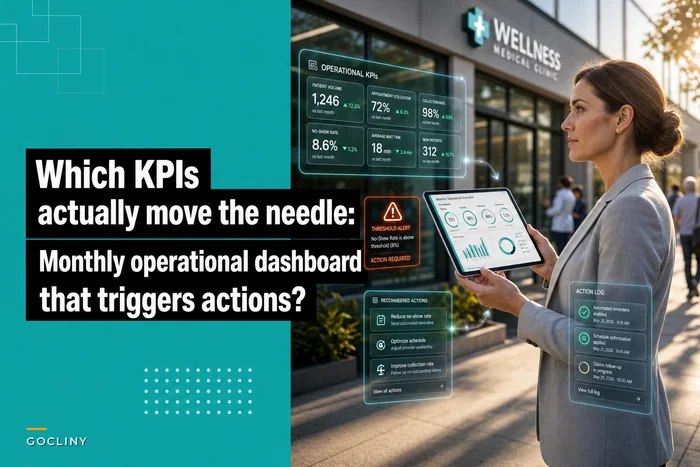



Most clinics don't have a routing problem. They have a classification problem that pretends to be a routing problem.
What that looks like in practice: a message lands in the EHR inbox. Someone reads it, decides who "should" handle it, and forwards it. Multiply that by a few hundred items a day — refill requests, portal messages, prior-auth follow-ups, denied claims, patient billing questions, lab result callbacks — and you've built a system where every single item requires a human to think before it moves. That thinking is the bottleneck. Not the volume.
When a clinic says their inbox is "always behind," volume is rarely the actual issue. The issue is that the same message could reasonably belong to three different people, nobody agreed on which one, and so it sits until someone feels guilty enough to grab it. A clinic task routing system only works when the deciding is done once — up front, as policy — instead of re-litigated every time an item shows up.
This article is less about software and more about the underlying operating model: how you define task types, who owns what, how the clock runs, and how you catch the routing decisions that quietly go wrong.
Why the same message ends up in three different queues
The messy part of clinic operations is that work arrives from sources that were never designed to talk to each other. The EHR inbox has its own logic. The patient portal has another. Billing exceptions live in the clearinghouse or the practice management system. Faxes still exist. And each of these has a different idea of what an "item" even is.
A refill request in the EHR is a discrete task. A patient portal thread might contain a refill request, a complaint about a bill, and a question about a lab — all in one message. A billing exception is technically a task, but it's really a symptom of something upstream that already happened. These aren't the same kind of work, and yet clinics route them as if a message is a message.
The ambiguity concentrates in a handful of "gray zone" task types. A patient writes "I got a bill I don't understand and I also need my blood pressure meds." That's clinical and financial. Front desk thinks it's a nurse thing. Nurse thinks it's a billing thing. It bounces. Two days later the patient calls angry, and now it's an escalation instead of a two-minute reply.
The root cause is almost never laziness. It's that nobody wrote down the rule for the ambiguous case. Clean cases route themselves. It's the 15–20% of messages sitting on a category boundary that eat your day.
Start with task-type definitions, not tools
Before you touch any routing configuration, you need a shared vocabulary for what kinds of work exist. This is the taxonomy layer, and it's the part most clinics skip because it feels like busywork. It isn't. Every downstream decision — ownership, SLA, escalation — depends on the task being classified correctly in the first place.
Eliminate appointment gaps and no-shows.
GoCliny streamlines every patient interaction from booking to billing—seamlessly.
- Unified appointment scheduling
- Automated patient reminders
- Staff calendar & task management
No credit card required
-
Mutually exclusive where it matters. A given item should map cleanly to one primary type. If two types constantly overlap, they're probably one type with a sub-tag.
-
Tied to an action, not a topic. "Billing" is a topic. "Billing exception requiring re-file" is a task. The second one tells you what happens next.
-
Small enough to memorize. If your front desk needs a 40-row cheat sheet, the taxonomy failed. Aim for somewhere around 12–18 primary task types across all sources.
Here's a compact version of what a real taxonomy layer tends to look like once it's cleaned up:
| Source | Task type | Primary trigger | Default owner |
|---|---|---|---|
| EHR inbox | Refill request (routine) | Med refill, no red flags | RN / MA pool |
| EHR inbox | Result callback (abnormal) | Flagged lab/imaging | Provider |
| Patient message | Clinical question | Symptom or treatment query | RN triage |
| Patient message | Admin request | Records, forms, scheduling | Front desk |
| Patient message | Billing question | Statement or balance query | Billing coordinator |
| Billing exception | Denial (clinical) | Denied for medical necessity | Coder + provider |
| Billing exception | Denial (technical) | Missing info, wrong field | Billing coordinator |
| Billing exception | Underpayment | Paid below contract | RCM lead |
| Mixed / portal | Multi-intent message | Contains 2+ task types | Triage owner splits it |
That last row is the one that saves you. Multi-intent messages need an explicit rule: someone splits them into separate tasks before routing. Otherwise the message goes to whoever handles the first thing mentioned, and the second thing silently dies.
Keep the taxonomy to 12–18 primary task types so staff can actually memorize and use it.
The taxonomy layer is the foundation for every routing decision you'll automate or encode in software. If it isn't right, everything downstream will be trying to steer a bad map.
Below is a simple depiction of the classification and routing workflow.
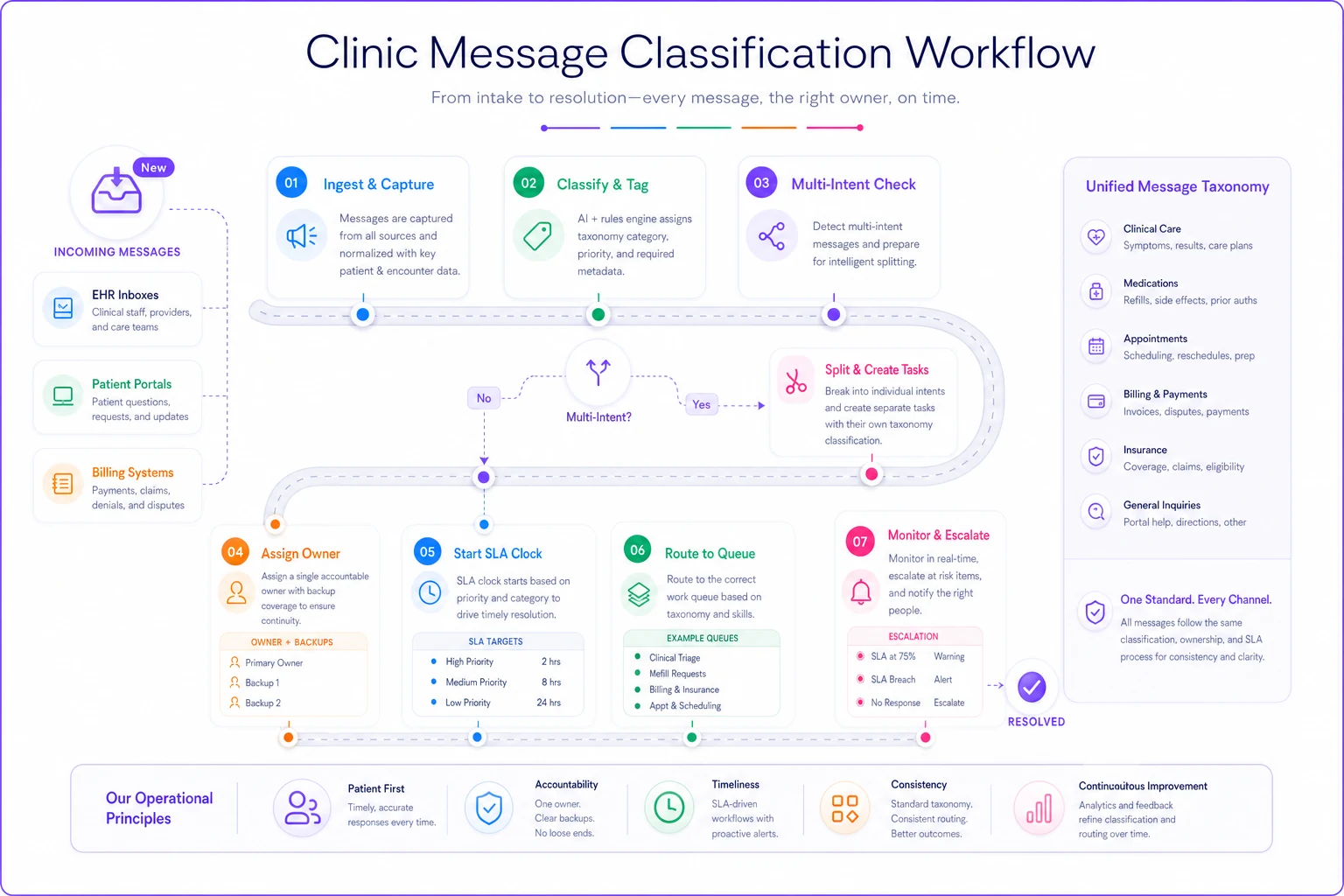
This sketch highlights splitting multi-intent messages, assigning ownership, and starting SLA clocks as discrete steps.
The ownership matrix: singular owners, backup depth
Once task types exist, ownership becomes a matter of assignment rather than debate. Every task type needs exactly one accountable role, plus a defined backup. Not a team. A role.
"The nursing team owns refills" is how refills sit for six hours. "Refill requests route to the MA on the rooming pod, backup to the triage RN" is how they get done. Diffused ownership is the single most reliable way to slow a queue. When everyone owns it, the clock starts on nobody.
The distinction that trips people up is accountable versus responsible. The MA might do the work (responsible), but if it stalls, the triage RN is the one who answers for it (accountable). You need both defined, because at scale the accountable role is who your escalation ladder pings when things slip.
Worth noting: when clinics grow past three or four providers, single-owner assignment stops being enough and you need a pool with a claim rule. Instead of naming one MA, you name the pool and require whoever opens the item to claim it — so it's visibly "taken" and nobody double-works it. The ownership stays singular at the moment of action, even though the pool is shared. This is closely related to how you'd design handoffs in an appointment lifecycle with clear SLAs and SOPs — the mechanics of "who has the ball right now" are identical.
SLA clocks that reflect clinical reality, not wishful thinking
A lot of clinics set one SLA — "respond to messages within 24 hours" — and call it done. That's not an SLA, that's a slogan. Different task types carry different risk, and the clock has to reflect that.
The mistake is setting SLAs based on how fast you want to be instead of what the task actually requires. An abnormal result callback and a records request should never share a clock. One is a clinical safety issue; the other is paperwork.
-
Urgent-clinical (abnormal results, symptom escalation)
measured in minutes to a few hours within the business day.
-
Routine-clinical (refills, non-urgent questions)
same business day or next.
-
Financial-time-sensitive (technical denials with filing deadlines, prior-auth follow-ups): tied to the external deadline, working backward.
-
Administrative (forms, records, general billing questions)
1–2 business days.
Billing exceptions are where SLA discipline pays for itself most clearly. A technical denial doesn't feel urgent — it's just a claim sitting in a work queue. But it has a timely-filing deadline attached, and that deadline is real money. Clinics tend to treat clinical items as urgent (correctly) and billing items as "whenever" (expensively). A denial that ages past its filing window is a clean write-off that nobody chose to take.
One more nuance: define when the clock starts and pauses. If you're waiting on a patient to send a photo or a payer to respond, the SLA clock should pause during that external wait — otherwise your metrics punish staff for things outside their control, and people stop trusting the numbers.
Escalation ladders: what happens when the clock runs out
An SLA with no escalation is just a hope. The ladder defines what happens automatically when a task ages past its threshold — and the key word is automatically, because manual escalation is exactly what fails under pressure.
A clean ladder has three or four rungs and gets more specific as it climbs:
-
Rung 1 — approaching breach the assigned owner gets a nudge. Quiet, no drama.
-
Rung 2 — breached the backup owner is notified and the item is flagged in the shared view.
-
Rung 3 — aged breach the accountable lead (RN supervisor, billing lead) is pulled in and the item gets prioritized above new work.
-
Rung 4 — pattern breach if the same task type keeps breaching, it stops being an item problem and becomes a staffing or design problem for the manager to fix.
That fourth rung is the one people forget, and it's the most valuable. Individual escalations fix individual items. Pattern escalations fix the system. If refills breach every Monday, no amount of nudging individual MAs solves it — you have a Monday capacity problem, and the ladder is telling you where to look.
A common failure: escalation that only goes up. When the supervisor gets pinged for every minor breach, they tune it out within a week. The ladder has to be tiered so most items resolve at rung one or two and leadership only sees the genuine stalls.
Where this breaks as you grow
At two providers, none of this needs formal structure. People can see each other's queues, ask across the room, and route by instinct. The instinct scales terribly.
-
Visibility collapses. No one person can see all the queues anymore, so "I thought you had it" becomes the default failure mode.
-
Gray-zone volume compounds. More providers means more multi-intent messages and more edge cases the taxonomy didn't anticipate.
-
The clock becomes invisible. With low volume, an aging item is obvious. With high volume, a breached denial hides inside a stack of ninety open tasks.
This is where routing has to move from social to structural. Not because people got worse at their jobs, but because the coordination cost outgrew what informal communication can carry. Manual routing has a hard ceiling, and clinics hit it right when they're growing fastest — the worst possible timing.
This is also where AI-assisted routing earns its place, and it's worth being specific about how. The valuable part isn't automation for its own sake — it's classification and pre-sorting. An AI-powered operational layer can read an incoming portal message, recognize it contains both a clinical question and a billing question, split it into two tasks, tag each with the right type, and drop them into the correct queues with the correct clocks already running. That's the exact judgment step that used to require a human to stop and think about every single item. Removing that step is what unblocks the queue. Staff still handle the clinical work — the software just makes sure the right work reaches the right person with the clock already ticking.
The same layer can watch SLA clocks across every source simultaneously and fire escalation ladder notifications without anyone remembering to check. Human attention is the scarce resource in a busy clinic; spending it on sorting instead of doing is the waste worth engineering out.
Audit sampling: how you know the routing is actually right
This is the part almost everyone skips. You can define perfect task types, ownership rules, and SLAs — and still be routing 15% of items to the wrong place. You just won't know, because misrouted items that eventually get handled look identical to correctly routed ones in your metrics.
The fix is periodic audit sampling. Not auditing everything — sampling.
-
Pull a small random sample each week — somewhere around 25–40 completed items across all sources.
-
Check three things per item Was it classified correctly? Did it reach the right owner on the first hop? Did it meet its SLA?
-
Log the misroutes by type, not just the count. You're looking for patterns.
-
Feed the patterns back into the taxonomy. If "billing question" keeps getting misrouted to nursing, that category has a boundary problem.
Misrouting almost always clusters around specific task types — usually the same two or three. Once you know which categories are ambiguous, you fix the definitions or add a routing rule for that edge case, and the misroute rate on that type drops quickly. Audit sampling turns "our inbox feels chaotic" into "these three task types account for most of our rework," which is actually fixable.
This audit loop belongs in your broader operations reporting rather than living as a one-off spreadsheet. If you already track the KPIs that actually trigger action on a monthly dashboard, routing accuracy and SLA-breach-by-type slot in naturally as leading indicators — they tell you where work is going to pile up before it does.
When a formal routing system makes sense — and when it doesn't
When it makes sense: you're running three or more providers, messages are arriving from multiple sources that don't share a queue, and you've started hearing "I didn't know that was mine" more than once a week. That combination is the signal that informal routing has hit its ceiling.
When it's overkill: a solo or two-provider practice with a single front-desk person and low message volume. Formalizing routing there adds process without solving a real bottleneck. The taxonomy exercise is still worth doing on one page, but you don't need SLA clocks and escalation ladders when everyone can see everything.
Who should be careful: clinics mid-way through an EHR migration or a significant staffing change. Building a routing taxonomy on top of workflows that are about to shift means you'll rebuild it in three months. Stabilize the underlying process first, then formalize the routing. Building elaborate rules on shifting ground is how you end up maintaining a system nobody trusts.
A real scenario
A four-provider primary care practice — roughly 300–350 patient messages and portal items a day across the EHR inbox, portal, and billing exception queue. The complaint wasn't unusual: refills routinely took most of a day, patients called to chase things they'd already messaged about, and denied claims were being noticed weeks late, sometimes past filing deadlines.
When they actually looked at it, the pattern was clear. Multi-intent messages were the choke point — those "clinical and billing" threads were getting routed to whoever handled the first sentence, and the second issue disappeared. Billing denials had no clock at all, so a handful aged out each month into write-offs.
They did three things: wrote a real 14-type taxonomy with a hard rule that multi-intent messages get split before routing, assigned single accountable owners with backups, and put actual SLA clocks on billing exceptions tied to filing deadlines. They added a weekly sample audit of about 30 items to catch misroutes.
Within a couple of months, routine refills were consistently same-day, the "I already messaged you" callbacks dropped noticeably, and — the one that mattered financially — denials stopped aging out silently. The recovered claims that used to slip past filing deadlines were worth more than the whole effort cost them. Nothing dramatic in any single week; it was the drip of lost items stopping that added up.
The takeaway
A routing system isn't a piece of software you buy — it's a set of decisions you make once so your staff don't have to remake them a few hundred times a day. Task-type definitions give you a shared language. The ownership matrix ends the "whose is it" debate. SLA clocks put real stakes on the items that matter.
Escalation ladders catch the stalls before patients do. And audit sampling keeps the whole thing honest as your volume and edge cases grow.
The clinics that stay calm at scale aren't the ones with the fewest messages. They're the ones who decided, in advance, exactly where each kind of message goes — and built a way to notice when that decision quietly stops working.
Ready to transform your practice workflow?
Join 2,000+ healthcare providers using GoCliny to increase efficiency, improve patient satisfaction, and grow revenue.