

Most clinics don't fail HIPAA because someone hacked them. They fail because a receptionist left a sign-in sheet face-up, a nurse pulled up a chart for a patient who wasn't hers "just to check something," or a callback went to a spouse who sounded reasonable on the phone but wasn't on the consent list. None of that shows up in a firewall report. It shows up when a patient complains, an auditor asks for proof, and nobody can produce a record of who did what and why.
This is the part of HIPAA that gets ignored because it's unglamorous. Technical security — encryption, access controls, backups — gets attention because you can buy it. If you want the technical side, that's covered in the clinic cybersecurity playbook for small practices. This post is about the operational half: the daily behaviors, the scripts people actually say out loud at the front desk, and the evidence trail that proves your privacy rules happened instead of just living in a binder.
The gap nobody writes down: "I was just helping"
The pattern that trips up small practices more than any malicious actor is a staff member accessing information they weren't supposed to, with completely good intentions.
A medical assistant looks up a coworker's lab result because the coworker asked her to "save the hassle of logging in." A front-desk person pulls a chart to confirm an address for a package. A provider glances at a VIP patient's record out of curiosity. Technically all three are access violations. Operationally, none of them feel like one to the person doing it.
What makes this dangerous is that your access logs do capture it — the EHR records every chart view — but nobody's reading those logs until a complaint forces the issue. By then you've got a documented access with no documented reason, which is almost worse than no log at all. You've essentially created evidence against yourself.
The fix isn't more training slides. It's building the "why" into the moment of access, and sampling it regularly so staff know the pattern is being watched.
Operational HIPAA workflows a clinic can actually run daily
1. The consent and callback decision at the front desk
Eliminate appointment gaps and no-shows.
GoCliny streamlines every patient interaction from booking to billing—seamlessly.
- Unified appointment scheduling
- Automated patient reminders
- Staff calendar & task management
No credit card required
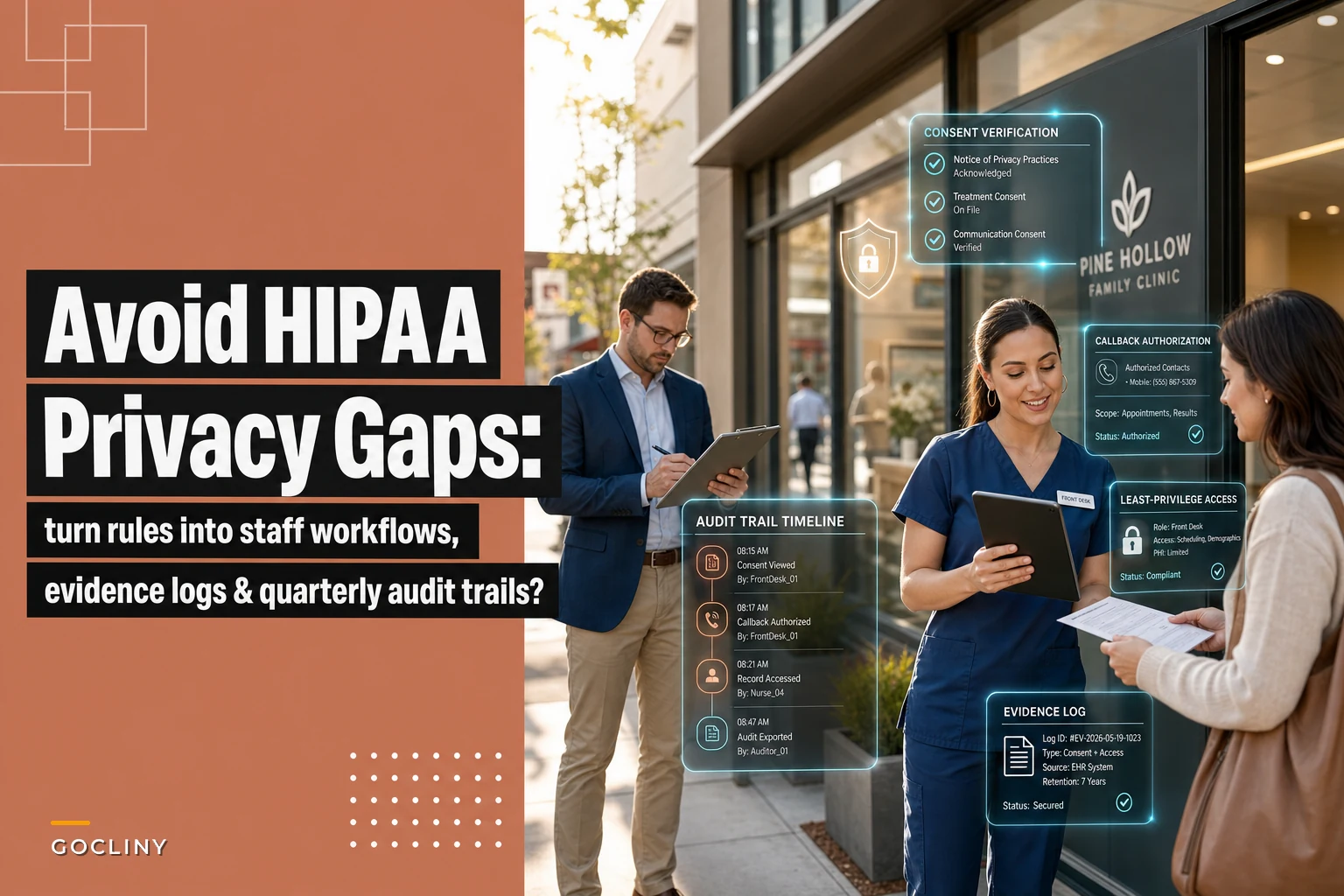
The riskiest privacy moment in most clinics happens on the phone, when someone calls asking about a patient. Front-desk staff want to be helpful, so they talk. The question is whether the person on the line is actually authorized.
What happens across a lot of practices is that the consent list exists in the chart but nobody checks it before speaking, because checking feels rude and slows the call. The real fix is a script that makes verification the default — and keeps it polite.
Callback / phone inquiry script: > "I'd be glad to help. For privacy reasons, I need to confirm I'm speaking with someone authorized on the account. Can you give me the patient's full name, date of birth, and the name you're listed under for release of information?"
If the caller isn't on the list: > "I understand — unfortunately I'm not able to share any health details with anyone who isn't on file as authorized. The patient can add you by [method] and then I'd be happy to help on the next call."
That second script matters more than the first. The hard part isn't verifying authorized people; it's saying no to someone who sounds reasonable and a little annoyed. If staff don't have exact words for the "no," they'll improvise, and improvising is where leaks happen.
A small but important rule: voicemails and callbacks to numbers on file still need a content limit. Leaving "Hi, this is Dr. Lee's office calling about your biopsy results" on a voicemail is a disclosure. The default message should be: > "This is a call from [clinic name]. Please call us back at [number]. Thank you." No clinical content, no reason-for-visit, until you've confirmed who you're talking to.
2. Least-privilege access, done in a way that doesn't paralyze the office
Least privilege sounds like an IT concept, but operationally it's about matching what each role can see and do to what that role actually needs. The common failure is that everyone gets near-admin access because it's easier than configuring roles, and then a single compromised or careless login exposes everything.
| Role | Can view | Can edit | Should NOT have |
|---|---|---|---|
| Front desk | Demographics, scheduling, insurance, balance | Scheduling, demographics | Clinical notes, lab results, full chart |
| Medical assistant | Assigned-patient clinical, vitals, intake | Vitals, intake, rooming notes | Billing adjustments, other-provider panels |
| Provider | Full clinical for their patients | Clinical notes, orders, Rx | System config, user management |
| Biller | Charges, claims, payments, limited clinical for coding | Billing, adjustments | Appointment clinical notes beyond coding need |
| Office manager | Everything operational, audit logs | Scheduling, roles, policies | — (but access is logged and reviewed) |
The key insight here: least privilege isn't about distrust, it's about shrinking the blast radius. When a front-desk login can't open clinical notes, a stolen password or a curious temp simply can't cause a clinical-data breach. You've made the worst case smaller before anything goes wrong.
Two patterns worth adopting:
"Break-the-glass" access for genuine emergencies. A medical assistant who needs a record outside her normal panel can access it, but the system flags it and prompts a reason. That access gets reviewed in your audit sample. This keeps access tight without blocking real care.
Offboarding the same day. The most common access gap isn't who has access — it's who still has access after they left. A per-role checklist that disables logins on the last shift closes this. Tie it to your termination process so it isn't optional.
Here's a simple workflow diagram you can follow.
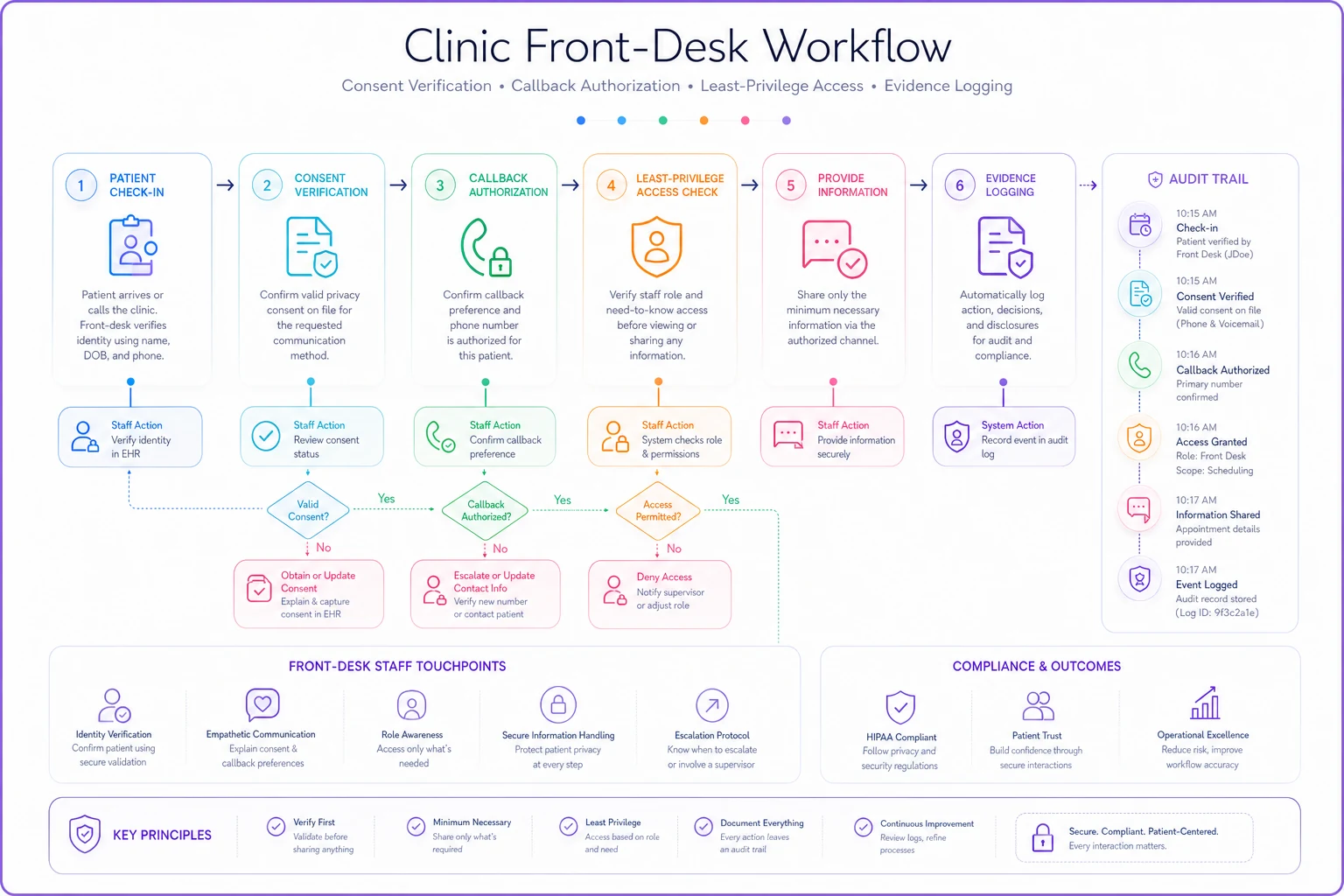
Keep dropdown options for authorization type and method to the most common values so logging stays fast and consistent.
This keeps access tight without blocking real care.
Evidence-log design: proving the rule happened
An auditor doesn't care that your policy says you verify callers. They care whether you can show it happened on a Tuesday in March. This is where most clinics fall apart — the behavior might be fine, but there's no trail.
Good evidence logs share a few traits. They capture the event close to when it happens, they're hard to backfill, and they record the four things an auditor actually asks: who, what, when, and why.
You don't need a fancy system to start. A disclosure log can be a structured spreadsheet or a field in your practice management system. What matters is that every release of information outside treatment, payment, or operations gets an entry covering the date and time, patient name or ID, what was disclosed, to whom and their authorization basis, who released it, and the method used (fax, portal, verbal, mail).
The design mistake to avoid: logs that require so much typing nobody fills them in. If logging a disclosure takes three minutes, it won't happen during a busy front desk shift. Keep required fields minimal and use dropdowns for the repeatable parts like method and authorization type. The goal is a log people actually complete, not a perfect one they skip.
A quarterly audit-sample plan you can actually sustain
You can't review every chart access — a two-provider clinic might generate thousands a month. The move is sampling: pull a small, representative set each quarter, check it against policy, and document the review. This is probably the most underused tool in operational privacy, and it's what turns a binder full of policies into a defensible program.
-
Pull the sample. Each quarter, select roughly 20–30 access events to review. Mix it deliberately: some random accesses, every break-the-glass event, any access to employee or VIP charts, and a handful of after-hours logins.
-
Check each against a reason. For each access, confirm there was a legitimate treatment, payment, or operations basis. Where it's not obvious, ask the staff member. Most will have a fine answer — document it.
-
Review disclosure logs. Pull 10–15 disclosures from the quarter and confirm each had proper authorization on file.
-
Spot-check the front desk. Listen to or observe a few callback interactions, or review voicemail scripts actually used. Confirm no clinical content is going out unverified.
-
Log findings and fixes. Write down what you found, what you corrected, and any retraining. This document is your proof of an active program.
-
Close the loop with staff. Share the pattern-level results — not individual call-outs in public — so people know the sampling is real and ongoing.
The reason this works is behavioral. Once staff know a random slice of their access gets reviewed every quarter, "I'll just peek at this chart" loses its appeal. You're not catching everyone — you're making the cost of carelessness unpredictable, which is enough to change habits.
A realistic scenario
A three-provider family practice had completed HIPAA training every year and still got a patient complaint: a patient's ex-partner called, sounded confident, and a newer front-desk hire confirmed an upcoming appointment and the reason for it. No malice — just a helpful employee with no script for saying no.
When the manager pulled logs to investigate, there was no disclosure log at all for phone inquiries, and the EHR access review had never been run. So beyond the single incident, she had no way to know whether this had happened before. That "I don't know" is the actual risk — not the one call, but the blind spot it revealed.
The changes were unglamorous. A printed callback script taped inside the front-desk drawer. A simple disclosure log with four required fields. A quarterly review of roughly 25 access events and 15 disclosures. Within two quarters, the front desk was verifying callers by reflex, and when the next tricky call came — a mother asking about her 19-year-old's visit — the staff member handled it correctly and logged the refusal. That log entry was the actual win. It's proof the system worked.
Where tools help, and where they don't
Operational privacy is mostly habits and scripts, so be skeptical of anything that promises to "automate HIPAA." Software can't say no to a caller for you.
What a workflow and management platform can do is reduce the friction that causes people to skip steps: surfacing the consent and authorization status right on the scheduling screen so staff don't have to dig, logging disclosures with a two-click entry instead of a blank form, and flagging break-the-glass or after-hours access automatically so your quarterly sample practically builds itself. The useful rule is that automation should remove the excuse for skipping a privacy step, not replace the judgment behind it. A system that auto-pulls your quarterly access sample and highlights unusual events saves real time and makes the review actually happen. A system that claims to make you "compliant" without changing what staff do at the desk is selling a false sense of safety.
A quick checklist to start this week
One related note: your privacy workflows have to survive bad days too. When your EHR goes down and you're on paper, consent checks and disclosure logging are the first things people drop. If you haven't thought through that scenario, the EHR downtime playbook for clinics covers how to keep operations — including these privacy steps — intact when the system isn't available.
-
[ ] Print a callback/phone-inquiry script and a "no" script; tape it where front-desk staff can see it
-
[ ] Set voicemail/callback messages to contain no clinical content before verification
-
[ ] Map each role to minimum necessary access; remove over-provisioned logins
-
[ ] Add same-day login disablement to your offboarding process
-
[ ] Stand up a disclosure log with four required fields and dropdowns
-
[ ] Enable break-the-glass flagging if your EHR supports it
-
[ ] Schedule the first quarterly audit sample on the calendar now
-
[ ] Decide who owns the review and where findings get documented
Cost to set up: a few hours of the manager's time and some printed scripts. The alternative — an investigated complaint with no documentation — is the kind of thing that turns a minor incident into a reportable one.
The point
The gap between "we have HIPAA policies" and "we can prove our privacy rules happened" is where small practices get hurt. Closing it doesn't take a security budget — it takes turning each rule into a specific behavior someone does at a specific moment, and leaving a trail that survives questioning.
Scripts at the front desk, access that matches the job, a disclosure log people actually fill in, and a quarterly sample that keeps everyone honest. That's the whole program. It's not glamorous, but it's what holds up when someone finally asks you to prove it.
Ready to transform your practice workflow?
Join 2,000+ healthcare providers using GoCliny to increase efficiency, improve patient satisfaction, and grow revenue.