


Most PMS rollouts don't fail because the software is bad. They fail because somewhere around week three, the front desk is still running the old scheduling spreadsheet "just to be safe," billing hasn't validated a single migrated claim, and the one super-user who actually understood the new workflow went on vacation during go-live week.
This guide covers the operational mechanics of getting from a signed vendor contract to a clinic running confidently on a new medical practice management system — in 90 days. Not a feature comparison. If you're still deciding what to buy, that's a different problem. This assumes you've chosen your system and now have to land it without torching your revenue cycle or your staff's patience.
One note before the timeline: implementation is fundamentally a change-management problem wearing a technical costume. If you want the higher-level framing on adoption curves and reinforcement loops, our piece on building a clinic change-management system with 30/60/90 adoption roadmaps pairs directly with this. What follows is the hands-on execution layer underneath it.
Before you touch a timeline: the three things that quietly sink implementations
Three patterns show up again and again in stalled rollouts, and all of them happen before go-live.
No single accountable owner. When "the practice manager and the IT consultant and the vendor rep" all share responsibility, nobody actually owns the go/no-go decision. Someone needs their name on the outcome.
Data migration treated as an IT task instead of a clinical one. IT can move records between databases. IT cannot tell you whether a patient's allergy list migrated correctly or whether a recurring appointment series broke. That's a clinical and front-desk validation job, and it gets skipped constantly.
No fallback plan for go-live day. Teams plan the happy path and assume the system will behave. It usually does — but the clinics that stay calm when it doesn't are the ones who decided in advance what happens when the eligibility check feature goes down at 9:15 AM on a full schedule.
Fix those three and you've already outperformed most rollouts.
The 30/60/90 at a glance
The hard truth: most of the real work lives in Days 1–30.
Eliminate appointment gaps and no-shows.
GoCliny streamlines every patient interaction from booking to billing—seamlessly.
- Unified appointment scheduling
- Automated patient reminders
- Staff calendar & task management
No credit card required
| Phase | Window | Primary Goal | Biggest Risk |
|---|---|---|---|
| Days 1–30 | Pre-go-live | Alignment, data migration, test-environment validation | Underestimating data cleanup time |
| Days 31–60 | Go-live + stabilization | Smooth cutover, daily issue triage, keep revenue flowing | Staff reverting to old workflows |
| Days 61–90 | Optimization | Lock in habits, tune workflows, measure KPIs | Declaring victory too early |
A rushed first month is why so many clinics limp through months two and three.
Days 1–30: Pre-Go-Live — where implementations are actually won
Write this down on day one. Vague ownership is the number-one predictor of a messy go-live.
Assign roles before you do anything else
-
Executive sponsor (owner or managing physician)
removes roadblocks, approves the go/no-go, signs off on budget for overtime during go-live week.
-
Project lead (usually the practice administrator)
owns the timeline, runs weekly check-ins, is the single point of contact with the vendor.
-
Clinical lead (a provider or lead MA)
validates clinical data migration, reviews charting and order workflows, speaks for the care team.
-
Front-desk lead
owns scheduling, check-in, and eligibility workflows; builds and tests the day-of flow.
-
Billing/RCM lead
validates fee schedules, payer setups, claim formats, and migrated balances.
-
IT lead
handles connectivity, hardware, user accounts, security, and the technical side of migration.
-
Super-users (1–2 per role)
get early access, train deeply, and become the floor-level help desk during go-live.
Clinics that name super-users early and give them extra training time consistently see fewer support tickets in week one — staff ask the person next to them instead of waiting on the vendor help line.
Name super-users early and give them extra training time to reduce week-one support tickets.
The vendor coordination checklist
-
[ ] Confirmed go-live date and the vendor's on-site vs. remote support commitment
-
[ ] Named vendor implementation contact + escalation path (with after-hours coverage for go-live week)
-
[ ] Data migration scope in writing
which fields migrate, which don't, and the cutoff date for historical data
-
[ ] A sandbox/test environment available for at least two weeks before go-live
-
[ ] Clear answer on how recurring appointments, outstanding balances, and insurance records transfer
-
[ ] Integration confirmation with your clearinghouse, labs, e-prescribing, and any patient-communication tools
-
[ ] Downtime/rollback procedure documented
-
[ ] Training materials and sandbox login credentials delivered to super-users
Get the "which fields don't migrate" answer in writing. That single question surfaces more surprises than any other — things like appointment notes, custom flags, or secondary insurance that quietly don't come across.
Data migration: validate like a skeptic
Migration isn't "move the data." It's "move the data, then prove it's correct before anyone depends on it."
-
Export and clean the source data. Deduplicate patients, fix obvious record errors, and purge records you don't need to carry over.
-
Run a test migration into the sandbox. Never do your first migration into the live environment.
-
Spot-check against a validation sample. Pull a representative set of records — 60–80 patients across new, active, and complex cases — and have the clinical and front-desk leads verify them field by field.
-
Validate the high-risk categories specifically active medication lists, allergies, outstanding balances, recurring appointments, and insurance/eligibility data.
-
Log every discrepancy and route it back to the vendor with a required fix-by date.
-
Re-migrate and re-validate until the sample is clean.
A quick data-validation checklist to hand your leads:
-
[ ] Patient demographics match (name, DOB, contact, correct merges)
-
[ ] Insurance records complete, including secondary payers
-
[ ] Outstanding balances reconcile to your old system's totals
-
[ ] Active medications and allergies intact
-
[ ] Future and recurring appointments present and correctly timed
-
[ ] Provider schedules and templates rebuilt accurately
-
[ ] Fee schedules and CPT/charge mappings correct
A mid-size practice carrying several thousand active patients should budget roughly two to three weeks just for cleanup and validation cycles — not the migration itself, but the proving-it-works part. Clinics that budget "a weekend" are the ones calling the vendor in a panic on day two.
Stakeholder alignment and early communication
Silence breeds resistance. Staff who hear nothing assume the worst — more work, broken workflows, a system chosen without them.
> Subject: Our new practice management system — what's changing and when > > Team, > > On [date], we're moving to [system name] for scheduling, billing, and patient records. This is a big step toward fewer manual workarounds and a smoother day-to-day for everyone. > > Here's what to expect: > - Training starts the week of [date], scheduled by role so you're only learning what's relevant to your job. > - [Names] are our super-users — your first stop for questions. > - Go-live is [date]. We'll have extra support on the floor that week and a lighter schedule to absorb the learning curve. > > Your feedback shapes how we set this up. If something about your current workflow is painful, tell [project lead] now — this is our chance to fix it. > > More details coming soon. > [Project lead]
That last line matters more than it looks. Framing the switch as a chance to fix existing pain — rather than a mandate from above — changes how staff show up to training.
Days 31–60: Go-Live and Stabilization
Training scheduled by role, not by broadcast
The biggest training mistake is the all-staff, everyone-learns-everything session. It wastes clinical staff's time on billing screens and leaves the front desk underprepared on workflows they'll touch 200 times a day.
| Role | Training focus | Depth needed |
|---|---|---|
| Front desk | Scheduling, check-in, eligibility, co-pay collection | Deep — hands-on, repeated |
| Medical assistants | Rooming, vitals, order entry, messaging | Deep on clinical workflow |
| Providers | Charting, orders, e-prescribing, closing encounters | Focused — respect their time |
| Billing/RCM | Claims, posting, denials, reporting | Deep + edge cases |
| Management | Reporting, dashboards, user admin | Moderate |
Keep provider sessions short and workflow-specific. Providers who feel their time is wasted in training become the loudest resisters — and they set the tone for their support staff.
Run at least one full dress rehearsal before go-live: a mock clinic day in the sandbox where the front desk schedules, an MA rooms, a provider charts, and billing drops a test claim. This surfaces the handoff gaps that siloed training never catches.
The go-live day playbook
Pick your go-live day deliberately. Avoid Mondays (heaviest volume) and avoid the day after a holiday. Many clinics go live mid-week with an intentionally reduced schedule — around 60–70% of normal volume for the first two or three days.
-
7
00 AM — Super-users and IT on-site before doors open. Confirm logins, printers, card readers, and connectivity.
-
7
30 AM — Quick huddle. Reconfirm who to go to for what, and where the issue log lives.
-
8
00 AM — Doors open. Super-users float — they don't take their own patients today.
-
Throughout the day — Every hiccup goes into a shared issue log (who, what, workflow affected, severity). No fixing from memory.
-
Midday check-in — 10 minutes to triage the top issues and decide what needs the vendor now vs. end-of-day.
-
End of day — Debrief. Reconcile the day's charges and payments against the schedule to confirm nothing dropped. Review the issue log and assign owners for overnight fixes.
Keep the old system in read-only access for a defined window — a couple of weeks — so staff can reference historical data without the temptation to keep working in it. Full parallel operation sounds safe but almost always backfires. It doubles the workload and lets people avoid committing to the new system.
Risk mitigation during the fragile window
The first two weeks are where revenue leaks quietly if you're not watching.
-
Claims Submit test or low-risk claims first and confirm they clear the clearinghouse before trusting high-dollar claims to the new pipeline. Early format errors compound fast.
-
Eligibility Have a manual fallback script ready in case real-time eligibility checks hiccup.
-
Scheduling Reconcile the appointment book at end of day against what migrated. Phantom or missing appointments are the most common early complaint.
-
Staffing Budget overtime for go-live week. A tired, under-supported team is how workarounds get born.
Budget overtime for go-live week. A tired, under-supported team is how workarounds get born.
Use this workflow diagram to align people on go-live roles and handoffs.
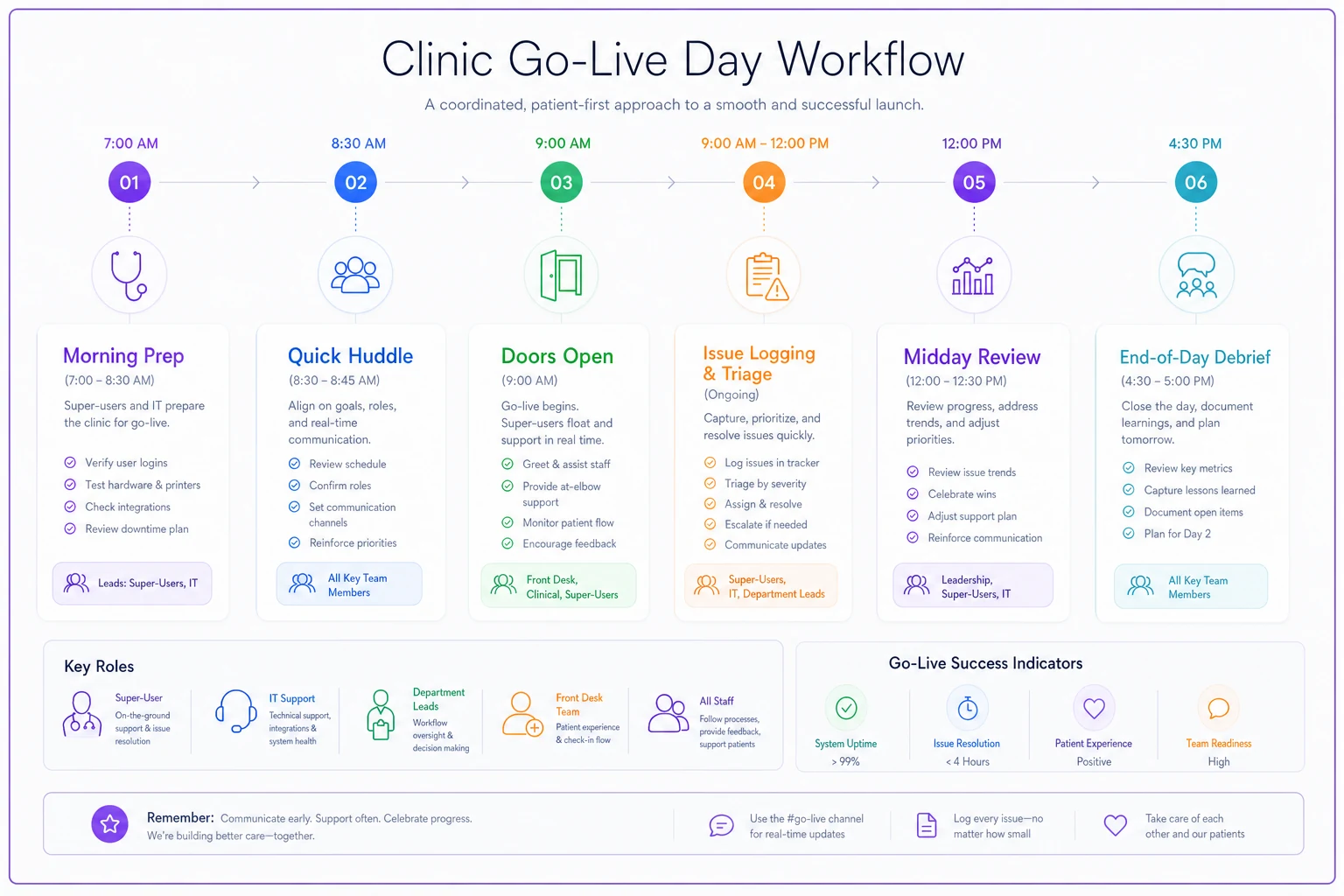
Share this with the team so everyone understands the sequence and handoffs on go-live day.
Days 61–90: Optimization and Making It Stick
By day 60, the system works. The job in month three is making sure staff actually use it the way it was designed — not a patchwork of shortcuts and old habits smuggled back in.
KPIs to watch in the first 90 days
| KPI | What it tells you | Watch for |
|---|---|---|
| Claim rejection rate | Billing setup accuracy | Spike vs. pre-go-live baseline |
| Days in A/R | Revenue cycle health | Creeping upward past week 4 |
| Check-in / scheduling time | Front-desk fluency | Not improving after week 3 |
| Encounter close rate (same-day) | Provider adoption | Open encounters piling up |
| Support tickets per day | Overall adoption curve | Should trend down, not plateau |
| Appointment no-show / error rate | Scheduling accuracy | Jumps from migration gaps |
Compare everything to a pre-go-live baseline. Without it, you can't tell "normal learning curve" from "something's broken." Capture those baseline numbers before you cut over — a step teams almost always forget until it's too late.
Reinforcement and retraining triggers
Adoption decays if you leave it alone. Define, in advance, the signals that should trigger a retraining intervention:
-
A specific KPI stays worse than baseline more than three weeks post-go-live.
-
One role's support tickets stay stubbornly high while others drop — that's a targeted training gap, not a system problem.
-
Staff reverting to manual workarounds (sticky notes, side spreadsheets, "I just call the patient instead").
-
A recurring error cluster in a specific workflow — same mistake, multiple people.
When a trigger fires, retrain narrowly. A 20-minute targeted refresher for the three front-desk staff struggling with eligibility beats a mandatory all-hands session nobody actually needs.
Closing the loop with feedback
Run a structured check-in at day 30 and day 90 post-go-live. Ask staff directly: what's still slower than the old way, what workaround have you invented, what would you fix. The workarounds people confess are a map of where your configuration or training fell short — and the fastest path to optimizations that make the system genuinely better than what you replaced.
When those gaps surface, they're worth acting on quickly. A tweak to a scheduling template or a fix to a claim format that takes an hour to resolve might be costing your team 15 minutes per patient every day.
A realistic scenario
A three-provider family medicine practice — around 340–360 visits a week — switched systems after years on an aging platform. Their first attempt stalled: they'd planned a single weekend migration, a one-day all-staff training, then went live on a Monday at full schedule.
By Wednesday of week one, the front desk was double-checking every appointment against printed copies of the old schedule, billing had a backlog of rejected claims from a fee-schedule mismatch nobody validated, and days in A/R had quietly climbed.
They reset. Second time around, they named a project lead and super-users, ran a two-week sandbox validation, trained by role, and went live on a Wednesday at roughly 65% volume with the old system in read-only. The difference wasn't the software — same product both times. It was the sequencing. Claim rejections that spiked badly in attempt one stayed close to their old baseline in attempt two, and front-desk check-in times were back to normal inside three weeks instead of dragging for two months.
The lesson practices keep relearning: the system you bought and the implementation you run are two separate projects. The second one is where the outcome is actually decided.
When a 90-day timeline is the wrong call
This roadmap assumes a reasonably stable clinic with the bandwidth to run a disciplined rollout. A few situations where you should adjust or wait:
-
You're mid-crisis. Short-staffed, in the middle of a billing emergency, or about to open a new location — stacking a system migration on top is asking for failure. Stabilize first.
-
Your data is a disaster. If the source records are deeply unreliable, your pre-go-live phase might need 45–60 days, not 30. Don't migrate garbage on a deadline.
-
Peak season. Going live during your busiest clinical weeks removes the slack you need to absorb the learning curve.
There's no prize for rushing. A delayed go-live date is a minor inconvenience. A botched one costs weeks of revenue and months of staff trust.
Bringing it together
A successful medical practice management system implementation isn't a technical achievement — it's an operational one. The clinics that land it well do the unglamorous things: they name a real owner, they validate migrated data like skeptics, they train people only on what they'll actually touch, they plan for the day the system misbehaves, and they measure against a baseline so they know whether they're learning or drowning.
Keep the scope of each phase honest. Month one is for getting ready — resist the urge to compress it. Month two is for surviving the cutover without leaking revenue. Month three is for making the new way the only way, before old habits creep back.
Adoption is what this ultimately rides on, not installation. For the deeper strategy on how adoption actually takes hold — the reinforcement loops that keep a new system from quietly dying after week six — pair this with our clinic change-management roadmap. The software is the easy part. Getting your team to trust it is the work.
Ready to transform your practice workflow?
Join 2,000+ healthcare providers using GoCliny to increase efficiency, improve patient satisfaction, and grow revenue.