

Most clinics don't fail at implementation because they picked the wrong system. They fail in the 90 days after the ink dries — when the vendor's implementation rep is juggling six other accounts, the billing team is still running the old system "just in case," and nobody has clearly owned the thing since the kickoff call.
This is a rollout plan, not a theory piece. If you want the deeper reasoning behind why adoption stalls and how reinforcement loops work, that's covered separately in the clinic change-management system with 30/60/90 adoption roadmaps. What follows here is the concrete sequencing — what to do in days 1–30, 31–60, and 61–90, who owns each piece, and the specific checklists that keep a go-live from turning into a three-month revenue dip.
Assuming you've already finished selection. The vendor is chosen, the contract is signed. The question now is purely operational: how do you move a live clinic onto a new medical practice management system without dropping claims, double-booking patients, or burning out your front desk?
First, the handoff you should already have in hand
Before day 1 of the rollout clock, there's a cleaner line than most clinics draw between "selection" and "implementation." The selection process should have produced a specific set of artifacts. If your vendor or internal selection lead didn't hand these over, go get them before you start — you'll waste the first two weeks chasing them otherwise.
The pre-launch handoff checklist (selection outputs only):
-
Signed statement of work with named implementation contact and their escalation path
-
Configuration workbook — the vendor's template for fee schedules, provider setups, appointment types, and location rules
-
Data migration scope document stating exactly which tables/objects migrate and which don't
-
Integration list with confirmed statuses (clearinghouse, labs, e-prescribing, patient payment processor)
-
Sandbox/test environment access for at least three internal staff
-
Go-live date options with the vendor's blackout periods already marked
-
Training credits or hours included in the contract, itemized
The common miss here isn't dramatic. It's that nobody confirms which data actually migrates. A clinic assumes historical insurance eligibility notes come over. They don't. Six weeks later the front desk is re-verifying every returning patient because the notes field was out of scope. That's a handoff failure, not a software failure.
Days 1–30: Build the backbone, don't touch patients yet
The first 30 days are entirely internal. No patient-facing changes. The temptation is to rush toward go-live because the old system contract is expiring, but the clinics that compress this phase are the ones spending days 60–90 cleaning up garbage data.
Eliminate appointment gaps and no-shows.
GoCliny streamlines every patient interaction from booking to billing—seamlessly.
- Unified appointment scheduling
- Automated patient reminders
- Staff calendar & task management
No credit card required
Assign real owners before anything else
| Role | Owns | Realistic time commitment |
|---|---|---|
| Implementation lead (usually practice manager) | Timeline, vendor relationship, go/no-go decision | 10–15 hrs/week |
| Billing/RCM lead | Fee schedules, payer setup, claims testing | 8–12 hrs/week |
| Front-desk lead | Scheduling templates, check-in flow, patient comms | 6–10 hrs/week |
| Clinical/provider champion | Encounter workflows, documentation, order sets | 3–5 hrs/week |
| Data owner | Migration validation, reconciliation | 6–10 hrs/week (front-loaded) |
The role that gets skipped most often is the clinical champion. Managers assume providers will "figure out the clinical side later." Then go-live happens and three physicians refuse to use the new encounter workflow because nobody asked them how they actually chart. Pick one provider who's reasonably respected and slightly tech-tolerant. One is enough.
The data-migration checklist (where most of the pain lives)
-
Inventory source data. Patients, appointments (future-dated), insurance plans, outstanding balances, recurring appointments, provider schedules, document attachments.
-
Decide the historical cutoff. Most clinics migrate active patients plus anyone seen in the last 24–36 months, and leave deep history in the old system as read-only. Migrating ten years of inactive charts just slows everything and inflates cost.
-
Dedupe before migration, not after. A clinic with roughly 14,000 patient records can easily carry 800–1,200 duplicates. Cleaning those on the new system is miserable. Clean the export file.
-
Map every field. Insurance plan names rarely match one-to-one. "BCBS PPO" in the old system might need to become a specific payer ID plus plan in the new one. This mapping is tedious and unglamorous and it's exactly where claims break later.
-
Run a test migration into sandbox. Not the whole dataset — a representative slice of a few hundred records.
-
Reconcile the test slice. Count patients in vs. out. Check that outstanding balances total matches to the dollar. Spot-check 20–30 records manually against the source.
-
Document what did NOT migrate and build a manual workaround for each gap.
The reconciliation step is the one people skip under deadline pressure. Don't. A migration that quietly drops 3% of outstanding A/R is a five-figure problem you won't notice until a patient calls asking why they got a statement for a balance they already paid.
Dedupe before migration, not after.
Configure, then test in sandbox
By the end of day 30 you want the system configured and tested in a sandbox, not live. Fee schedules loaded. A handful of test claims run through to the clearinghouse and back. Appointment templates built for each provider's real schedule, including their actual buffer and lunch patterns — not the idealized version.
Run at least ten test claims end to end before you trust the billing setup. Pick your most common CPT codes and your three highest-volume payers. If those clear cleanly in sandbox, you've de-risked the scariest part of go-live.
Days 31–60: Train in waves, mirror the real clinic
Phase two is training and parallel testing. The mistake here is the all-staff, one-afternoon, vendor-led webinar. People nod, forget everything, and then learn the system in a panic on go-live day while real patients stand at the desk.
Phased training schedule
-
Week 5 Front-desk team — scheduling, check-in, eligibility, patient collections. This group touches the system most, so train them first and deepest.
-
Week 6 Billing/RCM team — charge entry, claim submission, payment posting, denial workflows, reporting.
-
Week 7 Clinical staff and providers — encounter documentation, orders, results, messaging. Keep this focused; providers tune out fast if you train them on billing screens they'll never use.
-
Week 8 Cross-training and dry run. Everyone practices their role in a simulated clinic day using sandbox data.
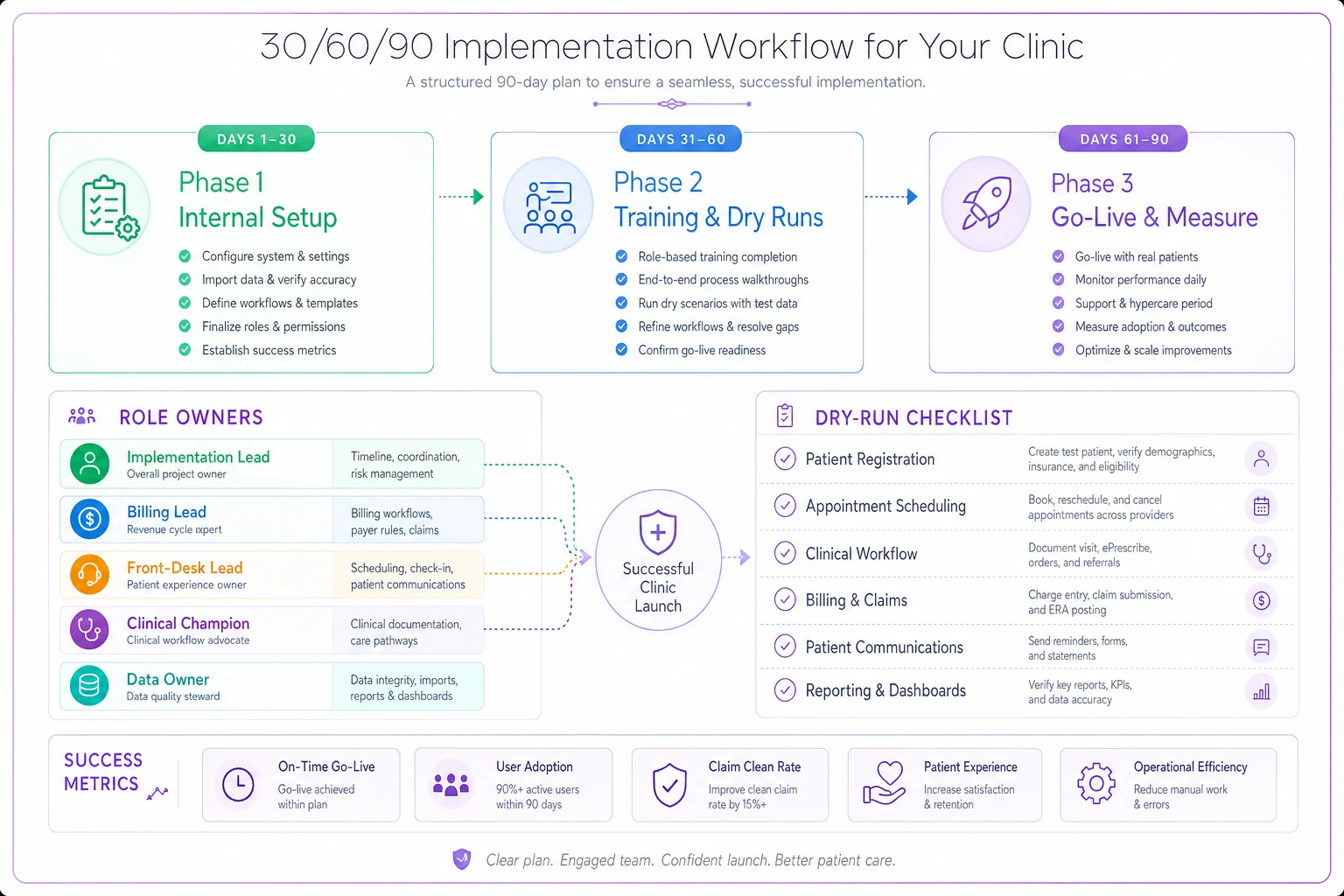
This visual maps the phased rollout and key role responsibilities.
The dry run is non-negotiable
Pick a normal-looking Tuesday's worth of appointments — say 40–50 encounters — and run them through sandbox as if they were real. Schedule them, check them in, document, charge, submit. Time it. You'll find the friction points: the check-in flow takes 90 seconds longer per patient, the billing team can't find the modifier field, the provider's favorite order set doesn't exist yet.
Finding these in a dry run costs you an afternoon. Finding them on go-live day with a full waiting room costs you patient trust and a day of overtime.
Decide your go-live style
| Approach | How it works | Best for |
|---|---|---|
| Big bang | Old system off, new system on, same day | Smaller single-site clinics; simpler to coordinate |
| Phased/parallel | New system for new scheduling first, billing cuts over a few weeks later | Larger or multi-site clinics; lower blast radius |
Parallel sounds safer, and sometimes it is, but running two systems at once doubles the work for weeks and staff quietly default to the old one. If you go parallel, set a hard date to kill the old system. Open-ended parallel running is how clinics end up paying for two platforms eight months later.
Days 61–90: Go live, then measure adoption like you mean it
Go-live happens early in this phase — ideally around day 60–65, on a lighter clinic day. The last 30 days are about stabilization and, critically, measuring whether people actually adopted the thing versus quietly routing around it.
The go-live week survival plan
-
Lighten the schedule by 20–30% for the first two to three days. Fewer patients, more breathing room.
-
Put the vendor's support contact on standby with a direct line, not a ticket queue.
-
Station your role leads on the floor, not in the back office. The front-desk lead stands at the front desk.
-
Hold a 15-minute end-of-day huddle every day for the first week
what broke, what's slow, what's the one fix for tomorrow.
KPIs and dashboards that tell you if adoption is real
-
Clean claim rate — target getting back to pre-migration baseline within 3–4 weeks. A dip is normal; a dip that doesn't recover means your payer or coding setup is wrong.
-
Days in A/R — watch for creep. A 5–10 day increase right after go-live is expected; 20+ days means claims are stuck.
-
Check-in time per patient — proxy for front-desk fluency. Should trend back toward baseline by week 3.
-
Appointments scheduled in-system vs. side channels — if staff are still using a paper book or spreadsheet "to be safe," adoption hasn't happened.
-
Documentation completion rate — are encounters being closed same-day, or piling up?
-
Support ticket volume by category — tells you exactly where retraining is needed.
Build a simple weekly dashboard with these six. A shared sheet the implementation lead updates every Friday is plenty. The point is to catch shadow workflows early, because the longer a workaround lives, the more permanent it becomes.
A real scenario
A three-provider primary care clinic switching systems at around 330–360 patient visits a week did the data cleanup properly but skipped the full dry run to save time. Go-live week, check-in time jumped from roughly 2 minutes to nearly 5 per patient, and the waiting room backed up by mid-morning on day one. Claims also stalled — days in A/R climbed about 18 days over the first three weeks because two of their top payers had been mapped to the wrong plan IDs, something a dry run with test claims would have caught. They recovered, but it took close to six weeks and a chunk of overtime. The slowdown cost them somewhere in the low five figures in delayed collections, plus a handful of patients who complained about wait times. The fix wasn't more software. It was the dry run they skipped.
Common failure modes and how to head them off
A few patterns show up again and again in clinic rollouts:
-
No single owner. "The team" owns it, which means nobody does. Fix: name the implementation lead in writing, with authority to make the go/no-go call.
-
Silent data loss on migration. A/R or future appointments drop and nobody reconciles. Fix: the dollar-level reconciliation in days 1–30.
-
Training too early or too shallow. People forget by go-live. Fix: phased training in weeks 5–8, ending with a dry run.
-
Shadow systems. Staff keep the old spreadsheet "just in case." Fix: track in-system vs. side-channel scheduling and address it directly in week-one huddles.
-
Open-ended parallel running. Two systems, indefinitely. Fix: set a hard kill date for the old system.
-
Vendor disappears after go-live. The implementation rep rolls off. Fix: confirm post-go-live support terms in the SOW before signing.
When to slow down — and when a rollout is set up to fail
This 90-day pace assumes a reasonably stable clinic. If you're in the middle of a provider departure, a billing staff turnover, or your busiest season, push the go-live. A rushed rollout during a rough patch doesn't save time; it just moves the pain into the part of the year you can least afford it.
A rollout is genuinely set up to fail when there's no internal owner with time carved out, when the vendor's only support channel is a ticket queue, or when leadership treats the switch as an IT project rather than an operational one. The software is the easy part. The 90 days around it are the work.
Get the owners named, the data reconciled to the dollar, the training phased, and the dry run done. Do those four things and go-live becomes a quiet Tuesday instead of a crisis — which is exactly what a medical practice management system implementation plan is supposed to buy you.
Ready to transform your practice workflow?
Join 2,000+ healthcare providers using GoCliny to increase efficiency, improve patient satisfaction, and grow revenue.