


Most clinics don't pick a bad practice management system because they're careless. They pick one because the evaluation gets hijacked—usually by whoever ran the most polished demo, or by a feature nobody ends up using. Six months later the scheduling grid is clunky, claims are kicking back, and the front desk has built a parallel spreadsheet to track the things the software can't.
This guide is built to prevent that. Not with hype about what modern software "can" do, but with the specific questions, cost math, and evaluation steps that separate a system you'll be happy with in year three from one you'll quietly resent by month four.
A quick note on scope: a medical practice management system handles the operational and financial side of a clinic—scheduling, registration, insurance eligibility, charge entry, claims, patient statements, and reporting. It's distinct from your EHR/EMR, which handles clinical documentation, though many vendors now bundle both. Keep that distinction sharp during evaluation, because a lot of buying mistakes come from assuming one product does the other's job well.
Deployment models: the decision that quietly shapes everything else
Before you look at a single feature, decide how you want the thing hosted. This narrows your vendor list faster than anything else.
| Model | Who it fits | What you trade away |
|---|---|---|
| Cloud / SaaS | Most small-to-mid clinics; multi-site groups | Less control over update timing; ongoing subscription cost |
| On-premise | Practices with strict internal IT policies or spotty internet | You own patching, backups, uptime, and the server |
| Vendor-hosted (private) | Larger groups wanting cloud convenience with more isolation | Higher cost; still dependent on vendor's infrastructure |
In practice, the vast majority of clinics under roughly 15 providers end up on cloud SaaS, and for good reason—nobody on a four-person front desk wants to be responsible for a database server. The exception worth taking seriously is connectivity. If your clinic sits somewhere with genuinely unreliable internet, a pure cloud PMS turns every outage into a day you can't schedule or check patients in. That's a real operational risk, not a theoretical one, and it should push you toward vendors with a solid offline mode or toward a hybrid setup.
One mistake worth flagging early: teams fixate on the deployment debate for weeks, then rush the feature evaluation. Deployment matters, but it's a filter, not the decision. Pick your model, cut the vendors that don't fit it, and move on.
The feature checklist, prioritized the way clinics actually feel pain
Every vendor checklist looks identical on paper. The trick is weighting. Here's how the categories rank once you account for which ones cause daily friction versus which ones you set up once and forget.
Eliminate appointment gaps and no-shows.
GoCliny streamlines every patient interaction from booking to billing—seamlessly.
- Unified appointment scheduling
- Automated patient reminders
- Staff calendar & task management
No credit card required
Tier 1 — you'll touch these every hour:
-
Scheduling. Multi-provider views, multi-location, resource/room booking, recurring appointments, blocked time, and—critically—how fast the front desk can rebook or move an appointment. Ask to watch someone reschedule a patient across two providers. If it takes more than a few clicks, your staff will hate it by week two.
-
Patient registration & eligibility. Real-time insurance eligibility checks baked into the workflow, not a separate portal someone has to remember to open.
-
Charge entry & billing. How charges flow from an encounter to a claim. Where do CPT/ICD codes come from, and can staff catch errors before submission?
-
Claims management. Scrubbing, clearinghouse submission, rejection handling, and the denial queue. This is where revenue lives or dies.
Tier 2 — important, but configured less often:
-
Patient communication. Appointment reminders (text/email/voice), two-way messaging, confirmations, and recall/recare. Look at whether reminders write back automatically when a patient confirms or cancels.
-
Patient statements & online payments. Can patients pay online? Are statements clear enough to reduce "what is this charge?" calls?
-
Reporting & analytics. A/R aging, collection rates, denial reasons, provider productivity, no-show rates. The question isn't "does it have reports"—every system does. It's "can a non-technical manager build a report without calling support?"
Tier 3 — nice, but don't let them drive the decision:
-
Patient portal features beyond basics
-
Marketing/campaign tools
-
Inventory or specialty-specific add-ons you might use someday
The buying mistake here is predictable: clinics get seduced by a slick Tier 3 feature in the demo and underweight the Tier 1 workflows they'll grind through all day. A beautiful patient marketing dashboard means nothing if rescheduling a patient takes eight clicks.
A quick word on where automation genuinely earns its keep
You don't need to chase every "AI" label on a vendor's slide deck. But a few workflow automations inside operational software do reliably reduce manual load—and they're worth asking about specifically:
-
Eligibility checks that run automatically the night before, so the front desk isn't verifying coverage at the window.
-
Reminder sequences that update the schedule on their own when a patient confirms, cancels, or no-shows.
-
Claim scrubbing that flags likely rejections before submission instead of after a payer bounces them back.
These aren't flashy. They quietly remove repetitive work and cut down on the small mistakes that pile up—wrong eligibility, missed confirmations, avoidable rejections. When a vendor demos these, ask them to show the failure path: what happens when the automation gets it wrong, and how does a human catch it?
Integration and compliance: where deals should live or die
This is the section most buyers skim and later regret.
EHR/EMR integration. If you're keeping a separate clinical system, the PMS has to talk to it cleanly—demographics, appointments, charges, and documentation status flowing both directions. "We integrate with that" is not an answer. Make the vendor name the integration method (HL7, FHIR API, a certified bidirectional interface, or a flat-file dump), tell you which direction data flows, and confirm whether it's real-time or batch. A batch sync that runs once overnight will surprise you in all the wrong ways.
Clearinghouse connectivity. Confirm which clearinghouses they support, whether the connection is included or costs extra, and how claim status updates come back. Some vendors nickel-and-dime you per transaction here.
HIPAA and security basics. Non-negotiables to confirm in writing:
-
A signed Business Associate Agreement (BAA)
-
Encryption at rest and in transit
-
Role-based access controls and audit logging
-
Documented breach notification process
-
Where data is hosted and backed up, and how restores are tested
Ask specifically: "When was your last third-party security assessment, and can we see a summary?" A confident vendor has an answer ready. A vague one tells you something.
The cost model nobody shows you upfront
Sticker price is the smallest part of the total. The real number includes everything below, and the items vendors tend to bury are exactly the ones that inflate year one.
-
Subscription or license fee — usually per-provider or per-user, monthly.
-
Implementation & setup — often a one-time charge that ranges widely.
-
Data migration — moving patient records, balances, and schedules from your old system. This is frequently underpriced in the quote and painful in reality.
-
Training — included hours vs. paid add-on hours.
-
Clearinghouse / transaction fees — per claim or per statement.
-
Integration fees — EHR interfaces sometimes carry setup and monthly costs.
-
Support tiers — basic support free, "priority" support extra.
-
Payment processing — if patient payments run through their system, check the per-transaction rate.
On the ROI side, don't try to model everything. Focus on the few inputs that actually move:
-
Staff hours saved on eligibility, reminders, and claim rework
-
Clean claim rate improvement (fewer resubmissions)
-
No-show reduction from better reminders
-
Days in A/R shrinking because claims go out faster and cleaner
A realistic framing: if a three-provider clinic cuts claim rework by even a few hours a week and trims no-shows modestly, the recovered revenue and time usually dwarf the monthly software fee. You don't need a spreadsheet with twelve tabs—three or four honest inputs will tell you whether the math works.
Vendor evaluation scorecard
Score each shortlisted vendor 1–5 on the categories below, then weight the Tier 1 items heavier so a strong demo on peripheral features can't inflate a weak core product.
| Category | Weight | What you're really scoring |
|---|---|---|
| Scheduling usability | High | Speed of real daily tasks, not feature count |
| Billing & claims workflow | High | Scrubbing, denials, resubmission ease |
| EHR/EMR integration | High | Method, direction, real-time vs. batch |
| Reporting flexibility | Medium | Can a manager self-serve? |
| Patient communication | Medium | Reminder write-back, two-way messaging |
| Implementation & data migration | High | Timeline realism, who does the work |
| Support quality | Medium | Response times, named contact, hours |
| Total cost (all-in) | High | Everything in the list above |
| Security & compliance | High | BAA, audits, access controls |
Clinics that build a weighted scorecard before the demos stay objective. Clinics that score from memory afterward almost always pick the vendor with the best presenter.
Sample RFP questions that get real answers
-
Walk us through moving an appointment between two providers on different days. (Make them do it live.)
-
What's your clean claim rate across your client base, and how do you measure it?
-
Exactly how does data migration work, who performs it, and what historical data comes over?
-
Which clearinghouses do you support, and what are the per-transaction costs?
-
Describe your EHR integration method and whether it's real-time or batch.
-
What does implementation look like week by week, and who's assigned to us?
-
When something breaks during business hours, what's the actual process and response time?
-
Can we talk to two current clients of similar size and specialty?
That last one matters more than the rest combined. References of a similar size and specialty will tell you in ten minutes what a dozen demos won't.
Implementation timeline and the pitfalls that derail it
For a small-to-mid clinic, a realistic implementation runs somewhere in the range of 8 to 16 weeks, depending on data migration complexity and how many integrations you're standing up. Specialty practices with heavy EHR coupling sit at the longer end.
A rough sequence:
-
Weeks 1–2 Kickoff, workflow mapping, decisions on configuration.
-
Weeks 3–6 Data migration prep and first test migration. Build schedule templates, fee schedules, user roles.
-
Weeks 6–10 Integration setup (EHR, clearinghouse), test claims, staff training rounds.
-
Weeks 10–14 Parallel run or pilot, final data migration, go-live prep.
-
Go-live + 2 weeks Hypercare—vendor on standby, daily issue triage.
The pitfalls that reliably cause pain:
-
Dirty data in, dirty data out. Migrating a messy patient database without cleanup just moves the mess. Budget time to scrub duplicates and stale balances first.
-
Training the whole team once, right before go-live. People forget it. Train in rounds, close to when they'll actually use each function.
-
No parallel run. Switching cold and hoping is how clinics lose a week of clean billing.
-
Underestimating the first billing cycle. The first few weeks of claims post-switch will surface edge cases. Plan for extra hands, not fewer.
-
No internal owner. Someone on your side has to own this. If "everyone" owns it, nobody does.
Pro tip: Schedule training in role-specific rounds rather than a single all-hands session to improve retention and immediate usability.
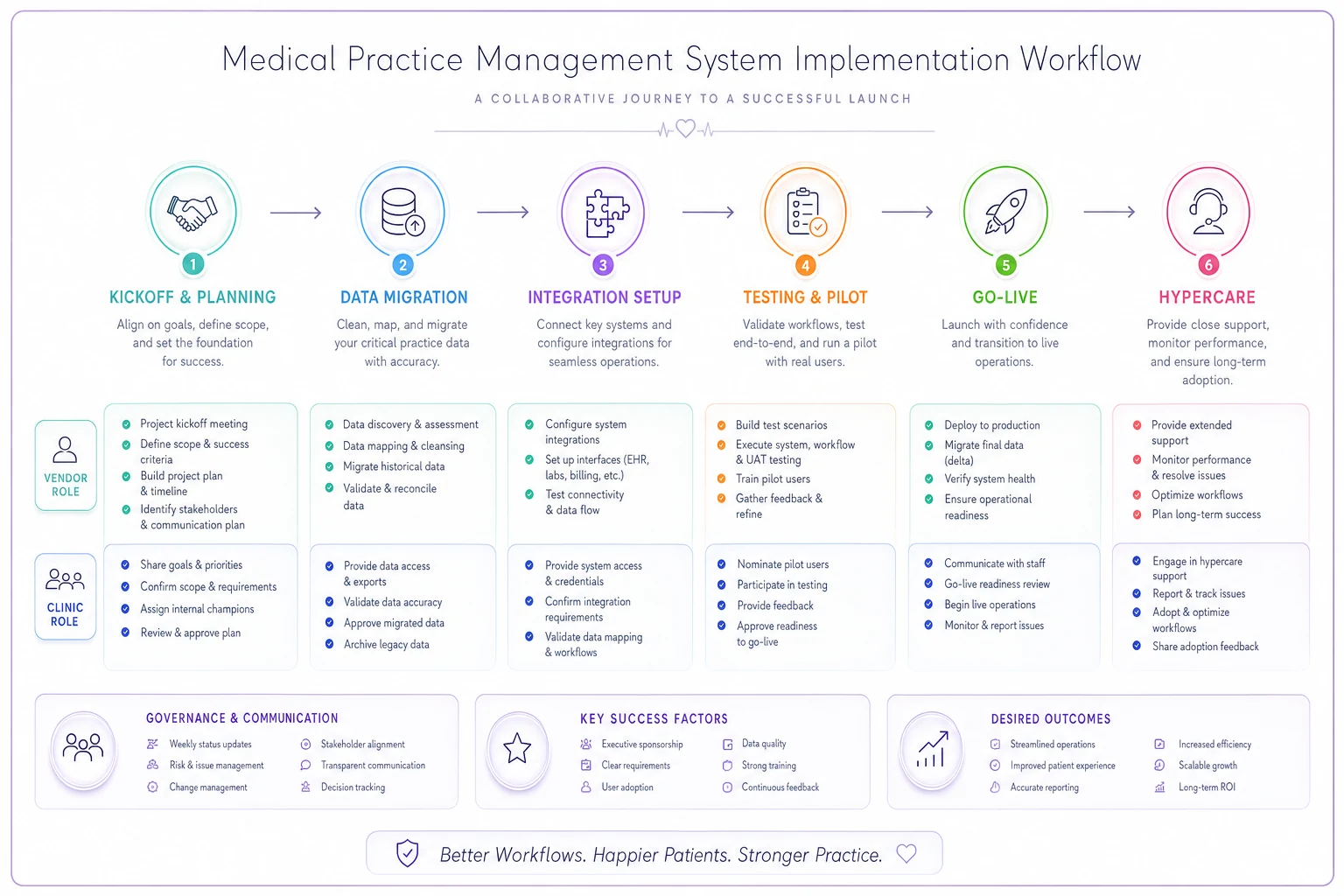
The diagram shows the sequence and who owns each phase; it's useful to share during vendor kickoff.
When a new PMS actually makes sense — and when it doesn't
It makes sense when: your current system is actively costing you money (high denial rates, slow A/R, staff workarounds everywhere), your vendor is sunsetting the product, or you're outgrowing single-location limits.
It's a bad idea when: the real problem is a broken process, not the software. Swapping systems won't fix a front desk that doesn't verify eligibility or a billing workflow with no denial follow-up. You'll just pay to rebuild the same chaos in a new interface.
Who should hold off entirely: a clinic in the middle of a leadership transition, a major payer renegotiation, or a staffing crisis. A PMS migration demands focus and a stable team. Starting one during turmoil is how good projects quietly fail.
A short real-world scenario
A two-location primary care group—five providers—was running an older PMS with a bolt-on reminder tool that didn't sync back to the schedule. Front desk staff re-keyed confirmations by hand, and roughly one in six appointments showed up as a no-show or last-minute cancel the system never flagged in time.
They switched to a cloud PMS with integrated eligibility and reminder write-back. Nothing dramatic happened overnight. But over the first couple of months, no-shows drifted down into a far more manageable range, the front desk stopped re-keying confirmations, and clean claim rate ticked up because eligibility was caught before the visit instead of after a denial. The monthly software cost was a fraction of the recovered revenue and reclaimed hours. The gains came from removing repetitive manual steps, not from any single headline feature.
The part people skip: adoption
Picking the right system is maybe half the job. The other half is getting your team to actually use it the way it was designed—which is where a lot of otherwise-good purchases quietly underperform. New software fails more often from weak rollout than from bad features.
If you want the migration to stick, pair this buyer's process with a real adoption plan. Our guide on building a clinic change-management system with 30/60/90 adoption roadmaps and reinforcement loops covers exactly how to structure the first three months so the investment doesn't erode once the vendor's hypercare window closes.
Choose deliberately, score honestly, migrate clean, and plan the adoption before you go live. Do those four things and the system you pick will still feel like the right call two years from now—which is the only review that actually counts.
Ready to transform your practice workflow?
Join 2,000+ healthcare providers using GoCliny to increase efficiency, improve patient satisfaction, and grow revenue.