

Your front desk staff makes around 40 clinical judgment calls every day without realizing it. "My chest feels weird" on line three. "I need my prescription refilled but also my vision's blurry" in the waiting room. "Is this rash an emergency?" through the patient portal at 4:47 PM.
Each interaction carries two risks: legal liability if something urgent gets missed, and provider burnout if everything becomes "urgent." Most clinics handle this with vague instructions like "use your best judgment" or "when in doubt, ask the nurse." That's how you end up with your MA getting pulled into triage conversations every 20 minutes while trying to room patients.
Non-clinical staff can handle 85% of triage decisions safely when you give them an actual decision framework instead of hoping they figure it out. The practices that get it right use decision trees, not judgment calls.
Why front desk triage fails without structure
Take a typical Monday morning. Your receptionist Jennifer gets this call: "I've had a headache for three days and my insurance expires tomorrow, can I come in today?"
Without a front desk triage SOP clinic framework, Jennifer has three choices. She can squeeze the patient into an already packed schedule (provider gets frustrated). She can say no availability exists (potential liability if symptoms worsens). Or she can interrupt clinical staff to ask (workflow disruption).
Now multiply that scenario by 15-20 ambiguous requests daily. Your front desk becomes a bottleneck, providers get interrupted constantly, and genuinely urgent cases might slip through because everything seems equally important.
The breakdown happens because non-clinical staff lack two things: clear criteria for what constitutes different urgency levels, and specific language for gathering necessary information without practicing medicine.
Building your triage decision tree
Start with three urgency categories, not five or seven. Too many levels create confusion and slow down decisions.
Eliminate appointment gaps and no-shows.
GoCliny streamlines every patient interaction from booking to billing—seamlessly.
- Unified appointment scheduling
- Automated patient reminders
- Staff calendar & task management
No credit card required
Emergency (Same Day Required) These are your non-negotiables. Chest pain, difficulty breathing, sudden vision changes, severe allergic reactions, uncontrolled bleeding, signs of stroke. Your front desk needs zero flexibility here - these get immediate provider notification or 911 direction.
Urgent (24-48 Hour Window) This category prevents most unnecessary same-day squeezes. Worsening infections, medication reactions without severe symptoms, injuries with moderate pain but stable vitals, mental health concerns without immediate danger. These patients need care soon but not immediately.
Routine (Standard Scheduling) Chronic condition management, prescription refills with adequate supply, mild symptoms lasting over a week, preventive care, follow-ups. These follow normal booking protocols.
Here's a simple visual of the decision tree workflow.
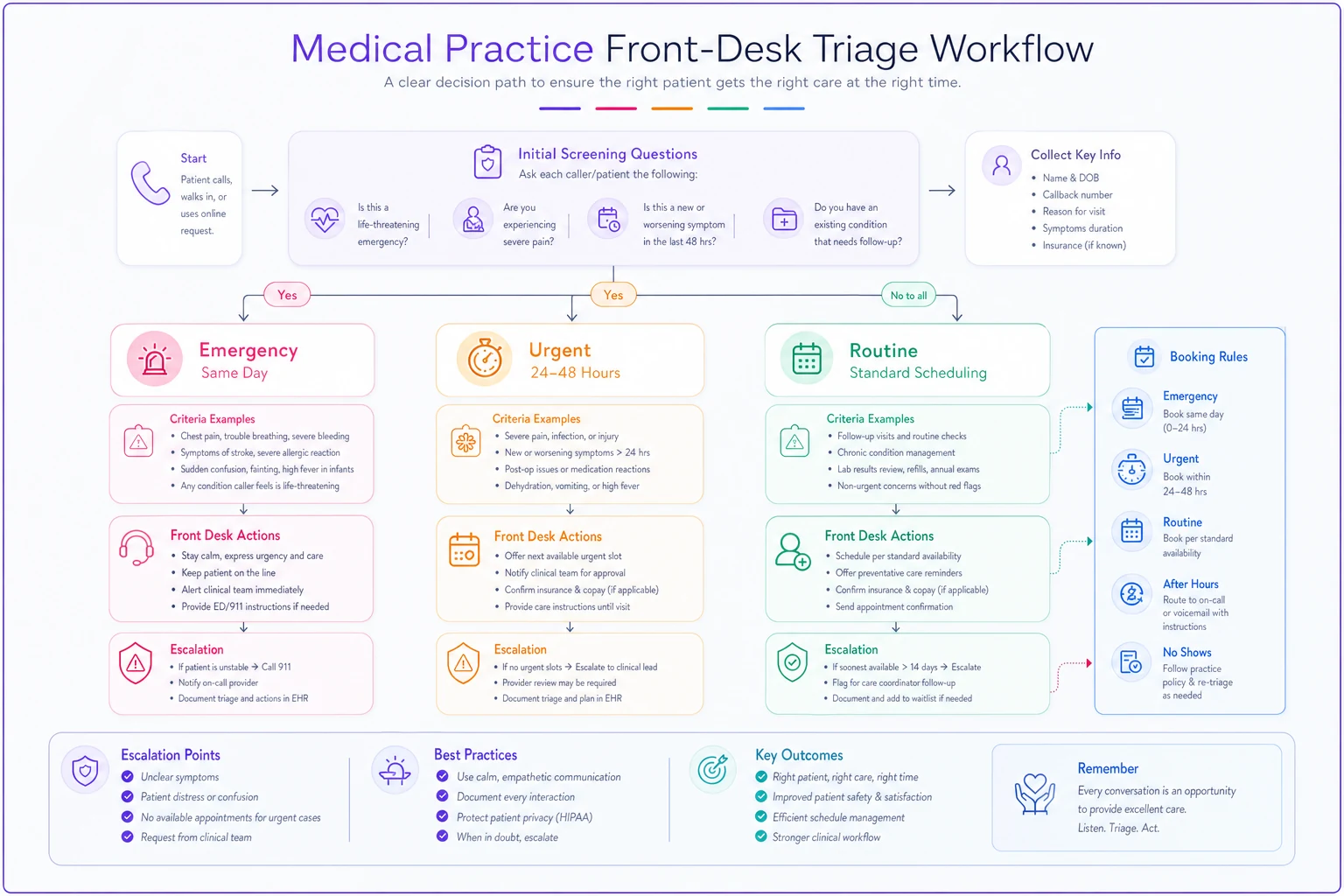
The magic happens when you add specific red-flag questions for each symptom category. Not medical diagnosis - just information gathering that routes appropriately.
Red-flag examples that actually work
Headache calls demonstrate this perfectly. Your front desk asks three screening questions:
"Is this the worst headache you've ever had?" (Yes = Emergency) "Did it start suddenly like a thunderclap?" (Yes = Emergency) "Any fever, stiff neck, or confusion?" (Yes = Emergency)
No to all three? Move to secondary screening: "How many days has this lasted?" (Over 14 = Urgent) "Any recent head injury?" (Yes = Urgent) "Are you out of medication that usually helps?" (Yes = Urgent if no refills)
Still no flags? Routine scheduling applies.
This framework works because it removes interpretation. Staff don't decide if a headache is "bad enough" - they follow specific pathways based on objective answers.
For abdominal pain: Emergency flags: Severe pain with fever, bloody vomit or stool, pain after injury Urgent flags: Pain over 48 hours, unable to keep fluids down, recent surgery Routine: Mild discomfort, chronic issues, constipation concerns
For skin issues: Emergency: Spreading redness with fever, blistering over large area, facial/throat swelling Urgent: New rash with medication, infected wound, severe itching affecting sleep Routine: Acne, mild rashes, cosmetic concerns
Booking rules that protect everyone
Your decision tree needs corresponding booking protocols. Emergency cases don't go on the schedule - they either come immediately or get directed to emergency services. Document the interaction, notify clinical staff, and follow up within 24 hours if they chose not to come in.
Urgent appointments get specific handling. Reserve two slots daily for urgent cases, ideally late morning and mid-afternoon when providers aren't rushed. If urgent slots fill, front desk escalates to clinical staff for override decisions. Never bump routine appointments without provider approval.
Reserve two slots daily for urgent cases, ideally late morning and mid-afternoon when providers aren't rushed.
For routine scheduling within your front desk triage SOP clinic framework, capacity matters more than convenience. A patient wanting Thursday afternoon doesn't override your booking limits. Offer alternatives, document preferences, but maintain schedule integrity.
Cross-training becomes essential. Every front desk member needs to understand which providers handle which conditions. The family medicine doc might take that urgent rash, but the psychiatrist obviously won't. Build provider capability matrices into your scheduling system.
Sample escalation scripts that limit liability
The language matters as much as the process. Your staff needs exact phrases that gather information without offering medical advice.
Initial Screening: "I need to ask you a few questions to make sure we schedule you with the right urgency. This isn't medical advice - I'm just gathering information for our clinical team."
For Emergency Symptoms: "Based on what you're describing, you need immediate medical attention. I strongly recommend you go to the emergency room now, or I can call 911 for you. Would you like me to notify our provider about your situation?"
For Urgent Symptoms: "Your symptoms need attention within the next day or two. I have an urgent appointment available tomorrow at 2 PM, or Thursday at 10 AM. If your symptoms worsen before then, please go to urgent care or the emergency room immediately."
For Routine Needs: "I can schedule you for our next available routine appointment, which is next Tuesday at 3 PM. If anything changes or worsens before then, please call us back immediately and we'll reassess the urgency."
When Unsure: "Let me have our clinical staff review this to determine the best scheduling option. Can I call you back within 30 minutes with appointment options?"
Documentation Language: "Patient reported [specific symptoms]. Offered [emergency/urgent/routine] appointment based on triage protocol. Patient [accepted/declined]. Advised to seek immediate care if symptoms worsen. Clinical staff notified."
These scripts protect your practice legally while keeping interactions efficient. Staff don't interpret symptoms - they gather facts and follow protocols.
When triage protocols actually backfire
Not every practice needs complex triage systems. Single-provider practices with established patient panels often work better with provider-directed scheduling. If your doc knows all 1,200 patients personally, they might prefer making judgment calls themselves.
Specialty practices face different challenges. Dermatology triage looks nothing like internal medicine triage. A suspicious mole might be urgent for you but wouldn't trigger emergency protocols. Build frameworks specific to your specialty.
Some practices tried implementing 15-page triage manuals thinking more detail meant more safety. Instead, staff got paralyzed by options. Your entire decision tree should fit on two pages maximum. Complexity increases errors, not safety.
Weekend and after-hours triage needs different rules too. Your answering service can't follow the same protocols as trained front desk staff. Simplify to: true emergency (call 911), urgent (go to urgent care), or routine (call back Monday).
Documentation that prevents lawsuits
Every triage interaction needs documentation, but not novels. Create checkbox forms or dropdown menus in your system covering:
-
Date/time of contact
-
Symptoms reported (exact patient words, not interpretation)
-
Red-flag questions asked and answers received
-
Urgency determination and rationale
-
Appointment offered or referral given
-
Patient response and decision
-
Any clinical staff consultation
A pediatric practice in Ohio avoided a malpractice claim because their receptionist documented: "Mother reported infant crying for 6 hours. Asked about fever (yes, 103°F), feeding (refusing bottle), and alertness (seems drowsy). Followed emergency protocol, urged immediate ER visit. Mother declined, stated would 'wait and see.' Notified Dr. Chen immediately."
When the infant arrived at the ER eight hours later with meningitis, that documentation proved the practice followed appropriate protocols. The liability shifted to the parent's decision to delay care despite proper guidance.
Real implementation at a multi-provider family practice
Mountain View Family Health struggled with exactly this problem. Six providers, twelve exam rooms, and front desk staff constantly interrupting nurses for triage questions. Their previous "system" involved sticky notes and shouting down hallways.
They started by tracking a week of triage requests. 168 total calls needing assessment. Only 11 were true emergencies, 31 were urgent, and the rest were routine. Yet their front desk had escalated 89 of them to clinical staff for decisions.
The practice built a one-page decision tree covering their top 20 complaint types. Each pathway had 3-5 yes/no questions leading to clear urgency determinations. They laminated copies for each desk phone and built the same logic into their scheduling software.
Training took two hours on a Thursday evening. Role-playing with real scenarios from the previous month. Their medical assistant led the training, not administration, which gave it more credibility with front desk staff.
First month results: Clinical interruptions dropped from 89 to 22. Those 22 were genuinely ambiguous cases needing clinical judgment. More importantly, they caught three urgent situations that might have been scheduled routinely before - a DVT symptom cluster, appendicitis signs, and stroke warnings in a diabetic patient.
Their front desk manager reported the biggest change wasn't efficiency - it was confidence. "I'm not guessing anymore. I follow the tree, document my steps, and know I'm doing it right."
Technology augmentation without losing the human element
The operational burden of consistent triage can overwhelm front desk staff during peak periods. This is where AI-powered operational software starts making sense - not replacing human judgment but supporting it with consistency.
Modern platforms can pre-screen appointment requests through patient portals using the same decision trees. Patients answer red-flag questions before the phone call happens. Your front desk sees a pre-scored urgency level with the questionnaire responses, then confirms or adjusts based on conversation.
The real value comes from pattern recognition. The system notices when certain symptom combinations repeatedly lead to urgent visits and suggests protocol updates. It tracks which providers handle specific urgent conditions best and automatically routes accordingly.
But automation should enhance, not replace. Your front desk still talks to scared patients, provides reassurance, and makes nuanced decisions when edge cases arise. The technology just ensures your front desk triage SOP clinic protocols get followed consistently, documentation happens automatically, and patterns get surfaced for improvement.
Some practices integrate these decision trees directly into their phone systems. Press 1 for emergency symptoms (immediate transfer to clinical staff). Press 2 for prescription refills (routed to pharmacy line). Press 3 for appointments (front desk with triage protocols ready). This pre-sorting alone reduces triage burden by about 30%.
Maintaining triage quality over time
Your protocols need quarterly reviews minimum. Pull records of every urgent case that became an emergency within 72 hours - did your triage catch warning signs? Review every emergency that turned out routine - are your protocols too conservative?
Staff meeting scenarios keep skills sharp. Present a real case from the previous month (anonymized) and walk through the triage process together. Where did decisions diverge? Which questions yielded the most useful information?
| Metric | Target |
|---|---|
| Percentage of calls requiring clinical consultation | under 15% |
| Average time from initial contact to urgency determination | under 3 minutes |
| Number of triage-related incidents or complaints | zero |
| Provider satisfaction with appointment urgency matching clinical need |
The practices that excel at front desk triage share one characteristic: they treat it as a clinical quality issue, not an administrative task. Your front desk makes the first clinical decision in every patient encounter. Give them the tools to make it safely and efficiently.
Perfect triage doesn't exist. You're optimizing for two things: catching everything truly urgent while not overwhelming providers with false positives. Your front desk triage SOP clinic framework should lean slightly conservative - better to occasionally overreact than miss something serious.
The goal isn't turning receptionists into clinicians. It's giving non-clinical staff clear, defensible pathways for common scenarios while knowing exactly when to escalate. That balance keeps your providers focused on practicing medicine while your front desk confidently manages the initial sort.
Most practices see immediate improvement just from documenting their implicit triage logic. That senior receptionist who "just knows" when something's urgent? Get their decision process on paper. Build from their experience, add clinical validation, and suddenly your entire front desk operates at that senior level.
Your triage system becomes a competitive advantage when done right. Patients feel heard and appropriately prioritized. Providers trust the urgency determinations. Staff feel confident in their decisions. And your practice avoids both the liability of missed urgencies and the chaos of treating everything as urgent.
Perfect triage doesn't exist. You're optimizing for two things: catching everything truly urgent while not overwhelming providers with false positives. Your front desk triage SOP clinic framework should lean slightly conservative - better to occasionally overreact than miss something serious.
The goal isn't turning receptionists into clinicians. It's giving non-clinical staff clear, defensible pathways for common scenarios while knowing exactly when to escalate. That balance keeps your providers focused on practicing medicine while your front desk confidently manages the initial sort.
Most practices see immediate improvement just from documenting their implicit triage logic. That senior receptionist who "just knows" when something's urgent? Get their decision process on paper. Build from their experience, add clinical validation, and suddenly your entire front desk operates at that senior level.
Your triage system becomes a competitive advantage when done right. Patients feel heard and appropriately prioritized. Providers trust the urgency determinations. Staff feel confident in their decisions. And your practice avoids both the liability of missed urgencies and the chaos of treating everything as urgent.
Ready to transform your practice workflow?
Join 2,000+ healthcare providers using GoCliny to increase efficiency, improve patient satisfaction, and grow revenue.