

No-shows kill clinic economics faster than almost any other operational problem. You've blocked the time, staffed the shift, and turned away other patients who needed that slot. Then nothing—empty chair, wasted prep, provider sitting idle while overhead keeps running.
Most clinics throw everything at the wall: double confirmations, triple reminders, threatening cancellation fees, without actually knowing what moves the needle. Your reliable patients get bombarded with messages they don't need, and the chronic no-shows keep ghosting anyway.
Working with clinics testing different reminder systems across thousands of appointment cycles, there's a clear pattern to what actually reduces no-shows versus what just creates more admin work. The difference isn't sending more reminders. It's understanding which patients need which type of nudge, when they need it, and through what channel they'll actually respond to.
The three-bucket patient segmentation nobody talks about
Your no-show reduction playbook starts with recognizing that treating all patients the same is why most reminder systems fail. A 22-year-old coming in for their annual physical operates completely differently than a 68-year-old managing multiple chronic conditions who books recurring specialty visits.
Digital natives (typically under 40): Text confirmations work, but only if sent at specific times. Too early and they forget. Too late and they've already made other plans. Email reminders get ignored unless they contain actionable links. Phone calls feel invasive and often go unanswered. These patients will use online rescheduling tools but won't call your office.
Hybrid responders (40-65): They'll answer texts but prefer phone calls for anything complex. Email works for appointment details but not for confirmations. They want options but need human backup. This group has the highest successful reschedule rate when given easy pathways.
Traditional communicators (65+): Phone calls remain king. Texts confuse or get missed. Emails might work if they're checking regularly, but many aren't. Voicemails actually get listened to. This group needs more lead time for transportation arrangements.
The mistake clinics make? Building one reminder workflow and expecting it to work for everyone. That 3-day advance text might be perfect for your younger patients but completely miss your Medicare population who need a week's notice to arrange rides.
Running controlled tests without disrupting operations
Here's the framework that works for testing reminder strategies while keeping your clinic running:
Eliminate appointment gaps and no-shows.
GoCliny streamlines every patient interaction from booking to billing—seamlessly.
- Unified appointment scheduling
- Automated patient reminders
- Staff calendar & task management
No credit card required
Start with a baseline measurement over 30 days. Track your current no-show rate by provider, appointment type, day of week, and time slot. Don't just look at overall percentage—the patterns matter more than the average.
Pick one variable to test first. Don't change timing, channel, and message content all at once. Most clinics should start with timing since it's the easiest to implement and measure. Split similar appointment types into test groups:
-
Group A gets reminders at your current timing
-
Group B gets reminders at a modified schedule
Run this for at least 200 appointments per group before drawing conclusions. Smaller samples give you noise, not data.
Track not just no-shows but also cancellations and reschedules. Sometimes earlier reminders don't reduce no-shows—they convert them to last-minute cancellations. That's still progress if it lets you fill the slot.
Document everything in a simple tracking sheet:
-
Test dates
-
Groups tested
-
Reminder schedule for each group
-
No-show rates
-
Cancellation rates
-
Reschedule rates
-
Slots successfully refilled
After each test cycle, implement the winner as your new standard and test the next variable. This incremental approach means you're always improving without risking a complete system failure.
Here's a simple visual to keep your testing workflow clear and repeatable.
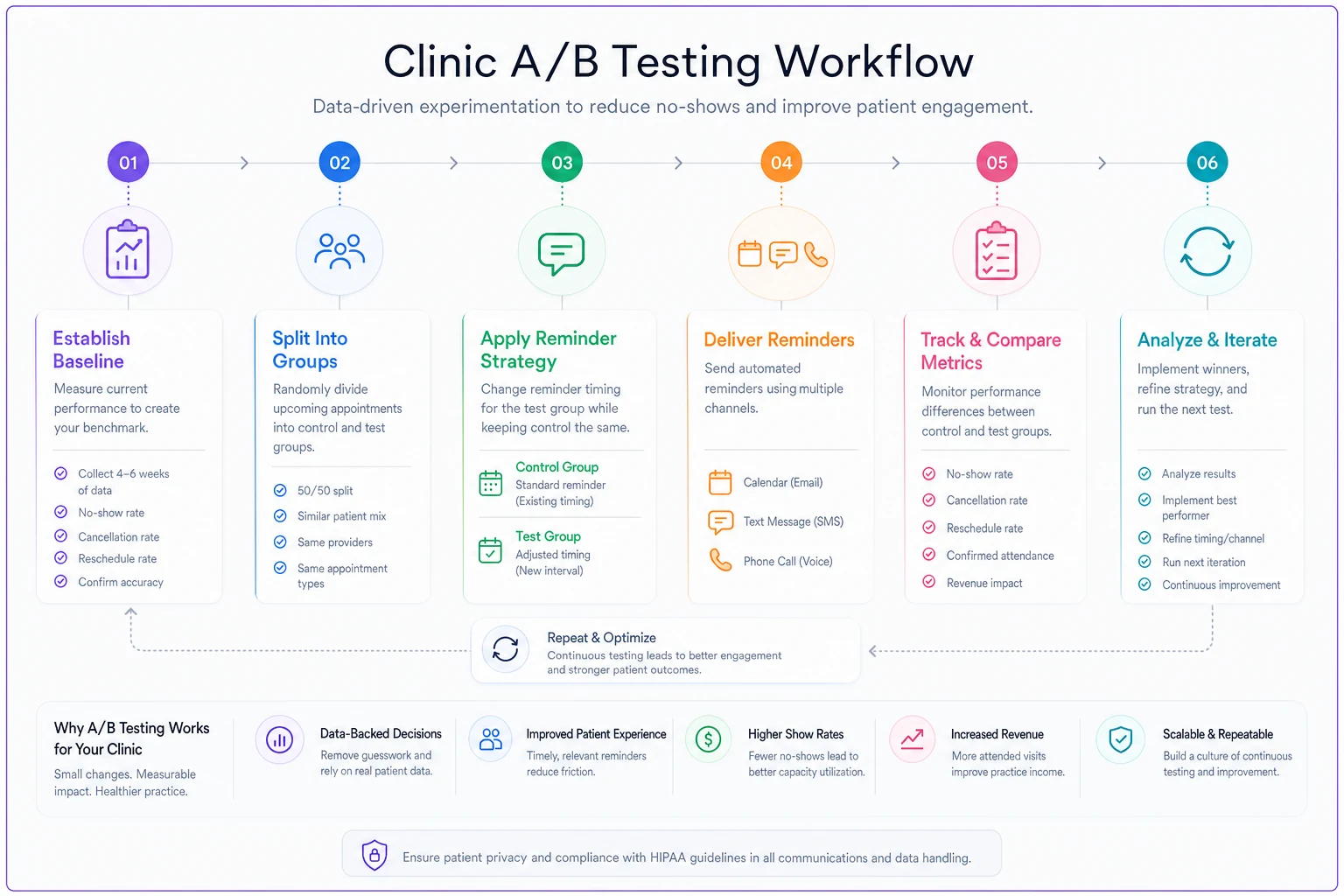
Keep the diagram where staff can reference it during setup and debriefs so tests are run consistently.
The diminishing returns of reminder frequency
More isn't better when it comes to appointment reminders. There's a sweet spot between too few (patients forget) and too many (patients tune out or get annoyed).
The data consistently shows this pattern:
| Reminder Count | No-Show Rate | Patient Complaints | Admin Time |
|---|---|---|---|
| 0 reminders | 18-25% | None | Minimal |
| 1 reminder | 12-15% | None | Low |
| 2 reminders | 8-11% | Minimal | Moderate |
| 3 reminders | 7-10% | Some | High |
| 4+ reminders | 6-9% | Significant | Very High |
Notice how the improvement flattens after two reminders? You're essentially working twice as hard for a 1-2% improvement while irritating the patients who were always going to show up.
The optimal cadence for most clinics:
New patients or procedures:
-
1 week out
Detailed email/text with prep instructions
-
48 hours out
Confirmation request via preferred channel
-
Morning of
Quick text reminder (if confirmed)
Established patients, routine visits:
-
72 hours out
Confirmation request
-
24 hours out
Reminder only if unconfirmed
High-value procedures (surgeries, expensive imaging):
-
2 weeks out
Phone call confirmation
-
1 week out
Text/email reminder with prep
-
48 hours out
Final confirmation
-
Day before
Brief reminder if confirmed
The difference? High-touch for high-value, light-touch for routine. Your front desk shouldn't spend the same effort on a follow-up visit as they do on a procedure that requires extensive prep and coordination.
Channel selection based on response rates, not preferences
Clinics often choose communication channels based on what's easiest for staff, not what actually generates responses. Text might be convenient, but if half your patients don't have smartphones or don't check messages, you're optimizing for the wrong metric.
Response rates by channel from clinic testing:
Text messaging: 78% read rate, 34% response rate for confirmations. Best for patients under 50. Falls to 45% read rate for 65+ population. Response window typically under 2 hours.
Phone calls: 62% answer rate on first attempt, 89% response rate when reached. Still the gold standard for older patients and complex appointments. Time-intensive but highest confirmation rate.
Email: 41% open rate, 12% response rate. Works for detailed instructions but terrible for confirmations. Better as a supplement than primary channel.
Automated voice calls: 38% listen to full message, 8% callback rate. Cheap but ineffective except as last resort for unreachable patients.
Patient portal messages: 29% read within 48 hours, 22% response rate. Only works for engaged patients already using the portal regularly.
The winning strategy isn't picking one channel—it's sequencing them based on patient behavior. Start with the highest-response channel for that patient segment, then cascade to alternatives if no response.
Message templates that actually drive action
Generic reminder messages get generic results. "You have an appointment tomorrow at 2 PM" doesn't create urgency or make cancellation easy for patients who can't make it.
Standard: "Reminder: You have an appointment with Dr. Smith tomorrow at 2:00 PM. Please call if you need to cancel."
Optimized: "Hi Sarah, confirming your appointment tomorrow (Tuesday) at 2:00 PM with Dr. Smith for your follow-up visit. Reply YES to confirm or CHANGE to reschedule. If you can't make it, releasing your spot now helps another patient—call 555-0100."
The second message uses the patient's name, specifies the day (not just "tomorrow"), clarifies the appointment type, makes confirmation simple, provides easy reschedule option, creates social pressure (helping other patients), and includes direct callback number.
For different appointment types, adjust the urgency and information:
Preventive care: "Your annual wellness check with Dr. Johnson is scheduled for Thursday at 10 AM. This visit is fully covered by insurance. Reply Y to confirm or call 555-0100 to reschedule."
Specialist referral: "Your neurology consultation with Dr. Park is Monday at 3 PM. We've been holding this specialist slot for you—please confirm by replying YES or call immediately if you need to change."
Procedure prep: "Your colonoscopy screening is scheduled for Friday at 8 AM. You should have started your prep instructions. Reply CONFIRM if you're on track or HELP if you have questions."
Each message template should match the appointment's importance and required patient action.
Policy trade-offs: fees, deposits, and waitlist management
Every no-show policy involves trade-offs. Strict cancellation fees might reduce no-shows but also drive away patients. No penalties mean higher no-shows but happier patients. The sweet spot depends on your patient mix and market position.
What actually happens with different policies:
24-hour cancellation requirement: Reduces no-shows by 15-20% but increases last-minute cancellations by 40%. You know about the empty slot but often can't fill it. Works best for routine appointments where you maintain a waitlist.
48-hour cancellation requirement: Better slot-filling rate but some patients forget their appointments between confirmation and visit. Increases administrative burden of reminder management. Good for specialty visits and procedures.
Cancellation fees ($25-50): Reduces no-shows by 25-30% initially, but effect weakens over time as chronic no-shows simply switch providers. Creates collection headaches. Damages relationships with generally reliable patients who have legitimate emergencies.
Deposit system (especially for new patients or procedures): Most effective for high-value appointments. $50-100 deposit for specialist consultations or procedures reduces no-shows by up to 40%. Administrative overhead of processing refunds eats into benefit. Some patients will go elsewhere rather than pay upfront.
Three-strike policy: After three no-shows in 12 months, require prepayment or same-day scheduling only. Focuses consequences on problem patients without penalizing everyone. Requires tracking system and enforcement consistency.
Positive reinforcement approach: Clinics that thank patients for good attendance, offer priority scheduling for reliable patients, or provide small perks (validated parking, coffee cards) see 10-15% improvement in show rates without any punitive measures. Costs money but builds loyalty.
Most successful clinics use hybrid approaches—deposits for new patients or expensive procedures, gentle reminders for established patients, and consequences only for repeat offenders.
Setting up your A/B testing framework
Running meaningful tests requires more structure than just trying different things and seeing what feels like it works. You need clear protocols, consistent measurement, and statistical significance.
Start with your test hypothesis. Instead of "let's try more reminders," frame it as "sending confirmations 72 hours out instead of 24 hours out will reduce no-shows by 20% for working-age patients." Specific hypothesis leads to clear testing.
Define your test groups:
-
Control
Current reminder system
-
Test
Modified single variable
-
Minimum 100 appointments per group
-
Similar appointment types only
-
Same provider or provider type
-
Similar day/time distribution
Set your measurement period. Most clinics need 4-6 weeks to gather enough data for routine appointments. High-volume practices might get results in 2-3 weeks. Don't peek at results early—you'll see random variation and draw wrong conclusions.
Track more than just no-shows:
-
Show rate
-
On-time rate
-
Cancellation timing
-
Reschedule success
-
Patient complaints
-
Staff time required
-
Cost per reminder
-
Revenue impact
Calculate actual impact, not just percentages. If you reduce no-shows from 15% to 12%, that's a 20% improvement, but only 3 more kept appointments per 100 scheduled. Factor in the cost and effort of the new system against the revenue from those additional visits.
Don't peek at interim results—early looks increase false positives and wasted effort.
Document what worked and what didn't. Even failed tests teach valuable lessons. Maybe earlier reminders don't reduce no-shows but they convert them to cancellations you can fill. That's still useful information.
Building service level agreements for follow-up
Vague follow-up protocols mean inconsistent execution. Your team needs clear SLAs (service level agreements) that specify exactly when and how to handle different scenarios.
Initial reminder SLA:
-
Send according to appointment type protocol
-
If no response within 4 hours (text) or 24 hours (email), escalate to next channel
-
Document confirmation status in system
-
Flag unconfirmed appointments 48 hours before visit
No-response SLA:
-
First reminder no response
Second attempt via alternate channel within 24 hours
-
Second reminder no response
Phone call attempt 24 hours before appointment
-
Phone no answer
Leave detailed voicemail, send final text 2 hours before appointment
-
Document all attempts in patient record
Day-of no-show SLA:
-
15 minutes past appointment time
Call patient
-
No answer
Leave voicemail and send text
-
30 minutes past
Mark as no-show, release slot to waitlist
-
End of day
Send message about rescheduling with consequence warning if applicable
-
Next day
Follow-up call for high-value patients or concerning missed appointments
Chronic no-show SLA:
-
After 2 no-shows
Manager review of account
-
Add to "confirm required" list
-
After 3 no-shows
Require deposit or same-day scheduling only
-
Send formal warning letter
-
After 4 no-shows
Consider discharge from practice (following proper protocols)
These SLAs remove decision-making burden from staff and ensure consistent patient treatment. Everyone knows exactly what to do and when, regardless of who's working that day.
The hidden cost of manual reminder management
Clinics underestimate how much time and money they're burning on manual reminder workflows. A typical 4-provider practice making 80 appointment reminder calls daily spends roughly 3 hours of staff time just on outreach. At $18/hour, that's over $14,000 annually in labor for a task that automated systems handle better.
The real cost isn't just time—it's inconsistency. Manual processes mean some patients get called, others don't. Timing varies based on staff availability. Messages differ by who's calling. Follow-up happens sporadically. Documentation is incomplete.
AI-powered operational software becomes transformative here. Modern platforms don't just send reminders—they track response patterns, automatically adjust timing and channels based on what works for each patient, and handle the entire confirmation workflow without human intervention until absolutely necessary.
-
60-70% reduction in staff time on reminders
-
25-30% improvement in confirmation rates
-
40% faster response to cancellations
-
Complete audit trail of all patient communications
More importantly, AI automation learns from your specific patient population. It identifies which patients need extra reminders, which respond better to certain message types, and which are likely to no-show despite confirmation. This intelligence lets you focus human effort where it matters most—reaching out to high-risk or high-value patients personally while the system handles routine confirmations.
Better yet, these platforms adapt automatically. If a patient consistently responds to texts within 2 hours but ignores calls, the system learns and adjusts. If Thursday afternoon appointments have higher no-show rates, it can automatically send additional reminders for those slots.
Practical next steps: your 30-day implementation plan
Week 1: Baseline measurement
-
Pull no-show data for the last 90 days
-
Segment by provider, day, time, appointment type
-
Survey staff on current reminder process time
-
Document current policies and messages
Week 2: Design your first test
-
Choose highest-volume appointment type
-
Pick one variable (timing is usually easiest)
-
Create test groups
-
Train staff on new protocol
-
Set up tracking system
Week 3-4: Run the test
-
Execute consistently
-
Document any exceptions
-
Resist the urge to peek at results
-
Gather staff feedback on process
Week 4: Analyze and iterate
-
Calculate results
-
Compare test vs control
-
Decide whether to implement, modify, or test something else
-
Plan next test cycle
Clinics that see dramatic no-show reductions don't find one magic solution—they systematically test and improve until they've built a system perfectly tuned to their patient population. Each iteration gets you closer to that optimal balance between reminder effectiveness and operational efficiency.
Beyond reminders: the full no-show prevention ecosystem
Reminders are just one part of the puzzle. The clinics with the lowest no-show rates do several things differently.
They make scheduling itself reduce no-shows. Offering appointments within 48 hours for acute needs means patients don't forget or get better before their visit. Letting patients choose their preferred appointment time instead of assigning slots reduces no-shows by 15-20%.
They remove friction from the patient experience. Clinics that send parking instructions, have clear signage, and minimize wait times see fewer no-shows because patients don't dread the visit. One practice reduced no-shows by 8% just by fixing their impossible parking situation.
They build relationships that matter. When patients feel connected to their provider and practice, they show up. Clinics where staff know patients by name, providers spend adequate time, and follow-up feels personal see no-show rates half the industry average.
They treat no-shows as data, not just problems. Every no-show tells you something. Was it scheduled too far out? Wrong time of day for that patient? Transportation issue? Understanding why helps you prevent the next one.
Getting your no-show rate under control isn't about finding the perfect reminder script or the ideal cancellation fee. It's about building a complete system that respects both your practice's needs and your patients' reality. Start with the basics—test your reminder timing and channels, segment your patient communication, set clear follow-up protocols. But don't stop there.
The practices that win at this
Ready to transform your practice workflow?
Join 2,000+ healthcare providers using GoCliny to increase efficiency, improve patient satisfaction, and grow revenue.